 Last updated Nov 21, 2026
How to cancel Tinder Gold
If Tinder bills you, click your profile icon on tinder.com, then Manage Payment Account, Manage, Cancel Subscription twice and Yes I'm Sure: 7 steps, 49 s.
Watch zuzu cancel a Tinder Gold subscription
5 ways to cancel your Tinder Gold subscription
Tinder's help center lists 4 ways to cancel, and the one you use depends on who bills you. Texting zuzu is a 5th: zuzu does the online route for you.
Online
In your Tinder account on tinder.com, if Tinder bills you. You need your login.
49 s, 7 steps See howTinder app
In the Tinder app on Android, under Manage Payment Account, if Tinder bills you for a subscription bought in the app.
Your Android phone See howApple
In Settings on your iPhone, under your name and Subscriptions, if Apple bills you.
Your Apple account See howGoogle Play
In your Google Play subscriptions, if Google Play bills you.
Your Google Play account See howCan you cancel Tinder Gold online?
Yes, you can cancel Tinder Gold online, and the same steps cancel Tinder Plus, Platinum or any other Tinder subscription. If Tinder bills you, log in at tinder.com, click your profile icon, then Manage Payment Account and Manage next to your subscription. Click Cancel Subscription, then Cancel Subscription again and Yes I'm Sure on the two questions that follow.
The recorded cancellation on Nov 21, 2026 took 7 steps and 49 s. If you subscribed in the Tinder app on an iPhone and Apple bills you, you cancel in Settings under your name and Subscriptions. If Google Play bills you, cancel in the Google Play app, and if you paid with a card or PayPal in the Tinder app on Android, cancel under Manage Payment Account in the app.
Before you start, have your Tinder login ready and check who bills you. Your order number, in your confirmation email, starts with MK when Apple bills you, GPA for Google Play, and TNDR for tinder.com or a card in the Android app.
Timing matters more than speed. Your subscription renews automatically, and you're charged, until you cancel, so cancel before your renewal date to stop the next charge. If the App Store bills you, cancel at least 24 hours before that date, because Apple says it can charge a renewal up to 24 hours before the new period starts. After you cancel, your Gold benefits continue until the end of the period you've paid for, then expire.
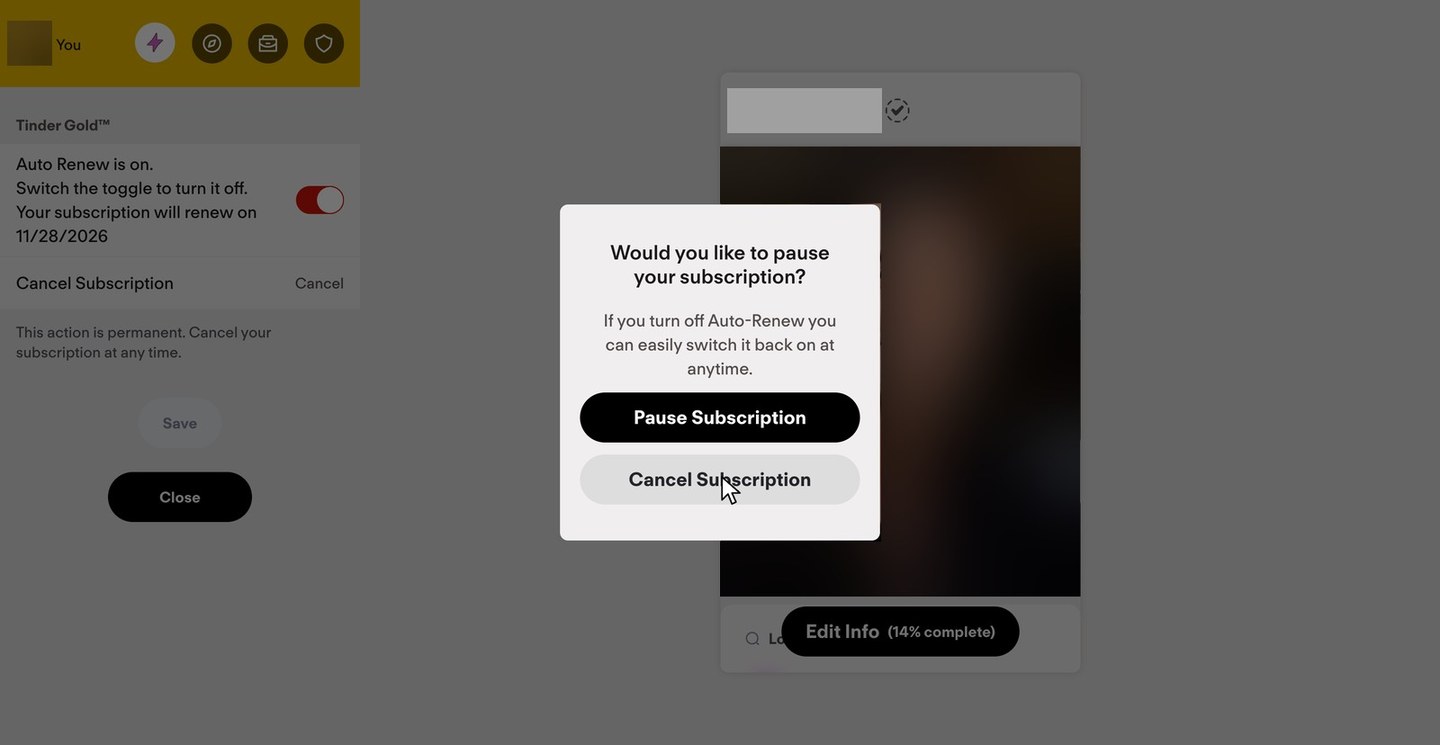
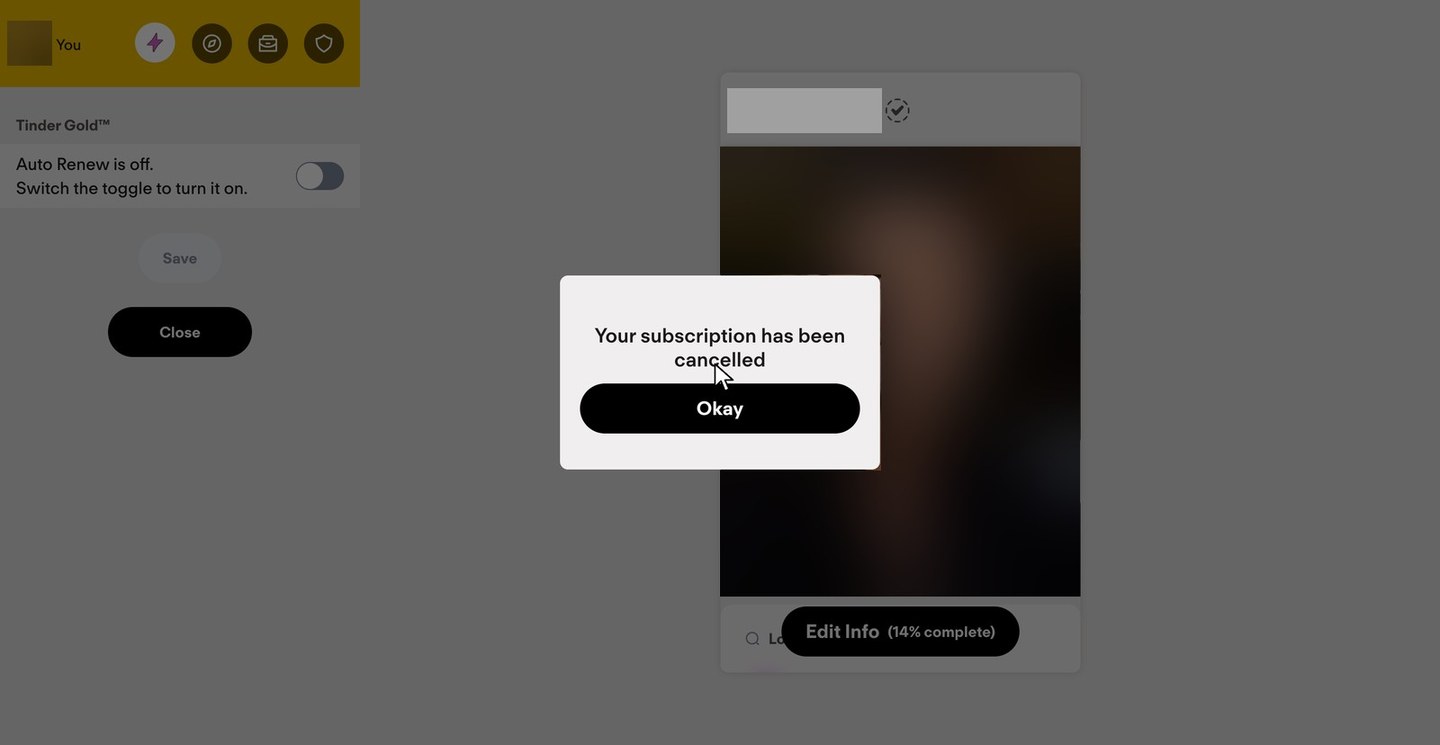
The part people miss is that Cancel Subscription doesn't cancel on its own. Tinder asks "Would you like to pause your subscription?" and then "Are you sure?", and only Yes I'm Sure cancels, after which the Tinder Gold panel says Auto Renew is off. Deleting your Tinder account or the app doesn't cancel the subscription either. Apple and Google Play handle their own cancellations, so if one of them bills you, cancel there, even after you delete your account. On Google Play, Tinder may offer you a discount when you start to cancel, and you can decline it and keep going.
The 7 steps further down show the online route screen by screen. If you'd rather not click through it, text zuzu and it's handled.
Tinder Gold cancellation policy 2026: what to know before you cancel
The rules that decide what you pay, from deleting your account to the 3 business days some states give you.
Deleting your account or the app doesn't cancel
Your subscription keeps renewing until you cancel it. If Apple or Google Play bills you, cancel with them, even after deleting your account.
Cancel with whoever bills you
Your order number shows who: MK means Apple, GPA means Google Play and TNDR means Tinder. Apple and Google handle their own cancellations.
Your subscription renews until you cancel it
It renews automatically at the full price shown when you bought it, and you're charged each time, until you cancel.
The rest of your period isn't refunded
Tinder's Terms say purchases are generally final, with no refund or credit for a partly used period unless the law where you live gives one.
Say no to the pause
On tinder.com, Tinder asks if you'd rather pause your subscription. Click Cancel Subscription there, then Yes I'm Sure.
Some states give you 3 business days to cancel
In 12 states, including California, New York and Illinois, you can cancel without penalty until midnight of the third business day after subscribing. For the refund, ask Apple if Apple bills you, or Tinder through its Help Center or with the signed notice the refund FAQ describes.

Text zuzu and skip 7 manual steps
zuzu is an assistant you text. It signs in, says no to the offer and cancels for you.
- 1You text: "Hey zuzu, cancel my Tinder Gold subscription."
Use your own words. Text before your subscription renews to stop the next charge.
- 2zuzu texts you when it's done, with your end date
zuzu goes through the same screens and says no to the offer. You can check your subscription under Manage Payment Account on tinder.com afterward, where the Tinder Gold panel says Auto Renew is off.
The old way: cancel Tinder Gold step by step
Prefer to do it yourself? You need your Tinder login. Each step shows the screen you'll see.
This is the route Tinder expects you to take if Tinder bills you, and it took 49 s in the recording. One screen asks you to reconsider, so it helps to know what's coming. Open More detail under any step for the full explanation.
Watch the full cancellation by hand · 0:49
The 7 steps · 49 s
-
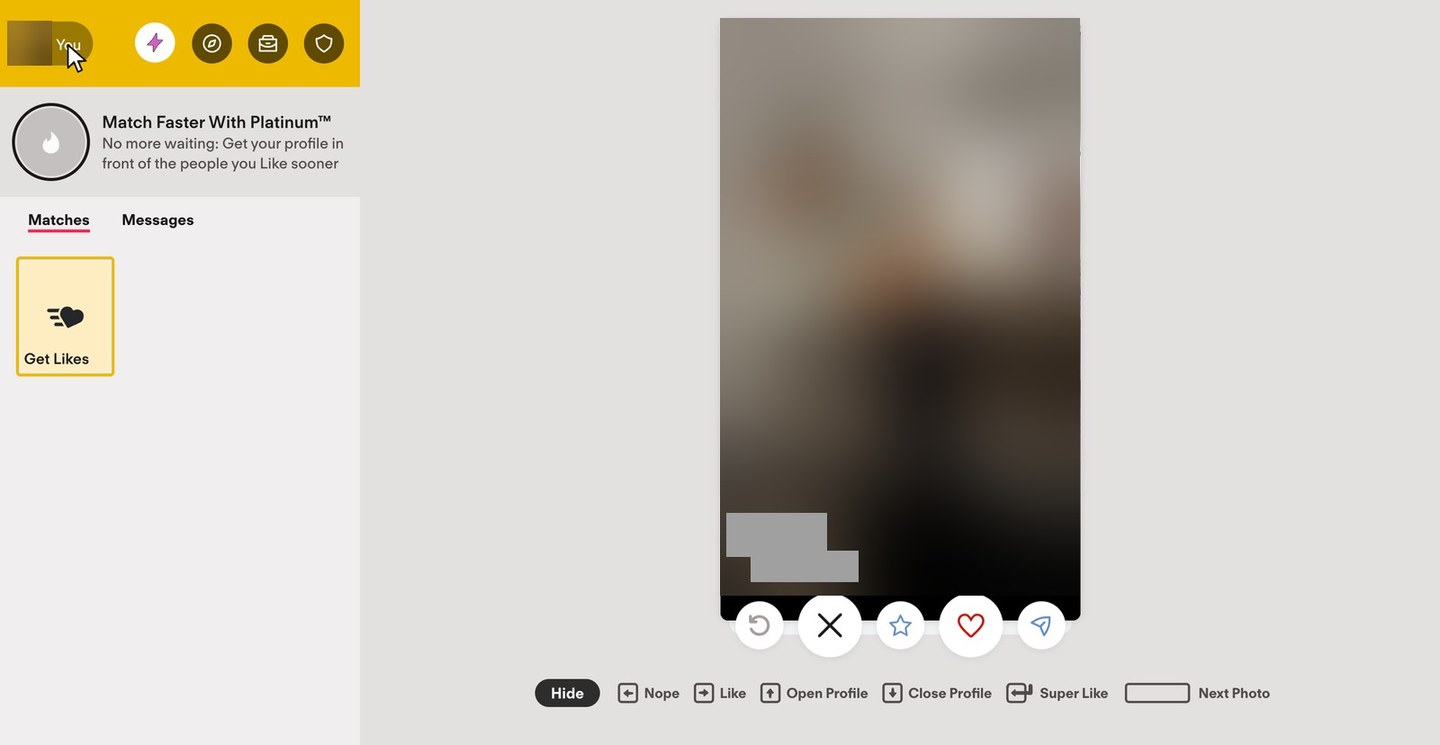
Click your profile icon
Go to tinder.com, sign in and click your profile icon, You, at the top left.
Watch this step · 0:02More detail on this step
A subscription belongs to one Tinder account at a time, so log in with the account you subscribed on.
-
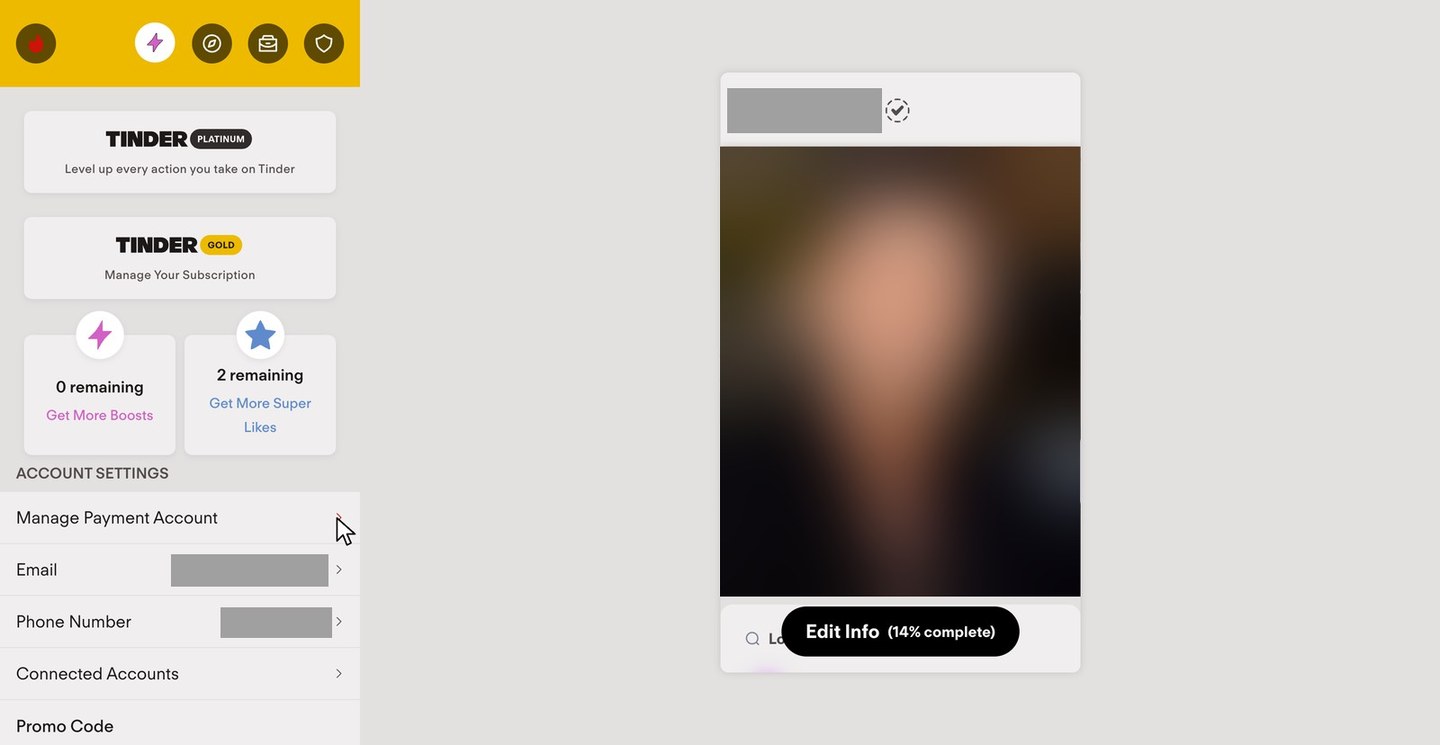
Click Manage Payment Account
Your profile page opens. Click Manage Payment Account, the first of your account settings.
Watch this step · 0:04More detail on this step
If Apple or Google Play bills you, cancel with them. Your order number shows who bills you: it starts with MK for Apple, GPA for Google Play and TNDR for Tinder.
-
Click Manage
The page lists your payment methods and, under Your Subscriptions, Tinder Gold. Click Manage next to it.
Watch this step · 0:10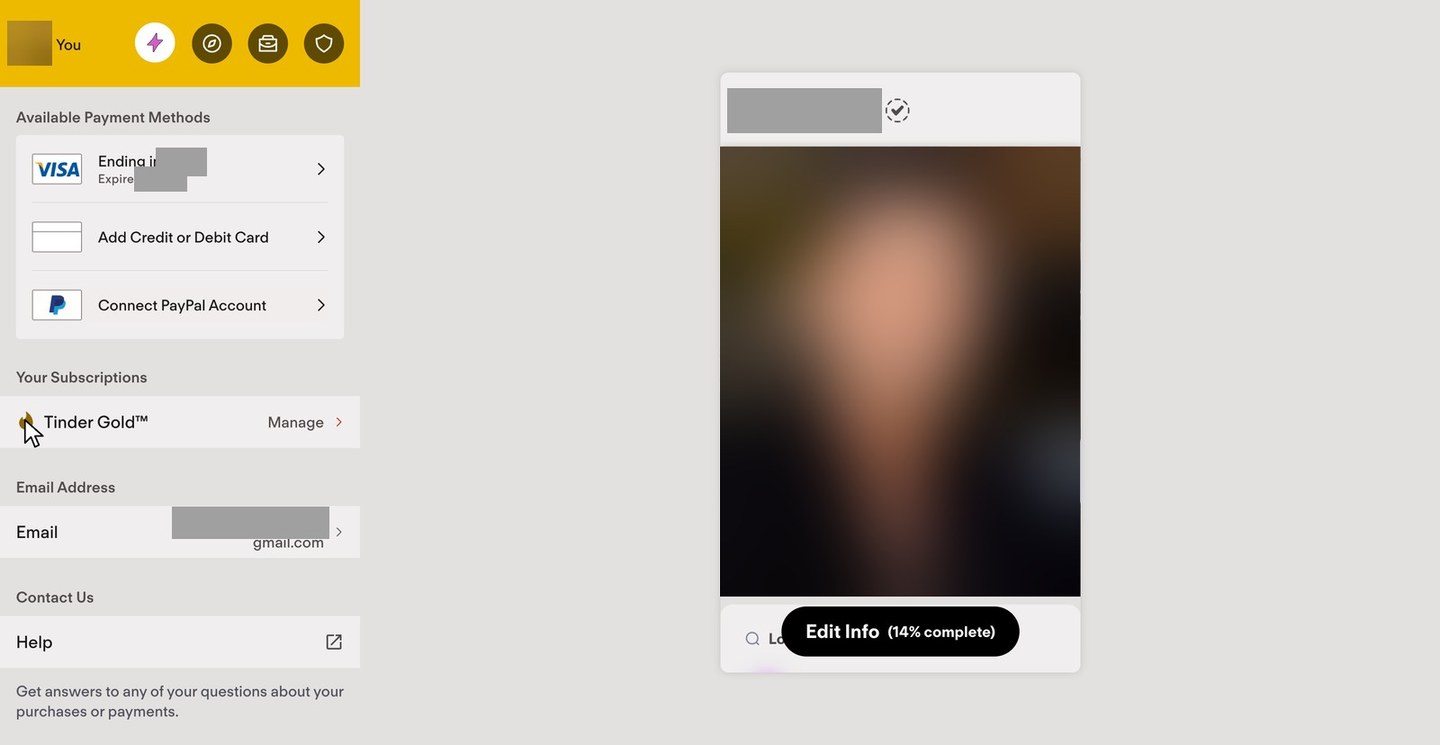
Tired already? zuzu does all 7 steps for you.
-
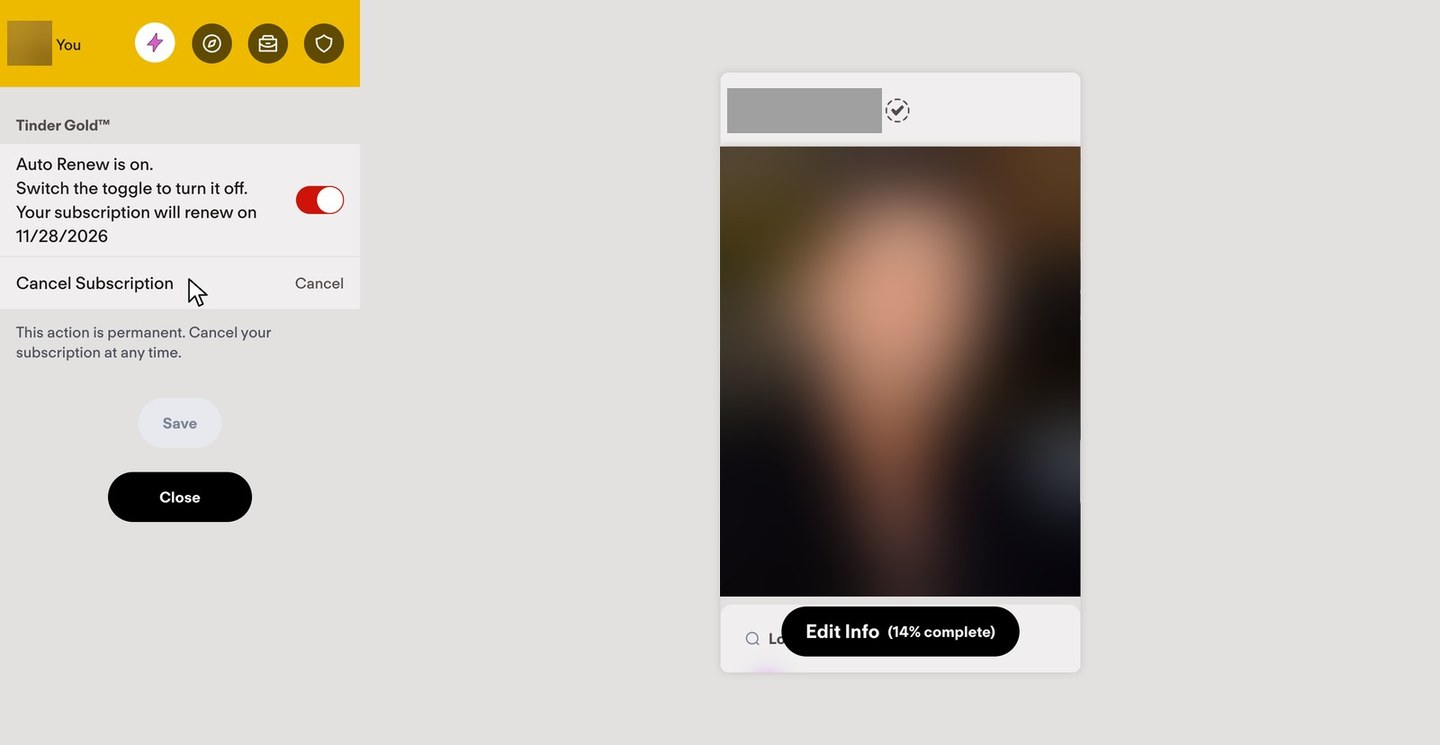
Click Cancel Subscription
The Tinder Gold panel shows that Auto Renew is on and the date your subscription renews. Click Cancel Subscription.
Watch this step · 0:15More detail on this step
Note the renewal date before you click, because the panel stops showing it once you cancel.
-
Click Cancel Subscription again
Offer to stayTinder asks "Would you like to pause your subscription?" and suggests turning off Auto-Renew instead. Click Cancel Subscription.
zuzu says no to the offer for you Watch this step · 0:27More detail on this step
Nothing is canceled yet. To pause instead, click Pause Subscription: Tinder then asks you to confirm turning Auto-Renew off, which you can switch back on at any time.
-
Click Yes I'm Sure
This is the click that cancelsTinder asks "Are you sure?" and says you keep your Tinder Gold features through the end of your subscription. Click Yes I'm Sure.
Watch this step · 0:35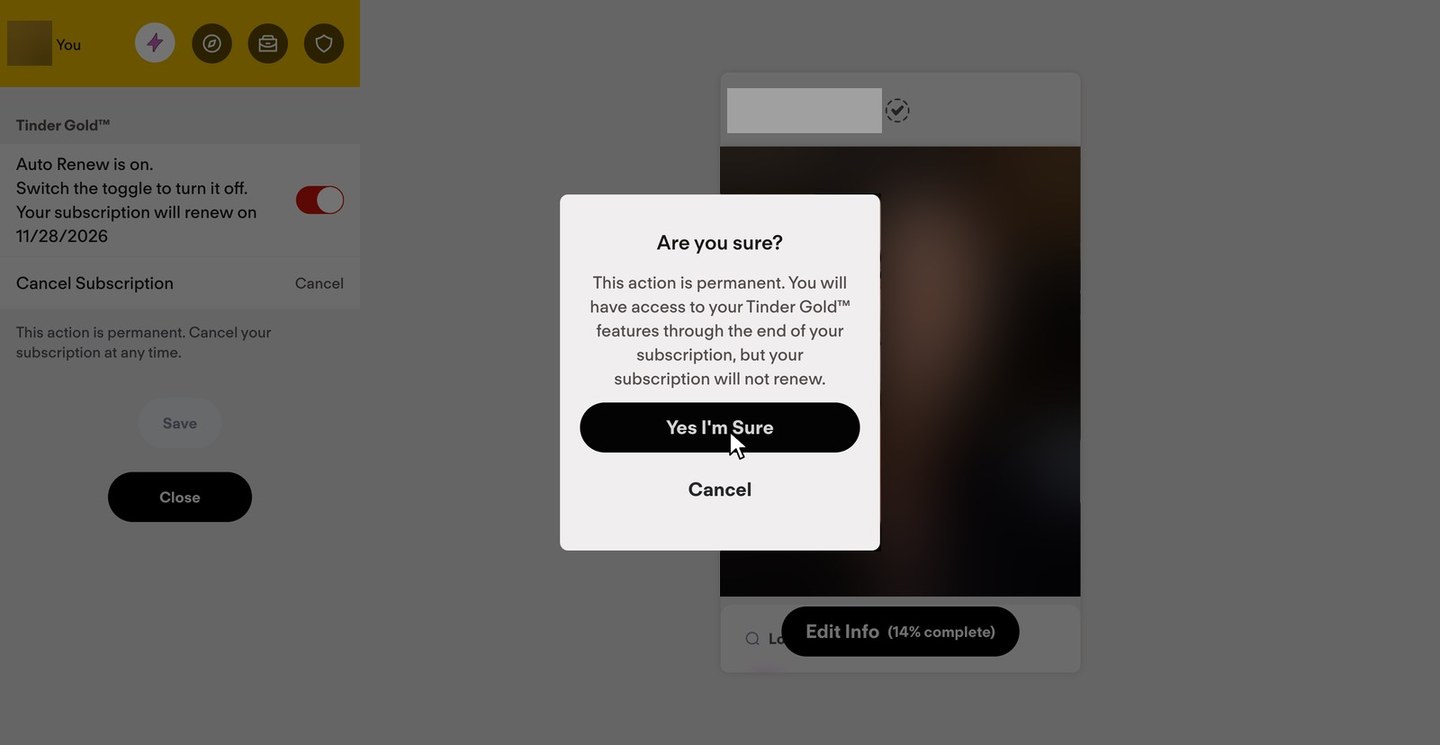
-
Check that Auto Renew is off
DoneTinder says "Your subscription has been cancelled," and the Tinder Gold panel behind it now says Auto Renew is off. Take a screenshot in case you need proof later.
Watch this step · 0:44More detail on this step
The panel shows no date now. Your Gold features last until the renewal date it showed before you canceled, and the subscription doesn't renew after that.
After you cancel your Tinder Gold subscription
You keep Tinder Gold until your end date
Your Gold benefits continue until the end of your subscription period, then expire without renewing. On tinder.com, that's the renewal date the Tinder Gold panel showed before you canceled. If Apple bills you, Settings shows the canceled subscription with no cancel button, or with an expiration message in red. In the recording, a weekly Tinder Gold subscription was canceled on Nov 21 and access runs until Nov 28, the day it was due to renew.
Your profile stays on Tinder
That's normal, because canceling ends only the subscription, so your profile stays on Tinder. To remove it, delete your account in Settings with Delete Account, or hide your profile if you only want a break.
Moving down to Plus?
On Android and tinder.com, Tinder doesn't support downgrading, so you let Gold expire after canceling, then subscribe to Plus. After a switch between iPhone and Android, you subscribe again on the new phone, because subscriptions don't transfer.
Keep a screenshot of the cancellation and a note of your renewal date until that date has passed. After it, check your bank or card statement once to make sure no new charge shows up. If one does, check your subscriptions with Tinder, Apple and Google Play first, since it may be a renewal of one you still have. For a renewal of your own subscription, ask Tinder for a refund through the Submit a request form in its Help Center, from the email you bought with, and include your order number, or ask Apple or Google if one of them bills you. Do that before you dispute it with your bank, because Tinder's Terms say a chargeback, even on an Apple or Google Play purchase, may get your account terminated. If you didn't make the charge, call your card issuer first, at the number on the back of your card.
How to cancel Tinder Plus
The same way as Tinder Gold. Tinder Plus, Gold and Platinum are Tinder's three subscriptions, and its cancel article gives one set of steps for whichever one you select, so only who bills you changes where you cancel.
On tinder.com, Plus is canceled under Manage Payment Account with Cancel Subscription. If Apple bills you, cancel in Settings on your iPhone, and if Google Play bills you, cancel in the Google Play app under Payments & subscriptions. Like Gold, Plus renews until you cancel and keeps working to the end of the period you've paid for.
How to cancel a Tinder subscription in the app
In your iPhone's Settings if Apple bills you, in the Google Play app if Google Play does, or in the Tinder app if you paid Tinder with a card or PayPal on Android. Uninstalling or deleting the app doesn't cancel the subscription.
On an iPhone or iPad, an order number that starts with MK means you subscribed in the Tinder app and Apple bills you. Open Settings, tap your name, then Subscriptions, tap your Tinder subscription and tap Cancel Subscription, scrolling down if you don't see it. Do it at least 24 hours before your renewal date, because Apple says it can charge a renewal up to 24 hours before the new period starts. If there's no cancel button, or you see an expiration message in red, it's already canceled. If you paid with Apple Pay or a web payment in the app, Tinder says to use the tinder.com steps.
On Android, sign in to Google Play with the Google Account that has the subscription. Open the Google Play app, tap your profile icon, then Payments & subscriptions and Subscriptions, select your Tinder subscription and tap Cancel subscription. Google says the app's developer may offer you a discount to keep the subscription, and you can decline it and finish canceling.
If you paid with a card or PayPal in the Tinder app on Android, open the app, tap your profile icon, then Manage Payment Account, find your subscription and tap Cancel Subscription. If Apple bills you but you now use an Android phone, go to account.apple.com and sign in to your Apple Account. Tinder subscriptions don't transfer between platforms, so after a switch between iPhone and Android you still cancel with the store that bills you, and you don't need the old phone: a Google Play subscription can also be canceled in your Google Play subscriptions on a computer.
Tinder Gold cancellation FAQ
Common questions about canceling Tinder Gold. Sources checked Nov 21, 2026.
How do I cancel my Tinder Gold subscription?
If Tinder bills you, log in at tinder.com and click your profile icon, then Manage Payment Account. Click Manage next to Tinder Gold, then Cancel Subscription, Cancel Subscription again when Tinder suggests a pause, and Yes I'm Sure. If you subscribed in the Tinder app on an iPhone and Apple bills you, cancel in Settings under your name and Subscriptions. A Google Play subscription is canceled in the Google Play app under Payments & subscriptions, and one you paid for with a card or PayPal in the Android app is canceled under Manage Payment Account in the Tinder app.
How do I cancel my Tinder subscription after deleting my account?
Through Apple or Google Play if one of them bills you, because deleting your Tinder account doesn't cancel the subscription. Tinder's Terms say you still cancel in that Apple or Google account, even after you've deleted your Tinder account or the app. If Tinder billed you directly, its cancel steps start with logging in at tinder.com, so send Tinder the details and your order number through the Submit a request form in its Help Center.
Why can't I cancel my Tinder subscription?
Check who bills you first. Your order number starts with MK if Apple bills you, GPA for Google Play and TNDR for Tinder, and Apple and Google Play handle their own cancellations. On an iPhone, a missing cancel button or a red expiration message means the subscription is already canceled, and if Tinder isn't in your list, search your email for “receipt from Apple” to find the Apple Account that pays. If you switched phones, you don't need the old one: cancel with the store that bills you, at account.apple.com for Apple or in Google Play on a computer, and if tinder.com still won't let you cancel, send Tinder the details through the Submit a request form in its Help Center.
Can you cancel Tinder Gold anytime?
Yes. Your subscription renews until you cancel it, and canceling partway through a period stops the next renewal without ending Gold early: you keep your benefits until the period ends. Google Play also says you can cancel at any time in its Subscriptions page. Tinder's Terms give no refund for the unused part of the period unless the law where you live requires one, though Tinder's refund page says “some exceptions apply” and offers help with “a purchase made in the last 14 days.”
Is it easy to cancel Tinder Gold?
Yes, once you know who bills you. If Tinder does, it's 7 steps on tinder.com. If Apple or Google Play does, you cancel in their own settings, and what trips people up is deleting the Tinder app or account, which doesn't cancel the subscription.
How do I cancel Tinder Gold on the website?
On tinder.com, if Tinder bills you. Log in, click your profile icon, then Manage Payment Account and Manage next to your subscription. Click Cancel Subscription twice, then Yes I'm Sure. Tinder says to use the same steps if you subscribed with Apple Pay or a web payment. On a computer, a Google Play subscription is canceled in your subscriptions in Google Play, where you click Manage, then Cancel subscription, pick a reason and click Continue. On a Mac, an Apple subscription is canceled in the App Store: click your name, then Subscriptions, your Tinder subscription and Cancel Subscription.
Where do I cancel Tinder Gold?
With whoever bills you. If your order number starts with TNDR, Tinder does, and you cancel on tinder.com or, if you paid in the Android app, under Manage Payment Account in the app. MK means Apple bills you, so you cancel in Settings on your iPhone, and GPA means Google Play, so you cancel in the Google Play app.
What happens if I cancel my Tinder Gold subscription?
You keep Gold until the end of the period you've paid for, and then it expires without renewing. Your profile stays on Tinder, because canceling doesn't delete your account. Under Tinder's Terms, the unused part of the period isn't refunded unless the law where you live requires it. Tinder's refund page says most in-app purchases are nonrefundable, but “some exceptions apply,” and it offers help with “a purchase made in the last 14 days.”
Can you cancel a 6-month Tinder Gold subscription?
Yes, with the same steps as any Tinder subscription. Canceling stops a 6 or 12 month subscription from renewing when the current term ends, and you keep Gold until then. Tinder's Terms give no refund for the unused months unless the law where you live requires one, but in the 12 states with a right to cancel, canceling within 3 business days of subscribing is without penalty. Canceling only stops the renewal, so for that refund ask Apple if Apple bills you, or contact Tinder through its Help Center or with a signed, dated notice saying that you, the buyer, are canceling, with your order number and the email address or phone number on your account, mailed or delivered to Tinder, Attn: Cancellations, P.O. Box 25472, Dallas, Texas 75225.
How do I cancel a Tinder subscription online?
On tinder.com, if Tinder bills you: log in and go to Manage Payment Account. A Google Play subscription can be canceled online too, in your subscriptions in Google Play on a computer, and Apple's help sends Android users to account.apple.com to cancel a subscription Apple bills.
How do I cancel a Tinder Platinum subscription?
The same way as Tinder Gold. Platinum, Gold and Plus are Tinder's three subscriptions, and its cancel steps don't change by tier: Manage Payment Account on tinder.com, or Apple's or Google Play's own settings if one of them bills you. To drop from Platinum to Gold on Android or tinder.com, cancel, wait for Platinum to expire and subscribe to Gold, because Tinder doesn't support downgrading there.
Can you cancel Tinder Gold and get a refund?
Usually not for time you've already paid for. Tinder's Terms give no refund for a partly used period unless the law where you live requires one, and its refund page says most in-app purchases are nonrefundable but “some exceptions apply” and offers help with “a purchase made in the last 14 days.” If Tinder billed you, contact Tinder through the Submit a request form in its Help Center, from the email you bought with, and include your order number. Apple and Google decide their own refunds: ask Apple Support, or ask Google within 48 hours of the purchase, after which Google says to contact the developer, Tinder. If you live in Arizona, California, Colorado, Connecticut, Illinois, Iowa, Minnesota, New York, North Carolina, Ohio, Rhode Island or Wisconsin, you can cancel without penalty within 3 business days of subscribing, and if you didn't buy through Apple, Tinder's Terms say to mail or deliver a signed, dated notice saying that you, the buyer, are canceling, with your order number and the email address or phone number on your account, to Tinder, Attn: Cancellations, P.O. Box 25472, Dallas, Texas 75225.
Can an app or service cancel Tinder Gold for me?
zuzu can. Text zuzu that you want to cancel Tinder Gold, and it goes through the same steps, says no to the offer and texts you when it's done, with your end date.
The ways to cancel and the rules on renewal, refunds, deleting your account and changing tiers come from Tinder's help articles on canceling a subscription, refund requests, deleting your account, restoring a purchase, downgrading and its subscriptions, from its Terms of Use, from Apple's help on canceling a subscription from Apple, from Apple's Media Services Terms, and from Google Play Help on canceling a subscription, discount offers when canceling, subscriptions and refunds. The advice on a charge you didn't make comes from the FTC's page on what to do if you were scammed. The rest comes from the recorded cancellation on Nov 21, 2026.
How this guide was made

Researched, written and tested by Harsh at zuzu.
- Recorded click by click on tinder.com on Nov 21, 2026, canceling a paid weekly Tinder Gold subscription.
- The ways to cancel and the renewal, refund and account rules come from Tinder's help articles and Terms of Use, and from Apple's and Google Play's help, checked on Nov 21, 2026.
Other guides for Tinder Gold
 Tinder scam check
Matches, messages and charges
Cancel more subscriptions you don't use and save money
Each guide follows one real cancellation on the company's own website, with every click recorded.
 Cancel Uber One
8 steps · 45 s on the website
 Cancel Walmart+
8 steps · 1 min 17 s on the website
 Cancel YouTube Premium
7 steps · 44 s on the website
 Cancel Amazon Music
5 steps · 43 s on the website
 Cancel Amazon Prime
6 steps · 45 s on the website
 Cancel Audible
5 steps · 48 s on the website
 Cancel Canva
7 steps · 46 s on the website
 Cancel ChatGPT
6 steps · 33 s on the website
Cancel your Tinder Gold subscription easily and start saving today
Text zuzu and it's handled.