 Last updated Nov 19, 2026
How to cancel your Uber One membership
Once you're signed in at ubereats.com, open the menu and click Uber One, Manage and End membership, then End Uber One on the last screen: 8 steps, 45 s.
Watch zuzu cancel an Uber One membership
4 ways to cancel your Uber One membership
Uber's US pages send you to the Uber One section of the Uber or Uber Eats app, and the recording shows the same Manage membership screen on ubereats.com. Texting zuzu is a 4th: zuzu does the online route for you.
Online
In your Uber account on ubereats.com, if Uber bills you. You need your login.
45 s, 8 steps See howUber app
In the Uber One section of the Uber app, under Manage Membership, if Uber bills you.
Your Uber account See howUber Eats app
In the Uber One section of the Uber Eats app, under Manage Membership, if Uber bills you.
Your Uber account See howCan you cancel your Uber One membership online?
Yes, you can cancel your Uber One membership online on ubereats.com. Open the menu and click Uber One, then Manage and End membership. Pick a reason, click Continue to cancel on the next two screens, and click End Uber One on the last one.
The recorded cancellation on Nov 19, 2026 took 8 steps and 45 s. Uber's own help gives the same route in the Uber One section of the Uber app or the Uber Eats app, and if a partner offer gave you Uber One, the partner may handle the cancel.
Before you start, have your Uber login ready. The first screen after End membership asks why you're leaving, and Continue to cancel stays grey until you pick a reason.
Timing matters more than speed. Uber can charge you up to 24 hours before the renewal day shown in Manage membership, and if you cancel after that charge but before the renewal day, Uber refunds it automatically. After you cancel, your benefits last until the end of the billing cycle, but Uber's own free trial ends the moment you cancel.
The part people miss is the last screen. After two Continue to cancel clicks, Uber offers a discount to stay, and you're canceled only when you click End Uber One there. Uber shows no confirmation screen afterward, so take a screenshot of your renewal date in Manage membership before you start.
The 8 steps further down show the online route screen by screen. If you'd rather not click through it, text zuzu and it's handled.
Uber One cancellation policy 2026: what to know before you cancel
The rules that decide what you pay, from the renewal charge to your Uber One credits.
Cancel before the next charge
Except where the law requires a refund, Uber doesn't refund or prorate a monthly payment already charged, even when you cancel partway through the month.
A charge near the renewal day comes back
Uber's help says to cancel at least 48 hours before your billing day. Its terms say Uber charges up to 24 hours before your renewal day, and if you cancel after that charge but before the renewal day, Uber refunds it on its own.
Benefits last until the billing cycle ends
After you cancel, you keep Uber One until the billing cycle ends. On Uber's own free trial, the benefits end the moment you cancel.
Use your Uber One credits first
Uber One credits can't be used without an active membership, and they expire at the end of the cycle you cancel in.
A paused membership renews on its own
A monthly plan can pause for one or two months, up to four times a calendar year, then renews by itself. Free trials, annual plans and partner offers can't pause. To skip the next charge, pause at least 24 hours before your billing day.
Say no to the discount
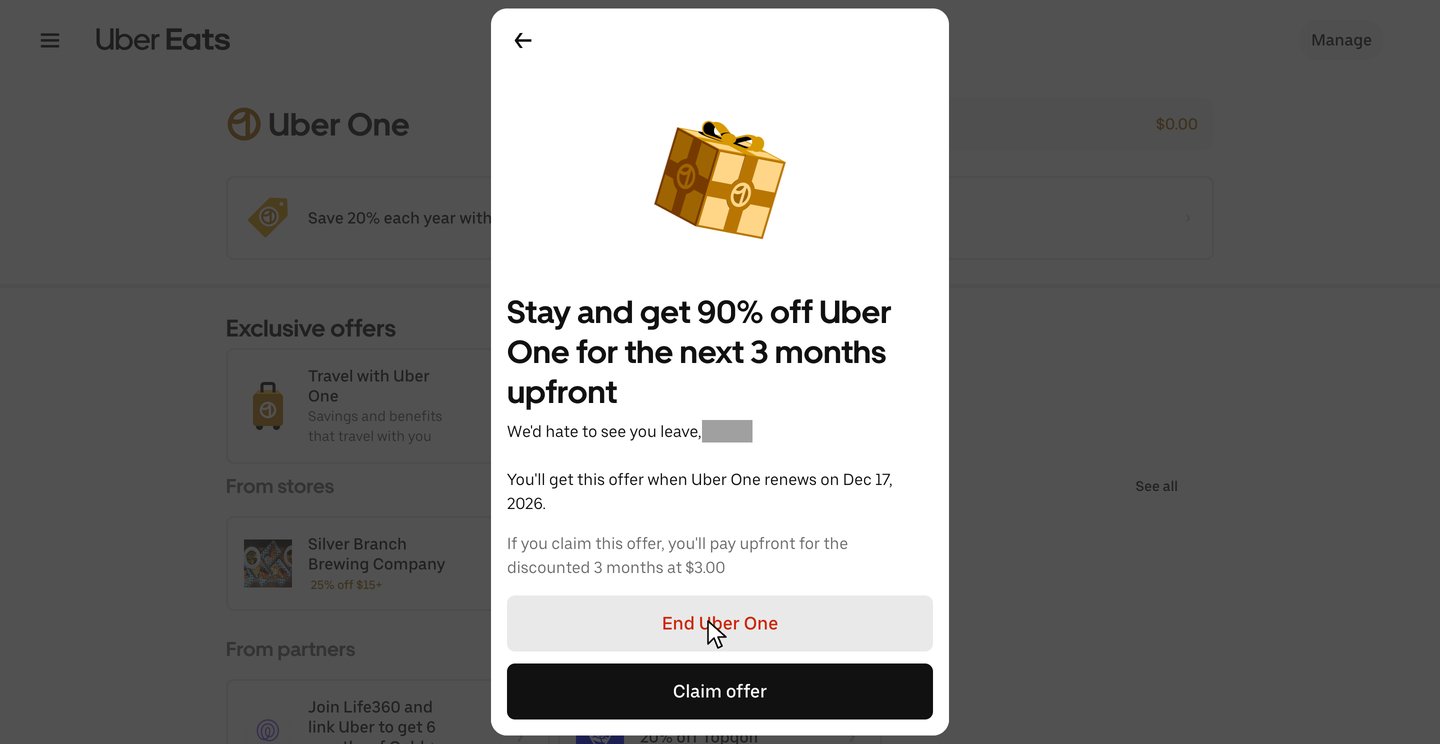
After two Continue to cancel clicks, Uber offers a discount to stay. You're canceled once you click End Uber One on that screen.

Text zuzu and skip 8 manual steps
zuzu is an assistant you text. It signs in, says no to the offer and cancels for you.
- 1You text: "Hey, cancel my Uber One membership."
Use your own words. There's no form to fill in.
- 2zuzu texts you when it's done, with your end date
zuzu goes through the same screens and says no to the offer. You can check the Uber One page on ubereats.com afterward.
The old way: cancel your Uber One membership step by step
Prefer to do it yourself? You need your Uber login. Each step shows the screen you'll see.
This is the online route on ubereats.com, and it took 45 s in the recording. A few extra screens ask you to reconsider, so it helps to know what's coming. Open More detail under any step for the full explanation.
Watch the full cancellation by hand · 0:45
The 8 steps · 45 s
-
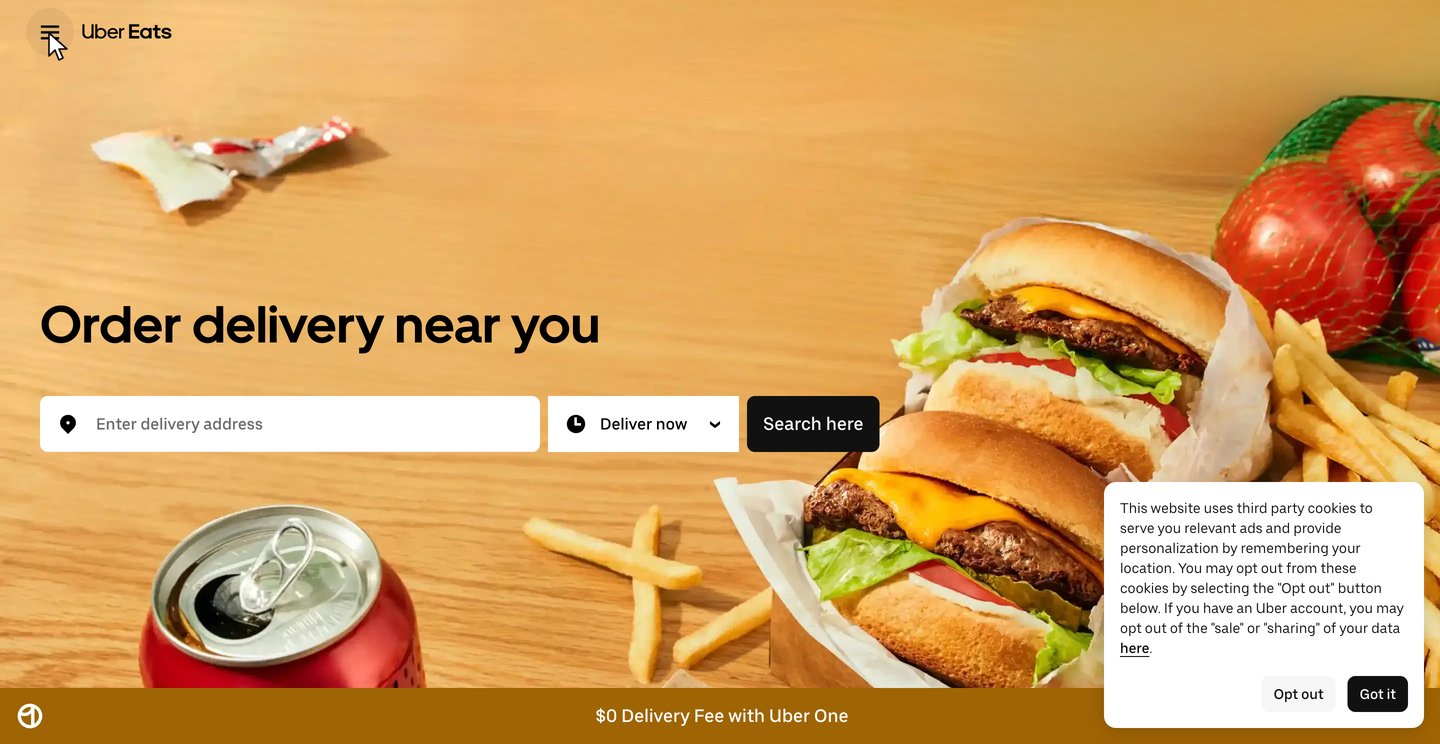
Open the menu
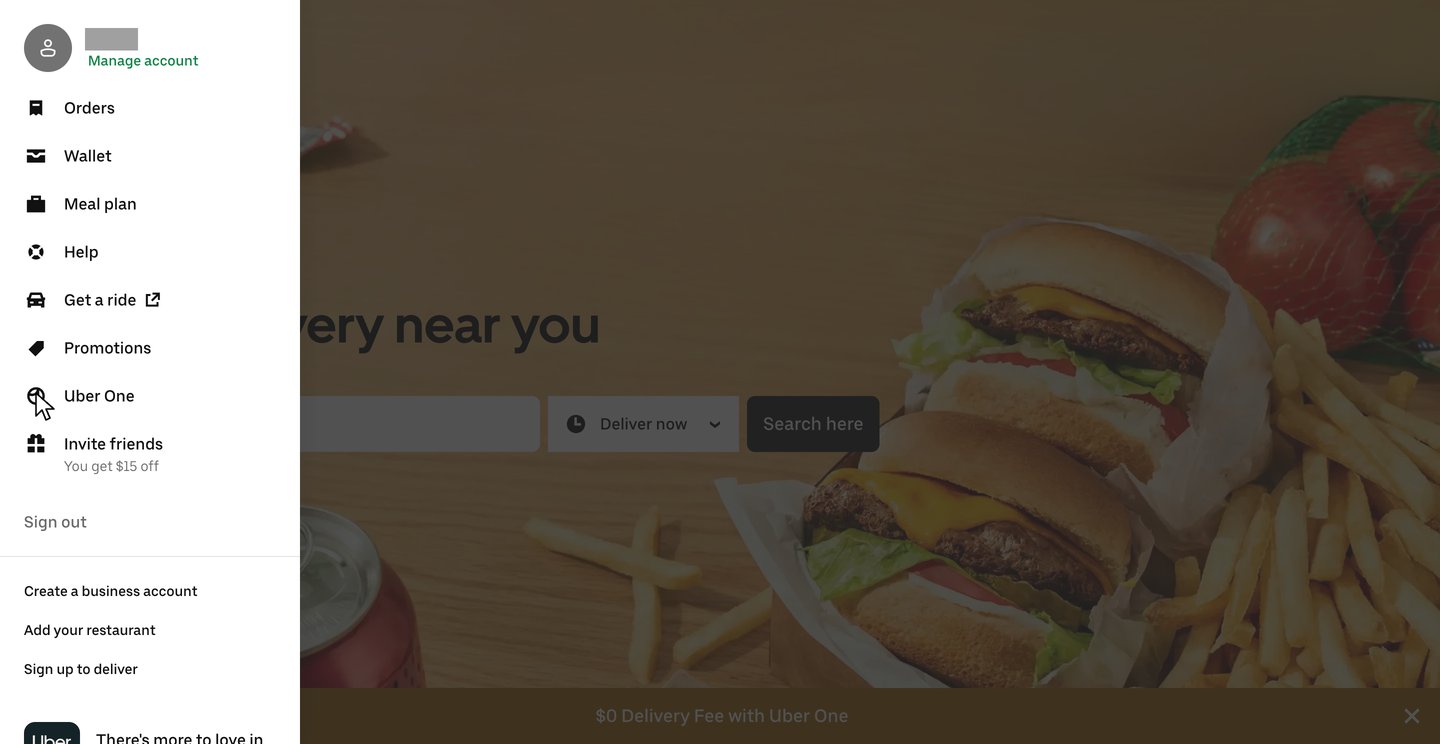
Go to ubereats.com and sign in if it asks. Click the menu button in the top left, next to Uber Eats.
Watch this step · 0:02More detail on this step
ubereats.com/uber-one opens the same Uber One page directly once you're signed in.
-
Click Manage
The Uber One page shows your savings and member offers. Click Manage in the top right.
Watch this step · 0:08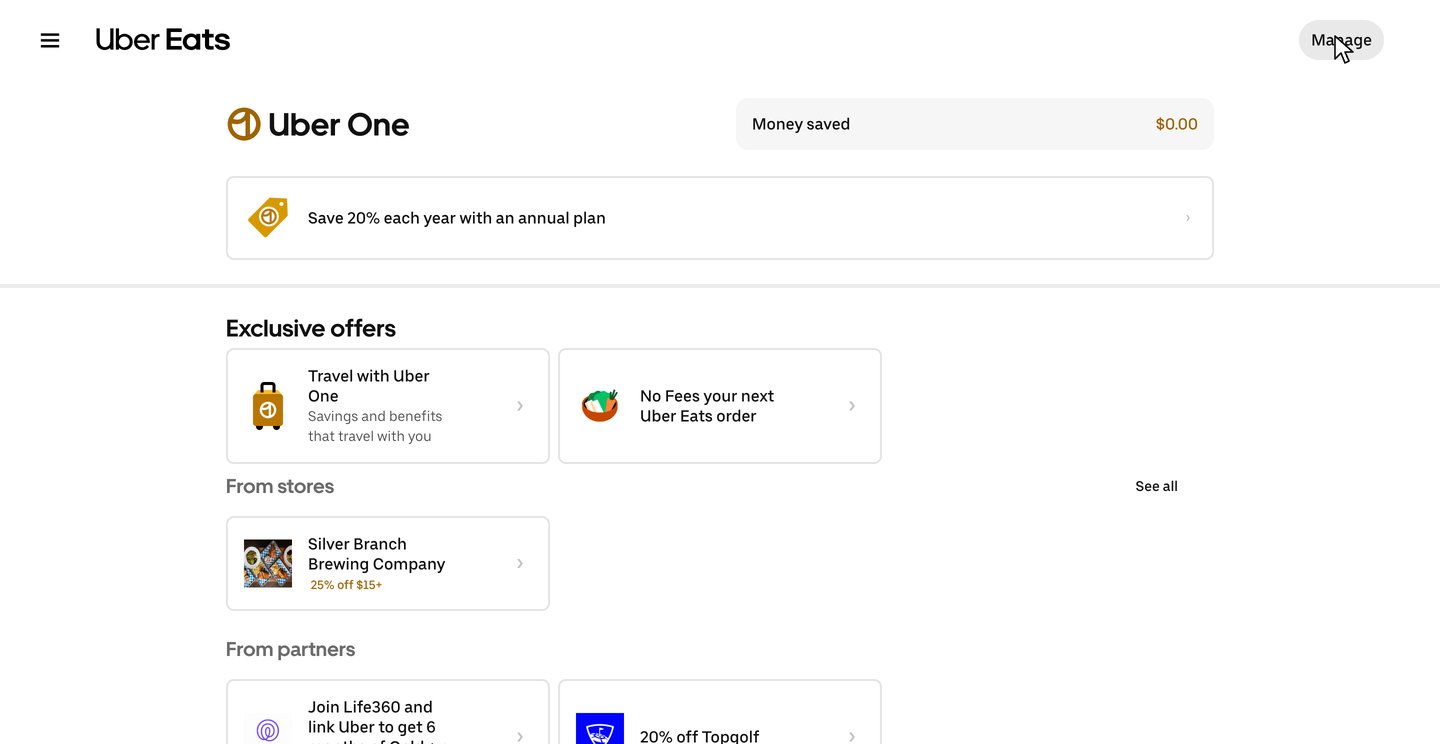
-
Click End membership
Manage membership shows your plan and its renewal date. At the bottom, click End membership.
Take a screenshot of the renewal date first, because Uber shows no confirmation screen after you cancel.
Watch this step · 0:12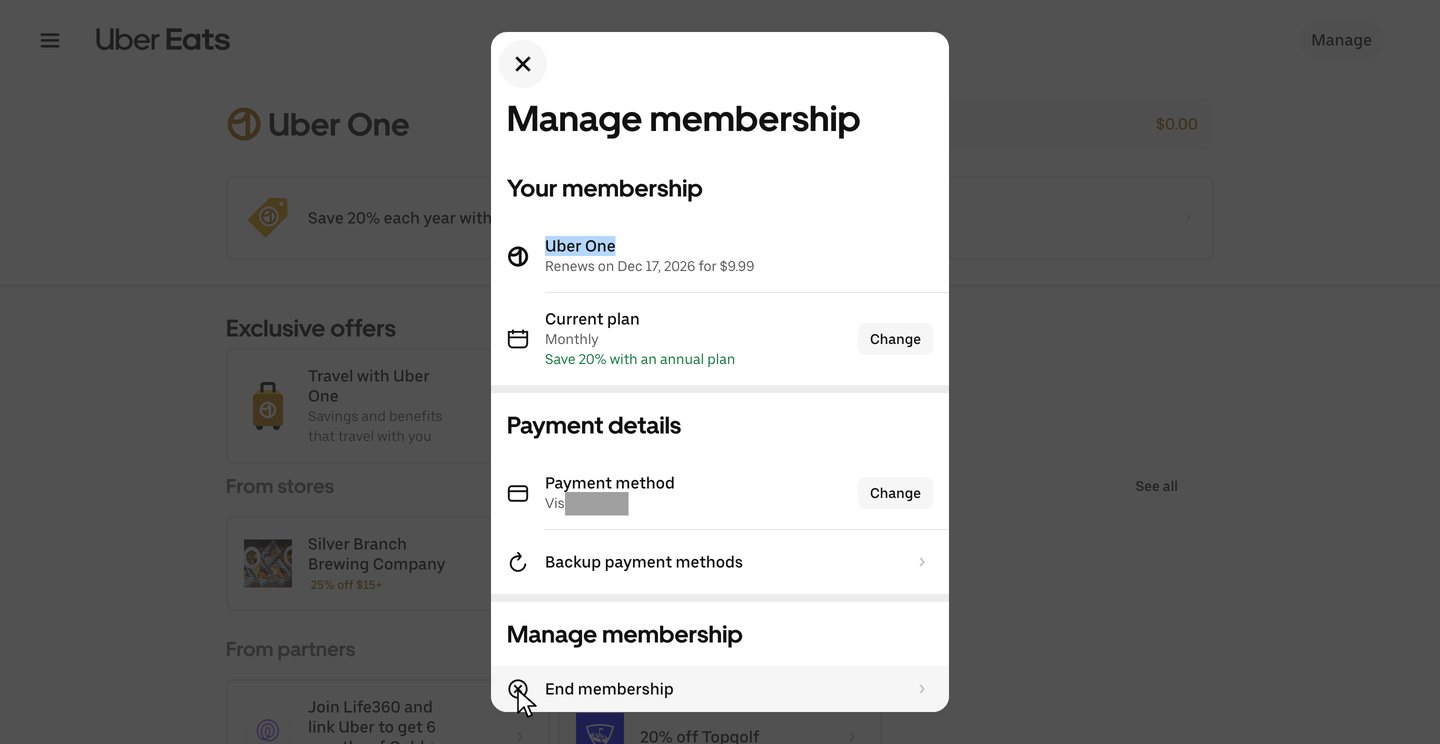
Tired already? zuzu does all 8 steps for you.
-
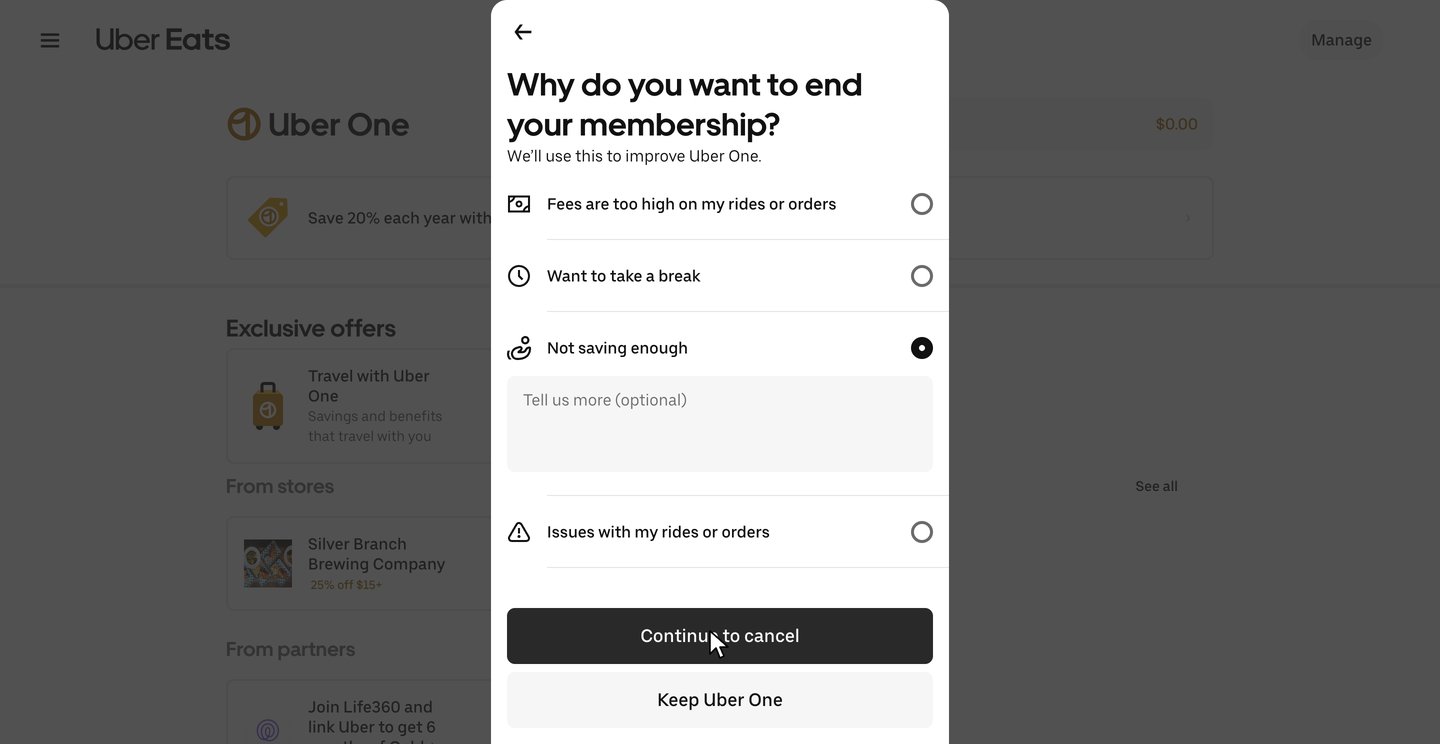
Pick a reason
Uber asks why you want to end your membership. Pick any reason other than Want to take a break, then click Continue to cancel.
Continue to cancel stays grey until you pick a reason.
Watch this step · 0:18More detail on this step
Picking Want to take a break can lead to a pause instead, and a paused membership renews on its own.
-
Click Continue to cancel again
Uber lists the benefits you'd lose and what members save on average. Click Continue to cancel.
Watch this step · 0:26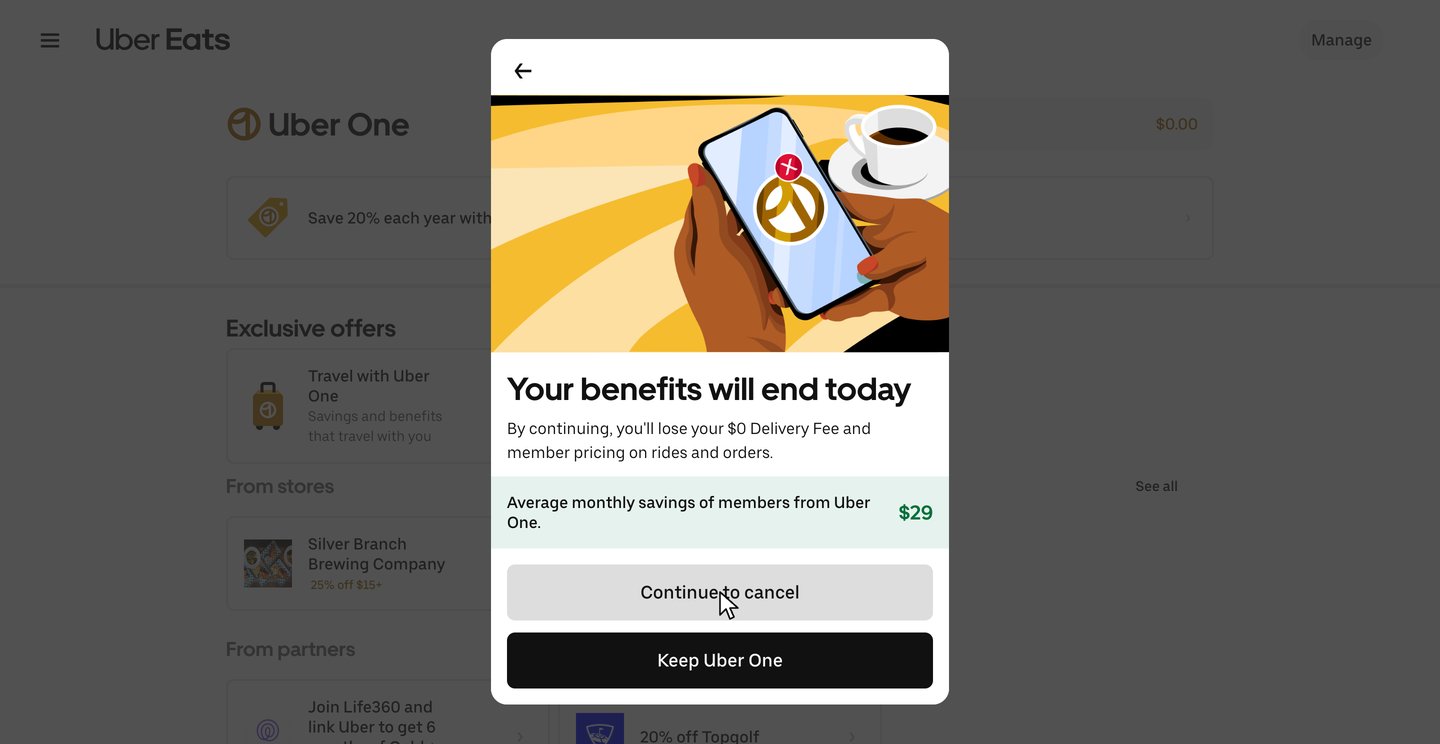
-
Click End Uber One
Offer to stayThis is the click that cancelsUber offers you a discount to stay. Click End Uber One, and your membership is canceled.
zuzu says no to the offer for you Watch this step · 0:34More detail on this step
To keep Uber One at the discount instead, click Claim offer.
-
Check the Uber One page
DoneUber shows no separate confirmation screen. In the recording, the Uber One page turned into the sign-up page with Join Uber One. Take a screenshot in case you need proof later.
Watch this step · 0:41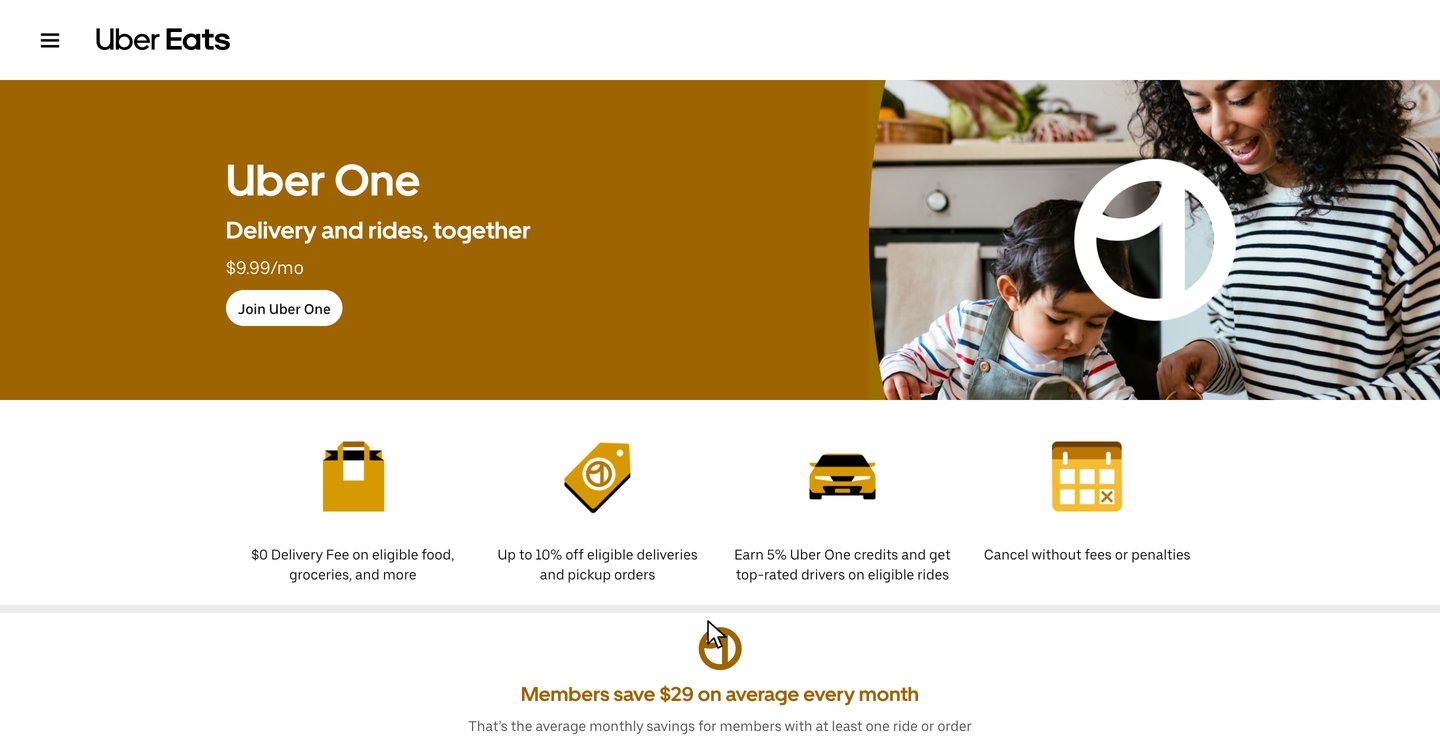
Can't cancel Uber One?
Check where you're looking first. In the recording, account.uber.com and the menu on m.uber.com had no Uber One item, while the menu on ubereats.com did. In the Uber or Uber Eats app, it's in the Uber One section.
If a partner offer gave you Uber One, the partner may manage the cancel, so check with them. Removing or canceling an eligible American Express card doesn't cancel Uber One, and Uber keeps collecting the membership fee until you cancel. A teen using a guardian's Uber One can't cancel it.
If an Uber One charge shows up that you don't recognize, check the Uber One section of the Uber or Uber Eats app first. It shows your membership status and billing date, so you can see whether a free trial you started has turned into a paid membership. If you didn't make the charge, call your card issuer first, at the number on the back of your card. To ask Uber about the charge, in the Uber app go to Account, then Help, and type Uber One. In the Uber Eats app, go to Account, Help, then Membership.
If you'd rather not click through any of it, text zuzu and it's handled.
After you cancel your Uber One membership
You keep Uber One until your end date
Uber's terms say your benefits last until the current billing cycle ends, which is the renewal day Manage membership showed before you canceled. Uber's own free trial ends the moment you cancel. In the recording, the membership was most likely the 4 week free trial for first-time members. It was canceled on Nov 19, 2026, four weeks before its first renewal on Dec 17, and the screens said the benefits would end that day.
Your credits and sharing stop
Uber One credits can't be used once the membership ends, and Uber can take back Uber Cash or credits earned through it. An adult you share Uber One with loses it at the same time, without separate notice.
Changed your mind?
In the recording, the Uber One page showed Join Uber One right after the cancel. The free trial is only for eligible first-time members, unless Uber sends you an offer to rejoin.
Keep a screenshot of the renewal date from Manage membership until that date has passed. After it, check your bank or card statement once to make sure no new charge shows up. If one does, check the Uber One section of the Uber or Uber Eats app first, which shows your membership status and billing date. If you didn't make the charge, call your card issuer first, at the number on the back of your card, and report the unauthorized charge at help.uber.com within 60 days, as Uber's terms ask.
How to cancel your Uber Eats subscription
Your Uber Eats subscription is Uber One: Uber sells it as one membership for Uber and Uber Eats. On ubereats.com, cancel it with the steps above. In the Uber Eats app, tap Account, then Uber One, Manage Membership and End Membership.
Uber One for Students, which you join in the Uber Eats app, cancels the same way.
How to cancel an Uber One free trial
The same way as a paid membership, before the trial ends. Uber's terms say a trial that took your payment details renews as a paid membership unless you cancel before it ends. The exception is the free 3-month Uber Pro Reward for drivers with Uber Pro Diamond status, which also takes payment details but doesn't renew on its own.
Canceling Uber's own free trial ends its benefits at once. In the recording, the membership was most likely the 4 week free trial for first-time members: its first renewal was four weeks away, and the cancel screen said “Your benefits will end today.” If the trial came through a third-party offer, you keep it for the full length even after you cancel. One such offer is Uber's Apple Card trial: six free months of a monthly membership, one per Uber account, for Apple Card customers 18 or older in the US and Puerto Rico who aren't already Uber One members, when they sign up through the offer's own link with Apple Card in Apple Pay as the payment method.
The free trial is for eligible first-time members, and each person gets one trial.
Uber One cancellation FAQ
Common questions about canceling Uber One. Sources checked Nov 19, 2026.
How do I cancel my Uber One membership?
On ubereats.com, open the menu and click Uber One, Manage and End membership, pick a reason, click Continue to cancel twice and click End Uber One. In the Uber or Uber Eats app, tap Account, then Uber One, Manage Membership and End Membership, then confirm. A membership from a partner offer may be canceled with the partner.
Can I cancel Uber One at any time?
Yes. Uber's terms say you can cancel at any time, and its Uber One page says there are no additional fees.
Can I get a refund if I cancel Uber One?
Not for the month you've paid. Uber's terms say a monthly payment already charged isn't refunded or prorated, and its Uber One page makes an exception where the law requires a refund. If you cancel within 24 hours before your renewal day and the charge already went through, Uber refunds that charge automatically.
How do I cancel an Uber One annual plan?
The same way as a monthly plan, under Manage Membership in the Uber One section of the Uber or Uber Eats app. If you bought it by mistake, Uber's help says you can cancel an annual membership within 45 days from purchase, through Help, then Membership and Uber One. Any refund depends on consumer laws, Uber One's terms and eligibility.
Can an app or service cancel Uber One for me?
zuzu can. Text zuzu that you want to cancel Uber One, and it goes through the same steps, says no to the offer and texts you when it's done, with your end date.
Fees, deadlines and the ways to cancel come from Uber's Terms and Conditions for Renewable Memberships, its Uber One page and its help on canceling in the app, canceling 48 hours before the billing day, signing up by mistake, pausing Uber One, American Express cards, Uber One for Students, with its American Express offer terms, its Apple Card offer and its Uber One blog post of Oct 7, 2025. The rest comes from the recorded cancellation on Nov 19, 2026.
How this guide was made

Researched, written and tested by Harsh at zuzu.
- Recorded click by click on ubereats.com on Nov 19, 2026, canceling an Uber One monthly membership.
- Billing, refund, trial, pause and partner rules come from Uber's US Terms and Conditions for Renewable Memberships, its Uber One page and its help articles, checked on Nov 19, 2026.
Cancel more subscriptions you don't use and save money
Each guide follows one real cancellation on the company's own website, with every click recorded.
 Cancel Walmart+
8 steps · 1 min 17 s on the website
 Cancel YouTube Premium
7 steps · 44 s on the website
 Cancel Amazon Music
5 steps · 43 s on the website
 Cancel Amazon Prime
6 steps · 45 s on the website
 Cancel Audible
5 steps · 48 s on the website
 Cancel Canva
7 steps · 46 s on the website
 Cancel ChatGPT
6 steps · 33 s on the website
 Cancel DashPass
6 steps · 47 s on the website
Cancel your Uber One membership easily and start saving today
Text zuzu and it's handled.