 Last updated Nov 16, 2026
How to cancel your Amazon Prime membership
Once you're signed in at amazon.com, open Prime Membership, click Cancel membership, then the Cancel on button at the bottom: 6 steps, 45 s.
Watch zuzu cancel an Amazon Prime membership · 0:41
3 ways to cancel your Amazon Prime membership
Amazon sends members to its Cancel Your Prime Membership page to cancel, and to Google Play or another company when your Prime came through them. Texting zuzu is a 3rd: zuzu does the online route for you.
Through another company
With Google Play if you signed up through it on Android, or with the company whose service includes your Prime.
The company's steps See howCan you cancel Amazon Prime online?
Yes, you can cancel your Amazon Prime membership online, on Amazon's Cancel Your Prime Membership page. On amazon.com, point to Account & Lists and click Prime Membership, then click Update, cancel and more, then Cancel membership.
The recorded cancellation on Nov 9, 2026 took 6 steps and 45 s. If you signed up through Google Play on Android, you cancel there, and if your Prime came with another company's service, you cancel with that company.
Before you start, have your Amazon login ready. The cancel page opens on offers to keep Prime, and the cancel button sits at the bottom, under Review your options.
Timing matters more than speed. Prime renews and charges you automatically unless you cancel before your renewal date, which is at the top of your Prime membership page. Canceling with the Cancel on button keeps your benefits until your end date, and Amazon says you won't be charged after it.
The part people miss is the last click. Amazon makes two offers to keep you, switching to the annual plan and a reminder before renewal. Cancel membership only opens the cancel page, and you're canceled only after you click the Cancel on button with your end date. After that, your Prime page shows Membership ending with that date, which is normal.
The 6 steps further down show the online route screen by screen. If you'd rather not click through it, text zuzu and it's handled.
Amazon Prime cancellation policy 2026: can you cancel Amazon Prime anytime?
Yes. If you signed up with Amazon directly, you can cancel any time before your renewal date to avoid the next charge. The rules that decide what you pay, from the renewal date to the refund window.
Cancel before your renewal date
Prime renews and charges you automatically unless you cancel before the charge. Your renewal date is at the top of your Prime membership page.
Full refund within 3 business days
Cancel within 3 business days of signing up or of your membership turning paid, and Amazon refunds the fee, minus any benefits you used.
After that, a full refund only if Prime went unused
Amazon refunds the full fee only if your account made no eligible purchases and used no Prime benefits since the last charge.
Say no to the annual plan and the reminder
Switch plan and Set reminder come first. You're canceled only after you click the Cancel on button with your end date.
Text zuzu and skip 6 manual steps
zuzu is an assistant you text. It signs in, says no to both offers and cancels for you.
- 1You text: "Hey cancel my Amazon prime subscription"
Use your own words. If Amazon asks you to confirm you're human, zuzu texts you a private link: do the check there, then tap Give back control.
- 2You tap Confirm cancellation when zuzu asks
At the last step zuzu asks before it cancels and shows the date your benefits end. Tap Confirm cancellation, or Keep Prime to stop.
- 3zuzu texts you when it's done, with your end date
zuzu goes through the same screens and says no to the annual plan and the reminder. You can check Membership ending on your Prime membership page afterward.
The old way: cancel Amazon Prime step by step
Prefer to do it yourself? You need your Amazon login. Each step shows the screen you'll see.
This is the route Amazon expects members to take, and it took 45 s in the recording. One screen asks you to reconsider, so it helps to know what's coming. Open More detail under any step for the full explanation.
Watch the full cancellation by hand · 0:45
The 6 steps · 45 s
-
Open Prime Membership
Go to amazon.com and point to Account & Lists in the top right. Click Prime Membership under Your Account.
Watch this step · 0:00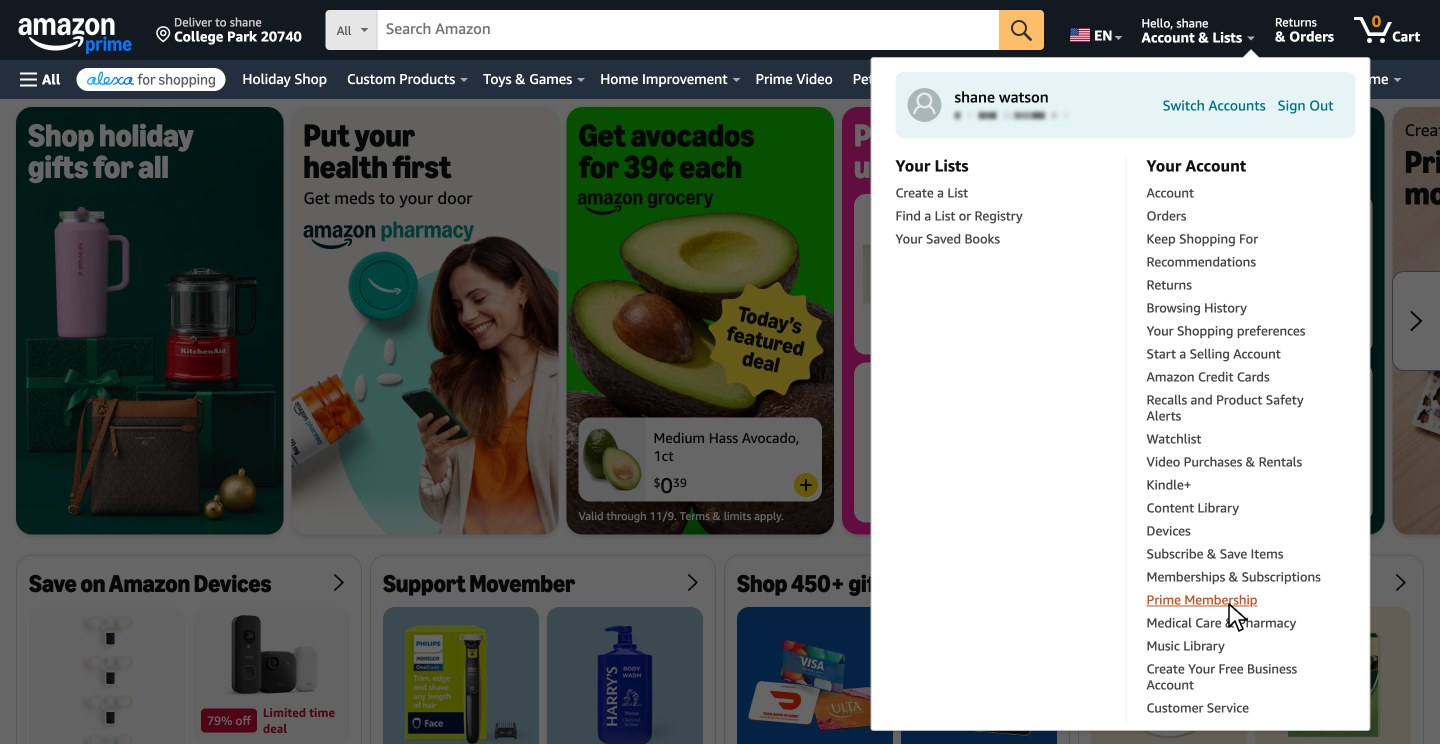
-
Click Update, cancel and more
Your Prime membership page opens. Click Update, cancel and more under Membership.
Your plan and renewal date show at the top of this page.
Watch this step · 0:07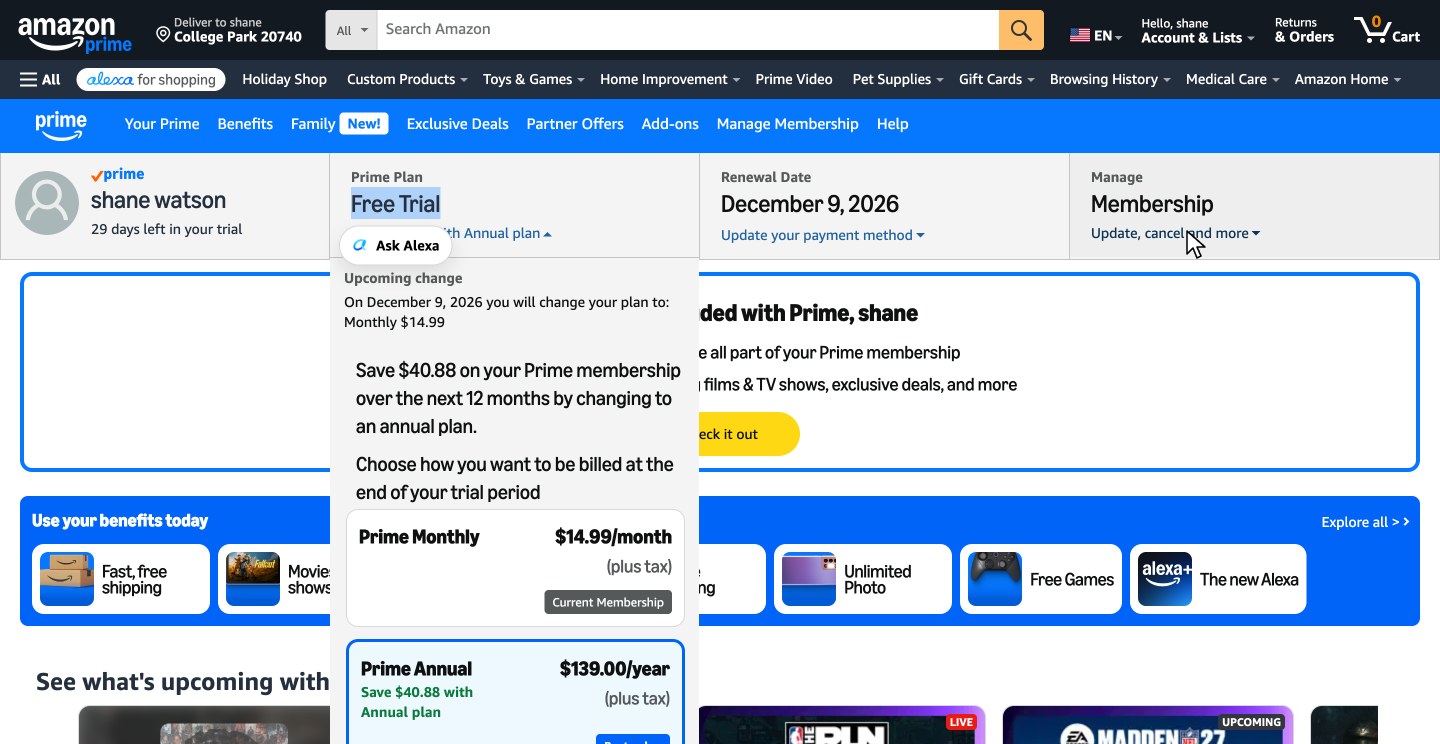
-
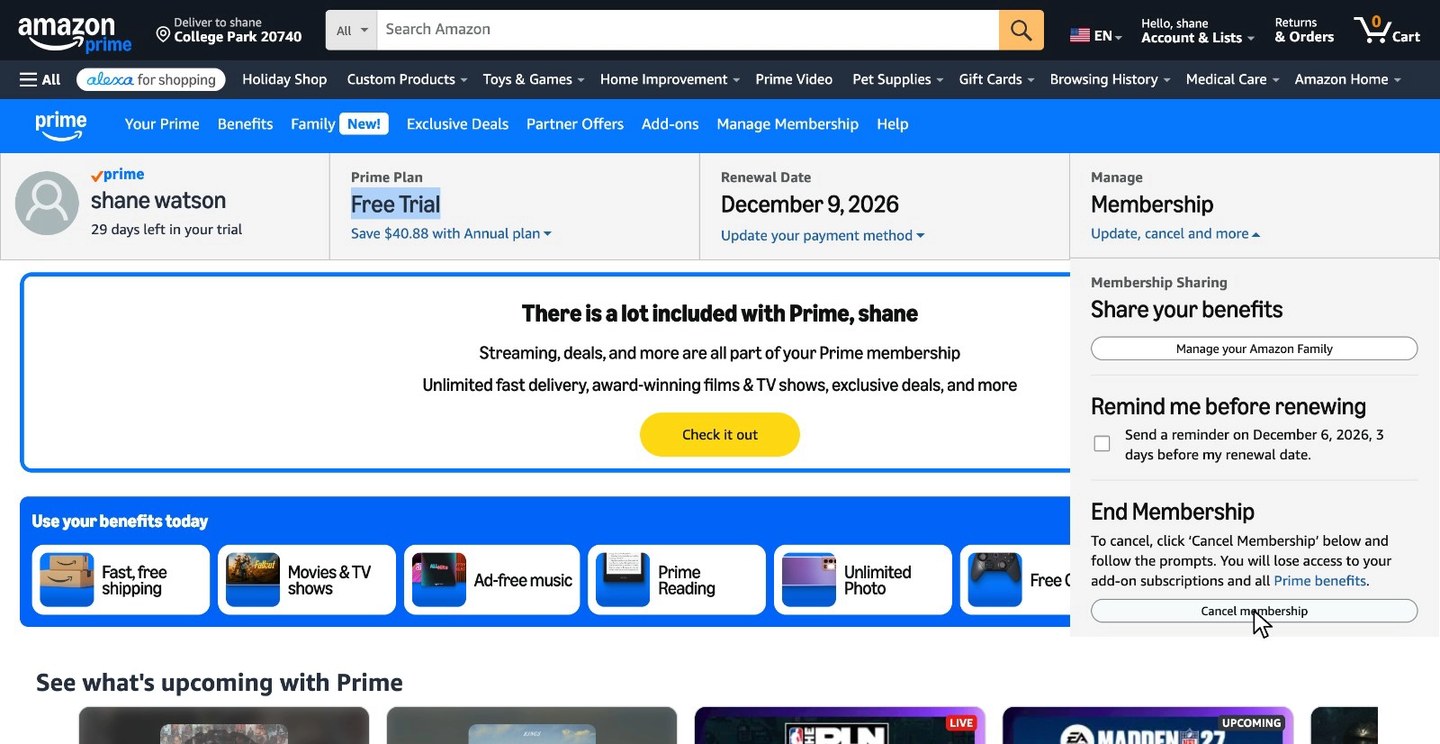
Click Cancel membership
A menu opens. Under End Membership, click Cancel membership.
Watch this step · 0:16More detail on this step
If you only want a warning before you're charged, check Remind me before renewing in the same menu instead. Amazon then reminds you 3 days before your renewal date.
Tired already? zuzu does all 6 steps for you.
-
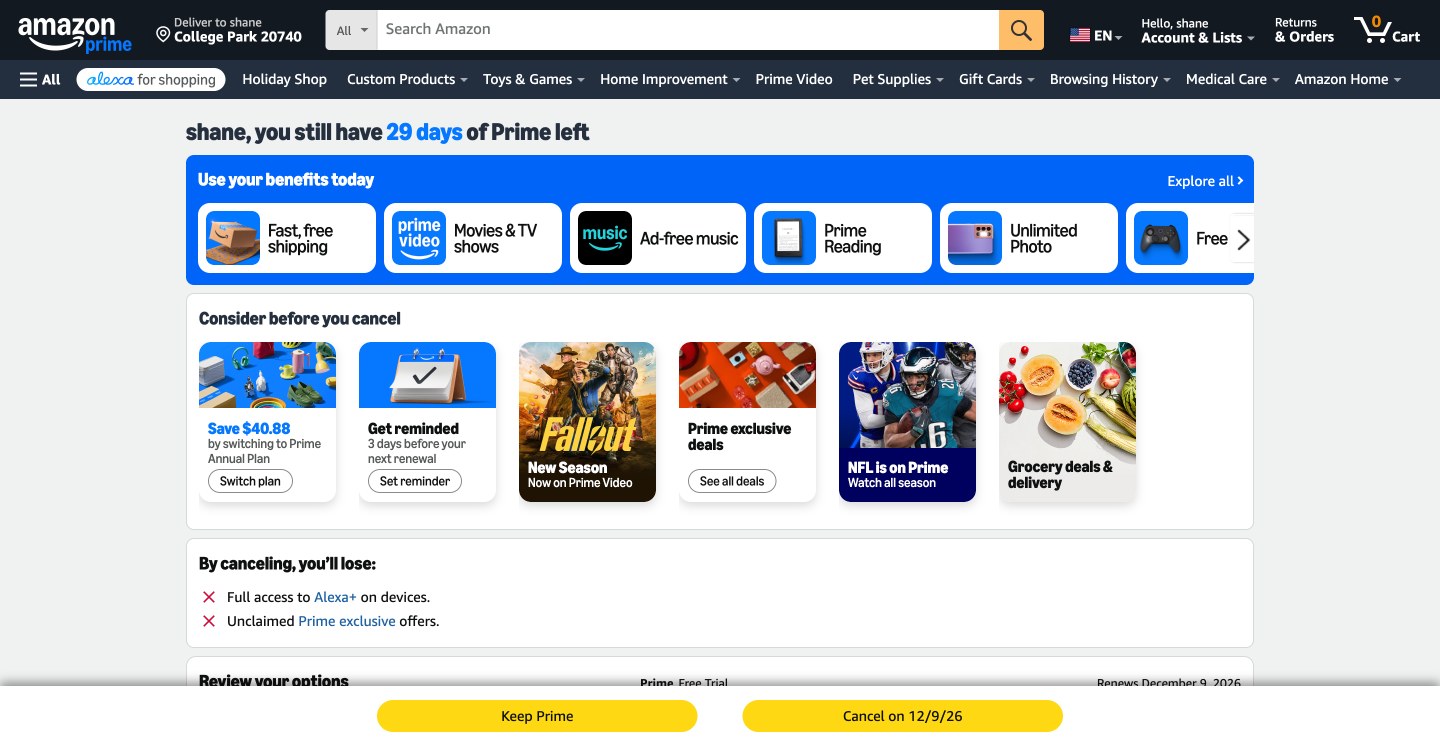
Scroll past the offers
Offer to stayAmazon suggests switching to the annual plan or setting a reminder instead, and lists what you'd lose. Scroll down past them.
zuzu says no to both offers for you Watch this step · 0:27More detail on this step
To keep Prime and pay once a year instead, click Switch plan. To keep Prime and get a reminder 3 days before your next renewal, click Set reminder.
-
Click the Cancel on button
This is the click that cancelsScroll down to Review your options. It shows the date your benefits end. Click the Cancel on button with that date.
Your benefits last until that date, and Amazon says you won't be charged after it.
Watch this step · 0:33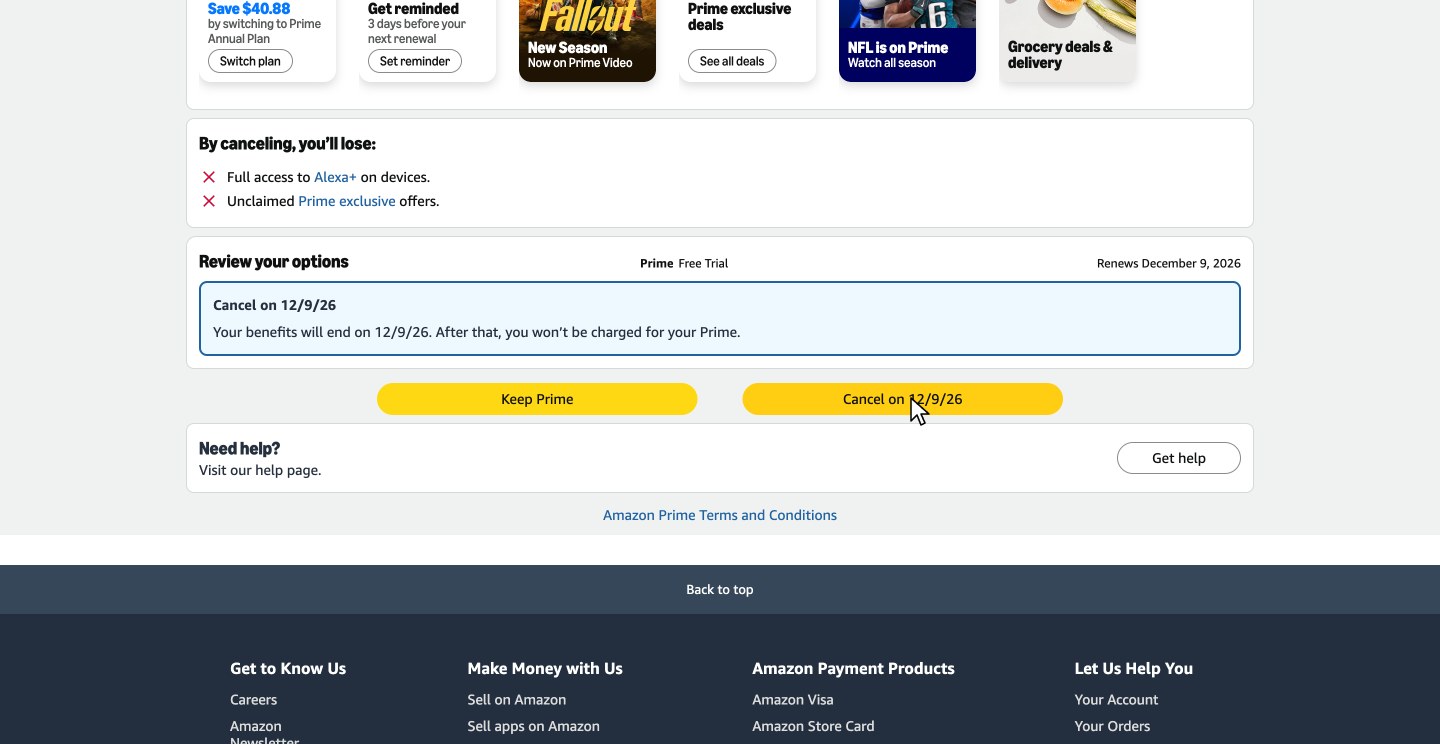
-
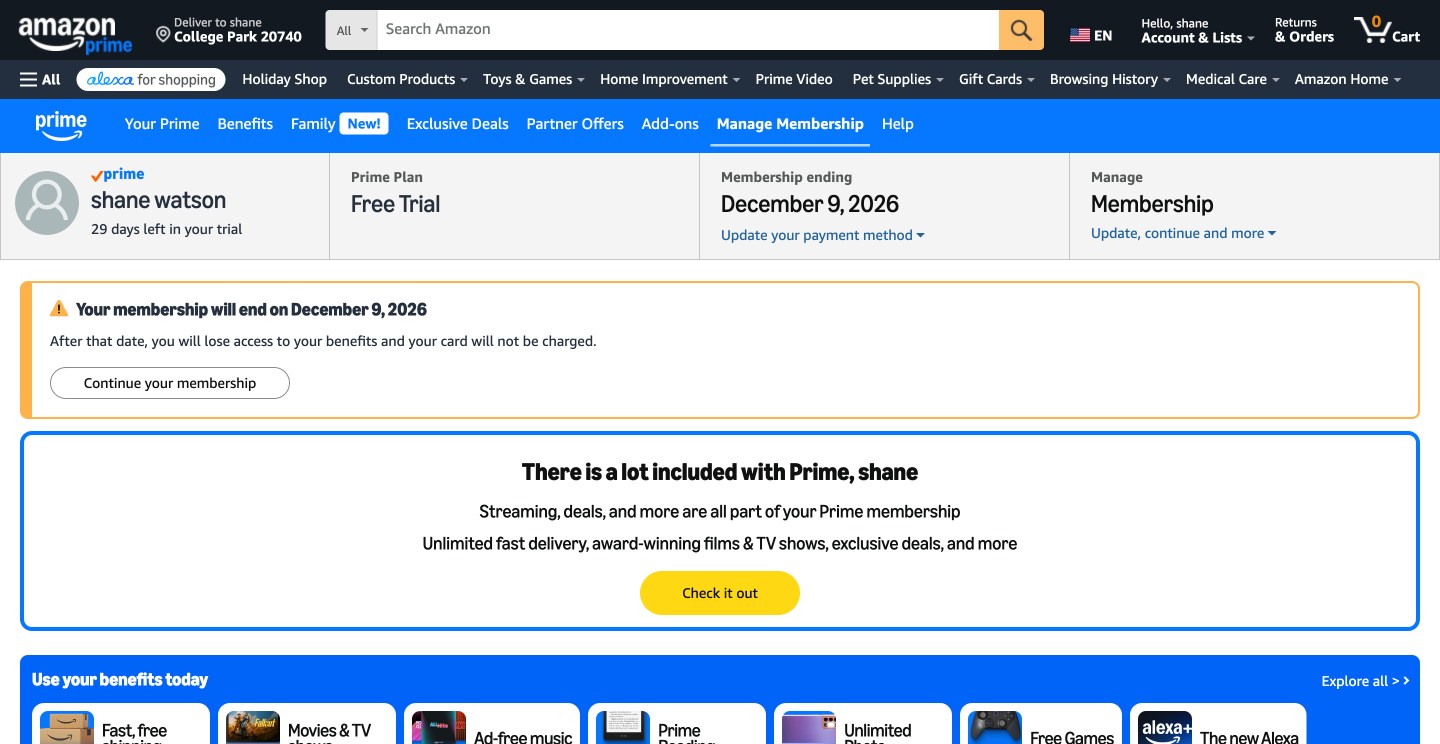
Check your end date
DoneYour Prime membership page now shows your end date. Take a screenshot in case you need proof later.
Watch this step · 0:44More detail on this step
The top of the page shows Membership ending with the same date. Click Continue your membership there if you change your mind before then.
Is it easy to cancel Amazon Prime?
Yes, once you know where the cancel button is. Online it's 6 steps, and the recorded cancellation took 45 s. What makes it feel hard is the cancel page: Amazon puts two offers to keep you and a list of what you'd lose above the button, and Cancel membership only opens that page.
Scroll down to Review your options and click the Cancel on button with your end date, and you're done. If you signed up through Google Play or another company, you cancel with them instead. If you'd rather not click through any of it, text zuzu and it's handled.
After you cancel your Amazon Prime membership
You keep your benefits until your end date
The cancel button and the page after it show the date. In the recording, the Prime free trial was canceled on Nov 9 and benefits run until Dec 9, the day it would have renewed.
Your Prime page shows Membership ending
That's normal. It shows your end date until then.
Changed your mind?
Click Continue your membership on your Prime membership page before your end date.
Keep a screenshot of the page that says your membership will end until that date has passed. After it, check your bank or card statement once to make sure no new Prime charge shows up. If one does, that screenshot is what you show Amazon or your bank.
How to cancel Prime Video
If Prime Video comes with your Prime membership, cancel Prime with the steps above. Amazon lists Movies & TV shows on Prime Video among Prime's benefits, and you lose your benefits on your end date.
If you pay for a Prime Video membership on its own, $8.99 a month, Amazon's Prime Video help says to cancel it online at Manage Your Memberships & Subscriptions. If a third party, such as a mobile service provider, set it up, cancel with that company. Channels you add on Prime Video are canceled separately, as the next section shows.
How to cancel a subscription on Amazon Prime
Add-on subscriptions on Prime Video, such as Paramount+, are canceled one at a time. Go to Manage Your Subscriptions, select Subscriptions at the top, find the add-on, then select Cancel and confirm. Cancel each add-on there whether or not you also cancel Prime.
The confirmation screen shows the add-on's end date, and you can reverse the cancellation until then. If Amazon offers a self-service refund and you take it, the add-on ends at once. To end it at once without that refund, Amazon says to contact customer service. If you pay for an add-on through Apple, cancel at least 24 hours before it renews, or you may be charged.
How to cancel Amazon Prime and get a refund
Amazon decides the refund by when you cancel and whether you used Prime. Within 3 business days of signing up or of your membership turning paid, Amazon refunds the full fee, minus the value of any Prime benefits you used in those days.
After that, Amazon's Prime Terms give a full refund only if your account made no eligible purchases and used no Prime benefits since the last charge. Its cancel article puts it the same way for paid members who haven't used their benefits, and says the refund takes three to five business days. You can still cancel after ordering, but an eligible purchase since your last charge rules out that full refund.
Amazon's help for paid members also names Cancel Membership - forgo benefits, which refunds the full fee if no one in your household used Prime in the paid period, and otherwise refunds part of it by the full months left. If your Prime came through Google Play or another company, ask them about a refund.
How to cancel Amazon Prime auto renewal
Canceling is how you turn it off. Amazon's Prime Terms say your membership continues automatically unless you cancel before the charge, so cancel with the steps above before your renewal date. Canceling with the Cancel on button keeps your benefits until your end date, and Amazon says you won't be charged after it.
If you only want a warning before the charge, check Remind me before renewing under Update, cancel and more on your Prime membership page. Amazon then sends a reminder 3 days before your renewal date, and your membership keeps renewing.
How to cancel Amazon Prime on the app
Amazon's cancel article doesn't list the app as a way to cancel. It sends you to its Cancel Your Prime Membership page, so open that page in your phone's browser and follow the prompts.
If you signed up for Prime through Google Play on an Android phone, Amazon says to cancel the subscription through Google Play instead. The same goes for a TV or a Roku: Amazon doesn't list a TV app as a way to cancel, so use the cancel page on a phone or computer.
If you cancel Amazon Prime, does it end immediately?
Not with the steps above. In the recording, Review your options offered the Cancel on button with the end date, and Amazon said the benefits last until that date and no charge follows. You keep using Prime until then.
To end a monthly membership right away, Amazon's help says to contact customer service. Its help for paid members also names Cancel Membership - forgo benefits, which, as the name says, gives up your benefits, with a full or partial refund.
How to cancel Amazon Prime shipping
The same way as the rest of Prime. Fast, free shipping is one of the Prime benefits on the cancel page, so canceling Prime with the steps above ends it on your end date.
Amazon also lists a Prime Shipping Only plan, by invitation only. Its fee page says to cancel any of your Amazon Prime memberships at Manage Prime Membership, the Prime membership page in step 2.
Can you cancel Amazon Prime by phone?
Not with a phone number. Amazon doesn't list the phone as a way to cancel. Its cancel article sends you to the Cancel Your Prime Membership page, and its Customer Service page, signed out, points to that article and shows no phone number.
If you need help canceling, the article says to go to the Customer Service homepage, select Something else, then I need help with something else.
Amazon Prime cancellation FAQ
Common questions about canceling Amazon Prime. Sources checked Nov 16, 2026.
How can I cancel Amazon Prime?
On amazon.com, point to Account & Lists and click Prime Membership, then Update, cancel and more, then Cancel membership. Amazon then offers to switch you to the annual plan or set a reminder. Scroll down to Review your options and click the Cancel on button with your end date. If you signed up through Google Play or another company's service, you cancel with them instead.
How do I cancel an Amazon Prime free trial?
The same way. In the recording, the account was on a free trial, and Review your options showed one choice: the Cancel on button with the date the trial ends. You keep Prime until that date and aren't charged after it. If you don't cancel, Amazon charges you for Prime automatically when the trial ends.
How do I cancel Amazon Prime Student?
The same way. Prime Student is one of Amazon's Prime membership plans, and Amazon's fee page says to cancel any of your Amazon Prime memberships at Manage Prime Membership, the Prime membership page in step 2.
Can an app or service cancel Amazon Prime for me?
zuzu can. Text zuzu that you want to cancel Amazon Prime, do Amazon's human check through the private link zuzu sends if Amazon asks for one, and tap Confirm cancellation when zuzu asks. zuzu goes through the same steps, says no to both offers and texts you when it's done, with your end date.
The ways to cancel, refunds, renewal, Prime Video and add-on subscriptions come from Amazon's help pages on canceling Prime, the membership fee, Prime Video, add-on subscriptions, switching memberships and Customer Service, and from its Prime Terms & Conditions. The rest comes from the recorded cancellation on Nov 9, 2026.
How this guide was made
- Recorded click by click on amazon.com on Nov 9, 2026, canceling a Prime free trial.
- The ways to cancel, refunds and renewal rules come from Amazon's help pages and Prime Terms & Conditions, checked on Nov 16, 2026.
Checked by Harsh, zuzu.
Cancel more subscriptions you don't use and save money
Each guide follows one real cancellation on the company's own website, with every click recorded.
 Cancel ChatGPT
6 steps · 33 s on the website
 Cancel Netflix
5 steps · 44 s on the website
 Cancel Paramount+
5 steps · 27 s on the website
 Cancel Peacock
4 steps · 20 s on the website
 Cancel Planet Fitness
10 steps · 2 min 13 s on the website
Cancel your Amazon Prime membership easily and start saving today
Text zuzu and it's handled.