 Last updated Nov 11, 2026
How to cancel your Planet Fitness membership online
Log in at planetfitness.com, click Manage on your membership, then Cancel: 10 steps, 2 min 13 s.
You'll need the login code Planet Fitness texts you.
Watch zuzu cancel a Planet Fitness membership · 0:34
4 ways to cancel your Planet Fitness membership
Planet Fitness lists 3 ways to cancel. Texting zuzu is a 4th: zuzu does the online route for you.
Online
In your member account on planetfitness.com. You need your login.
2 min 13 s, 10 steps See howCan you cancel Planet Fitness online?
Yes, you can cancel your Planet Fitness membership online, whether you call it your gym membership, your account or your subscription. On planetfitness.com, open My Account and log into your account, click Manage on your membership, then Cancel.
The recorded cancellation on Nov 2, 2026 took 10 steps and 2 min 13 s. Planet Fitness also lets you cancel in person at your home club or with a letter to your home club. Planet Fitness says some policies vary by location because of state and local rules, so ask your home club if anything below looks different for you.
Before you start, have your Planet Fitness login and your phone ready. When you sign in, Planet Fitness may text a login code to your phone. The cancel form opens in a new browser tab, so if a page seems stuck, check your other tabs before you try again.
Timing matters more than speed. Cancel at least 7 days before your billing date to stop the next monthly charge, and at least 7 days before your annual fee date to skip the $49 annual fee. If you cancel later, that payment still goes through. Either way, you keep access to the club until your end date.
The part people miss is the last click. Planet Fitness makes two offers to keep you, a freeze and a rate lock. Clicking No thanks, I still want to cancel on the rate lock only closes the pop-up, and you're canceled only after the second Cancel membership click. After that, your account shows Cancel Scheduled until your end date, which is normal.
The 10 steps further down show the online route screen by screen. If you'd rather not click through it, text zuzu and it's handled.
Planet Fitness cancellation policy 2026: what to know before you cancel
The rules that decide what you pay, from the 7-day cutoff to the $49 annual fee.
Cancel at least 7 days before your annual fee date
Planet Fitness charges the annual fee once a year. Your annual fee date is in the member portal and on your membership agreement.
Cancel at least 7 days before your billing date
That's the cutoff to stop the next monthly charge. After it, the next payment still goes through.
Only if you end a minimum term early
The buyout fee applies only to memberships with a minimum term. No Commitment memberships can be canceled at any time without a fee.
Say no to the freeze and the rate lock
No thanks on the rate lock only closes the pop-up. You're canceled after the second Cancel membership click.
Text zuzu and skip 10 manual steps
zuzu is an assistant you text. It signs in, says no to both offers and cancels for you.
- 1You text: "can you cancel my planet fitness membership"
Use your own words. There's no form to fill in, and zuzu replies to say it's starting.
- 2You send zuzu the login code Planet Fitness texts you
Planet Fitness texts the code to your phone when zuzu signs in. Send it to zuzu as soon as it arrives.
- 3zuzu texts you when it's done, with your end date
zuzu goes through the same screens and says no to the freeze and the rate lock. You can check Cancel Scheduled in your account afterward.
You'll need the login code Planet Fitness texts you.
 ZuzuBusiness Account
The old way: cancel Planet Fitness step by step
Prefer to do it yourself? You need your Planet Fitness login. Each step shows the screen you'll see.
This is the route Planet Fitness expects members to take, and it took 2 min 13 s in the recording. A few extra screens ask you to reconsider, so it helps to know what's coming. Open More detail under any step for the full explanation.
Watch the full cancellation by hand · 2:13
The 10 steps · 2 min 13 s
-
Open My Account
Go to planetfitness.com and click My Account in the top right.
Watch this step · 0:00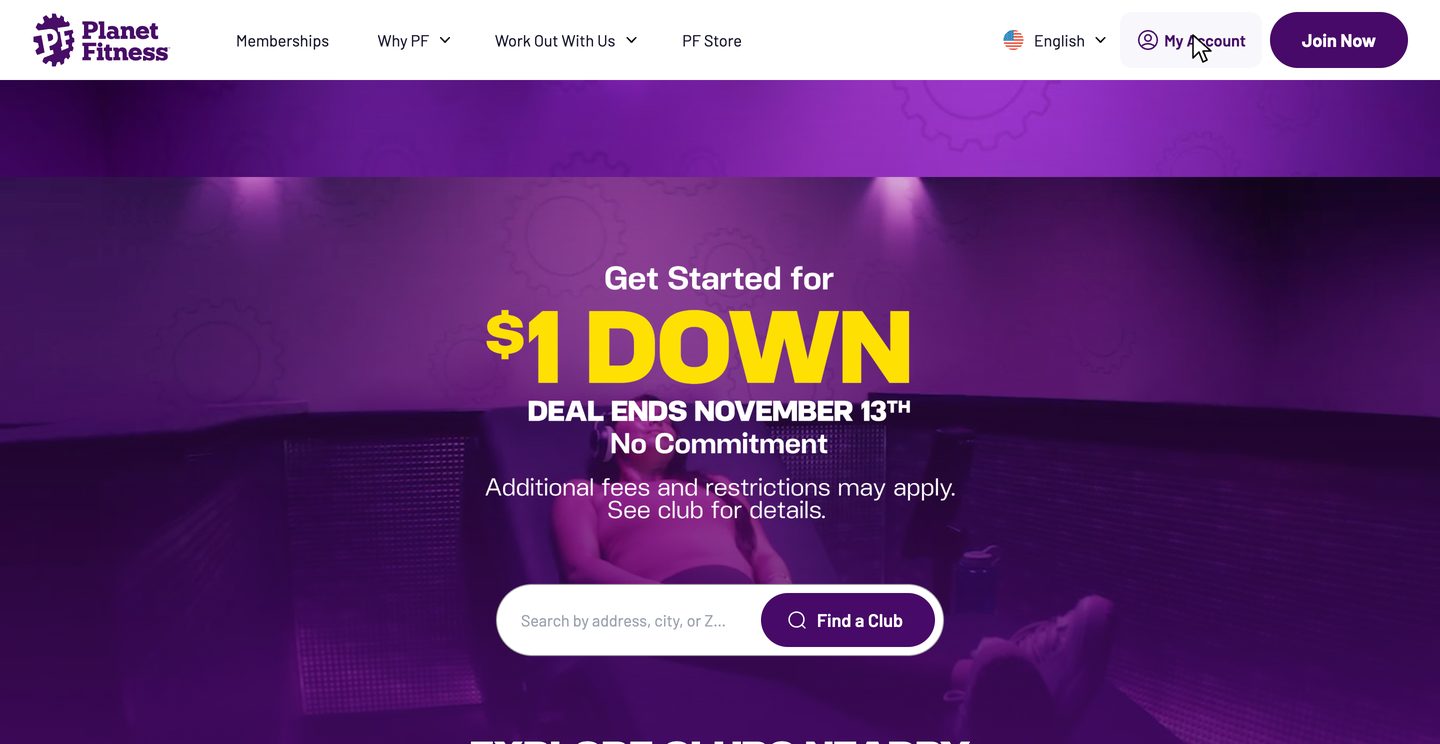
-
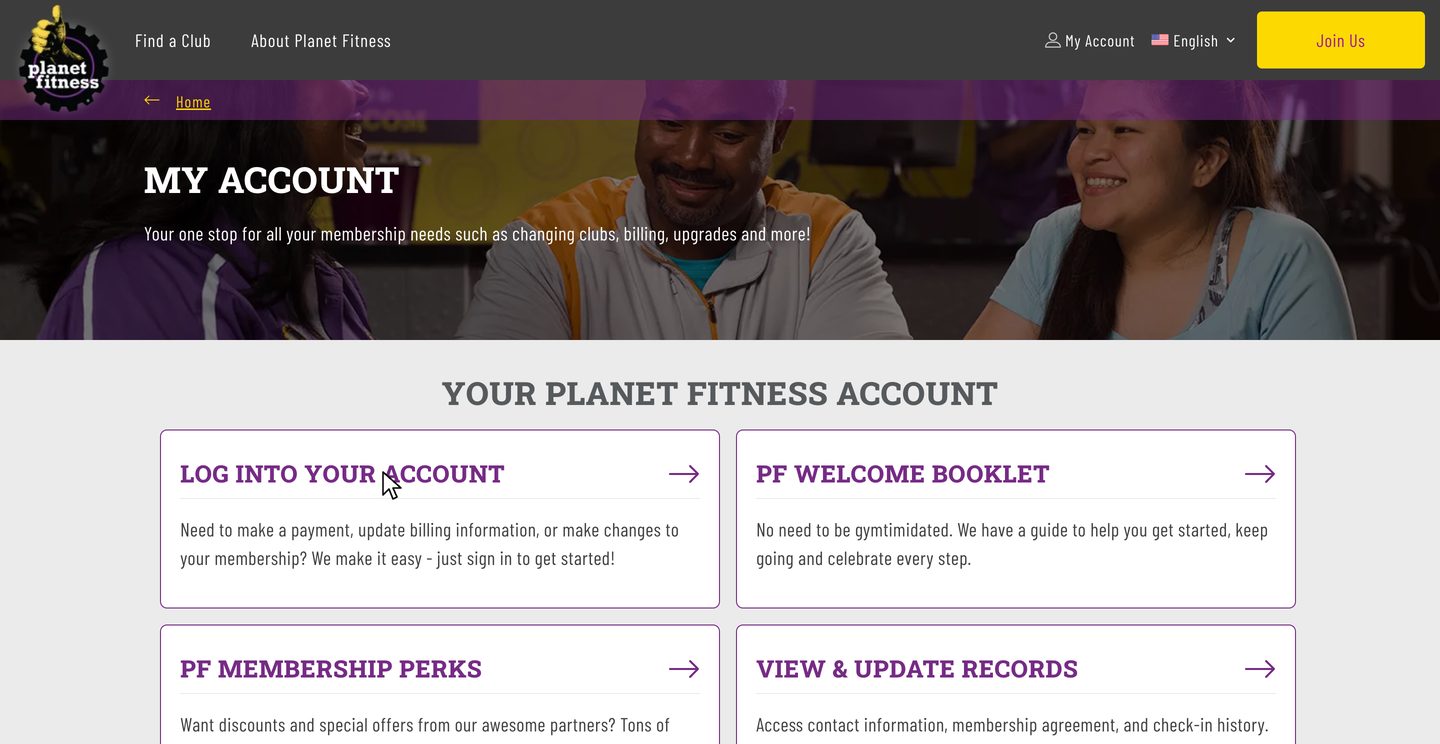
Log into your account
Click Log into your account and sign in. Your profile opens in a new tab.
If nothing seems to happen, check your other tabs.
Watch this step · 0:03More detail on this step
Planet Fitness may text you a one-time login code when you sign in, so keep your phone nearby. If you can't sign in at all, canceling in person or by mail doesn't need your login.
-
Click Manage
Find your membership under Membership details and click Manage.
Your plan name shows here, for example PF Black Card.
Watch this step · 0:12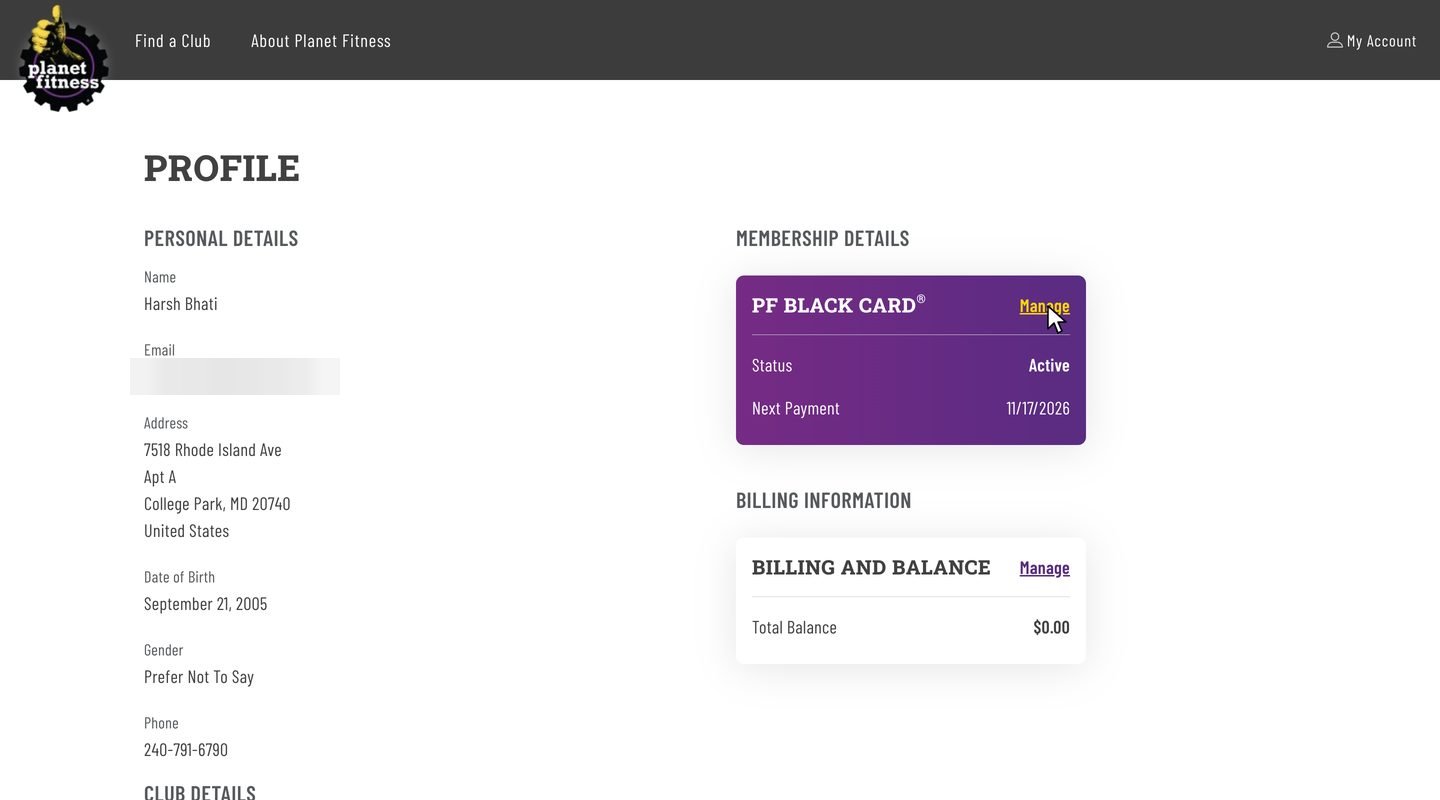
-
Click Cancel
Under More options, click Cancel. The cancel form opens in a new tab.
Watch this step · 0:18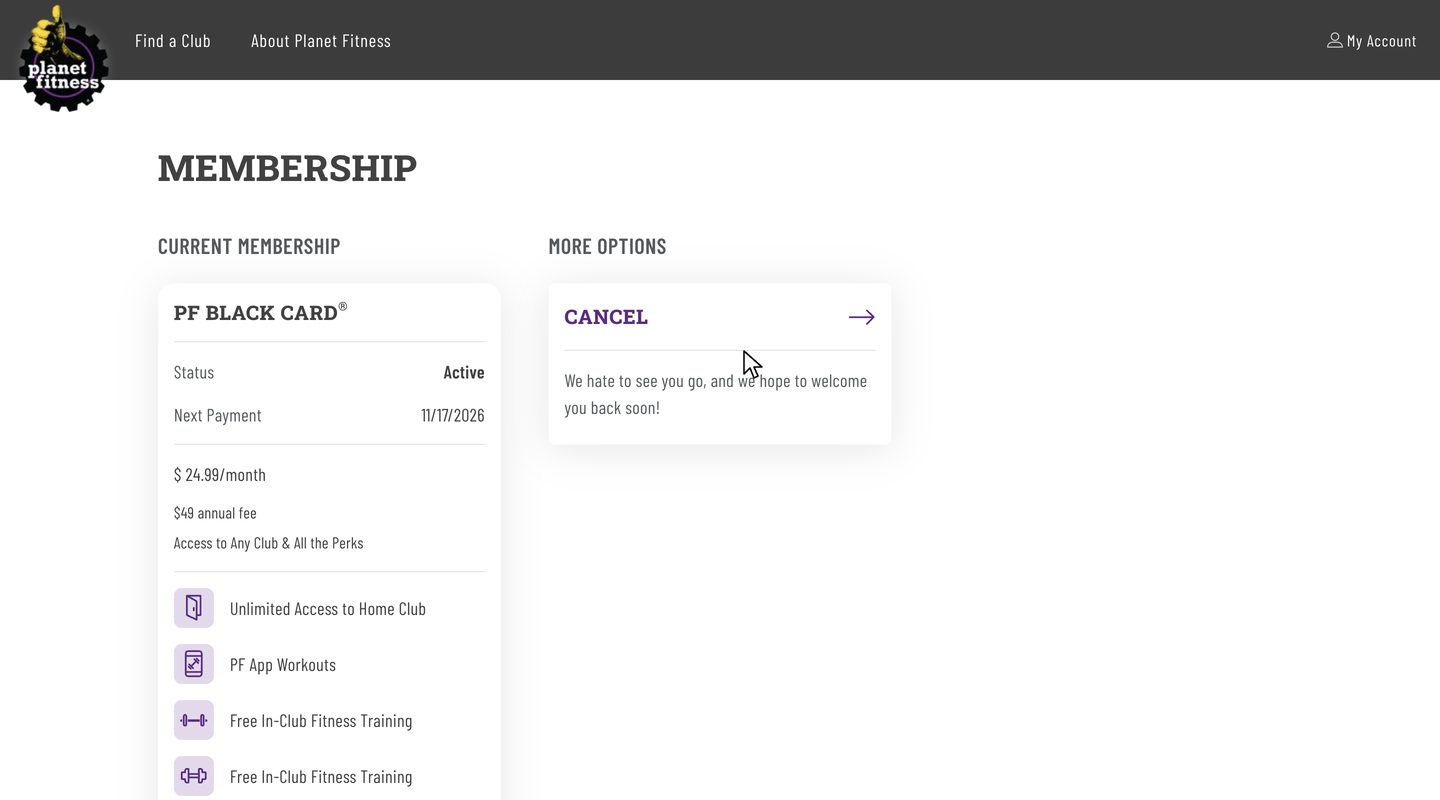
-
Answer two questions
Pick why you're leaving and how likely you are to come back. The rest is optional. Click Continue.
Watch this step · 0:29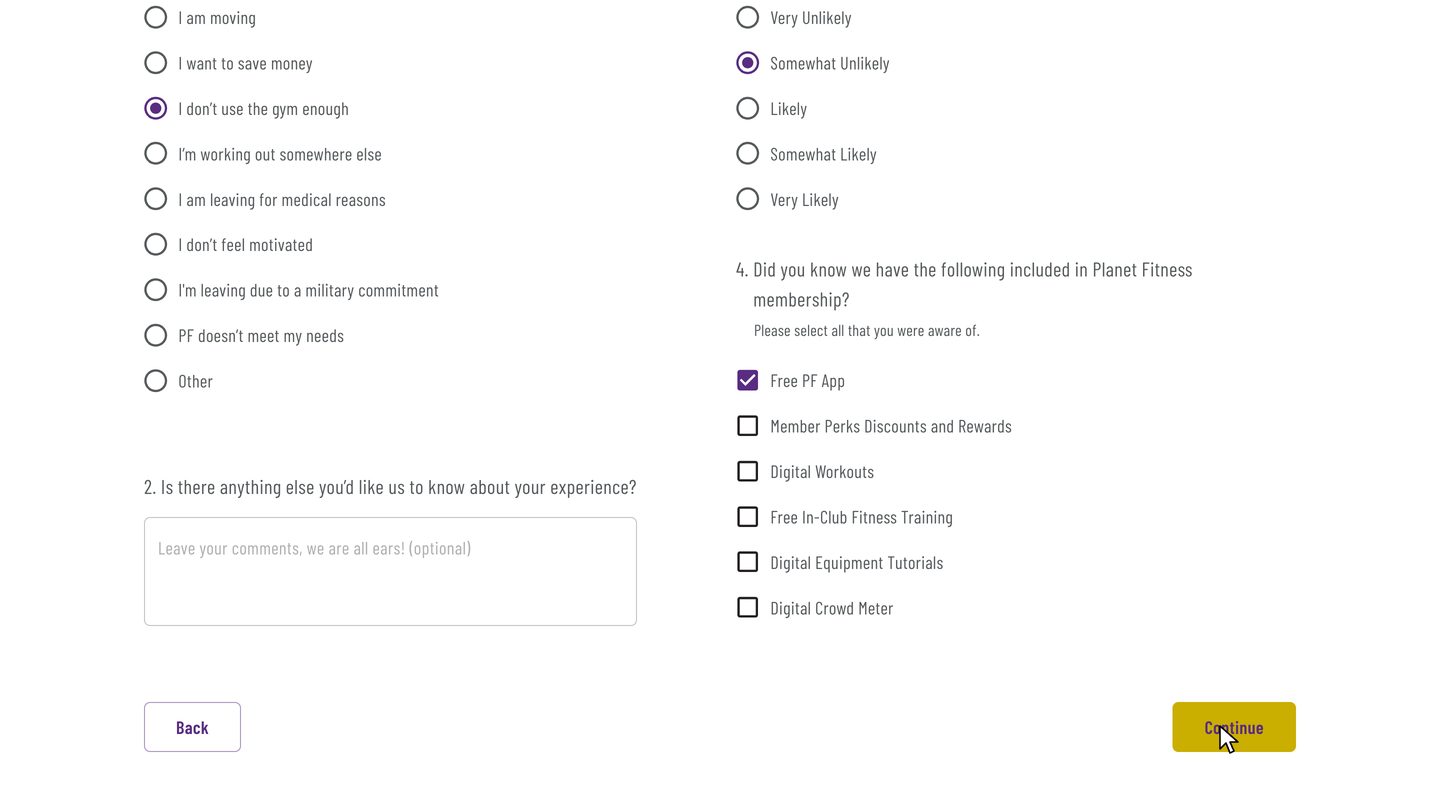
Tired already? zuzu does all 10 steps for you.
Cancel now in less than 1 minuteYou'll need the login code Planet Fitness texts you.
-
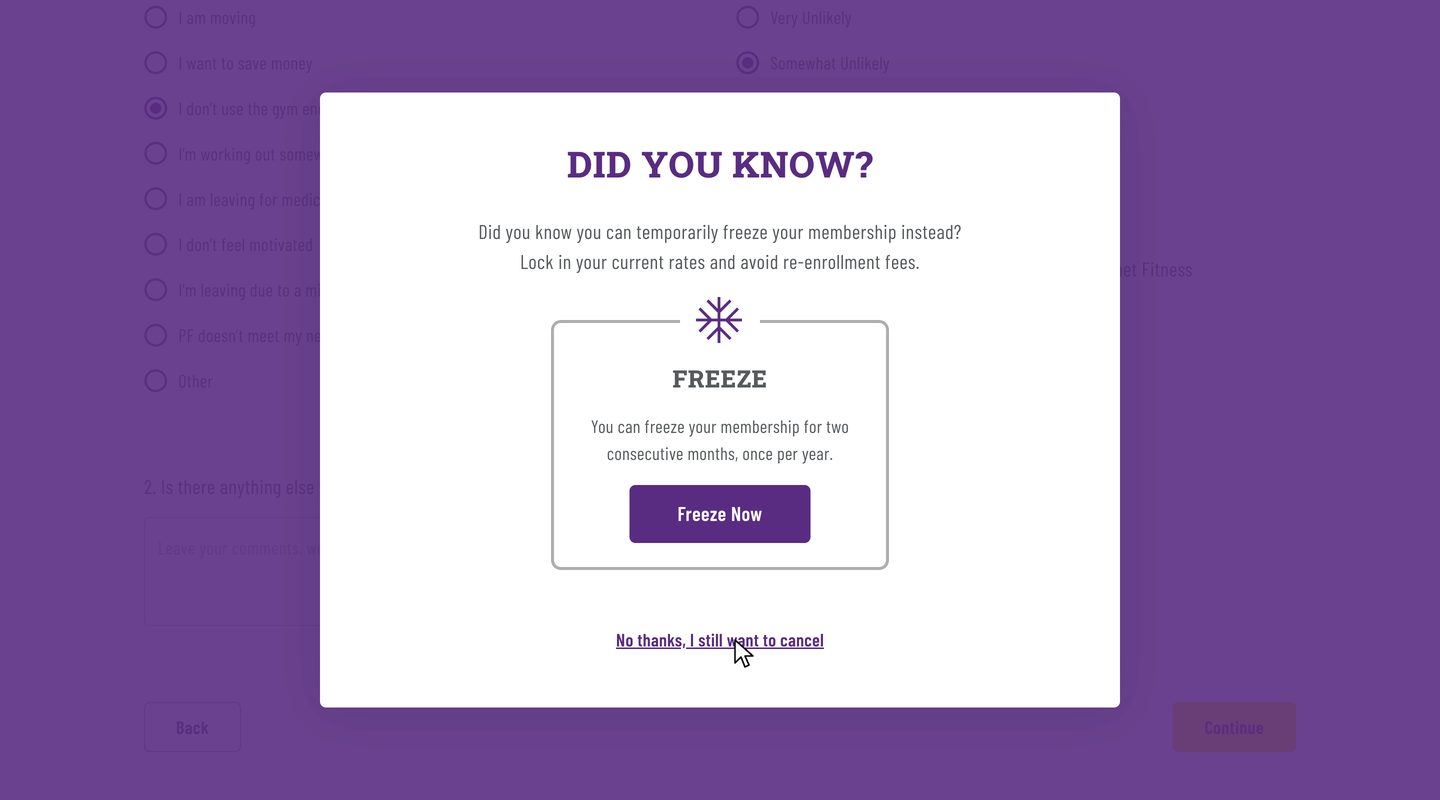
Say no to the freeze
Offer to stay 1Planet Fitness suggests freezing your membership instead. Click No thanks, I still want to cancel.
zuzu says no to both offers for you Watch this step · 1:05More detail on this step
The freeze puts your membership on hold for two months in a row, once a year. Click Freeze Now on the pop-up if you'd rather keep your membership that way.
-
Click Cancel membership
The review page shows when your membership ends. Scroll down and click Cancel membership.
Take a screenshot of your end date here. The confirmation page at the end doesn't show it.
Watch this step · 1:18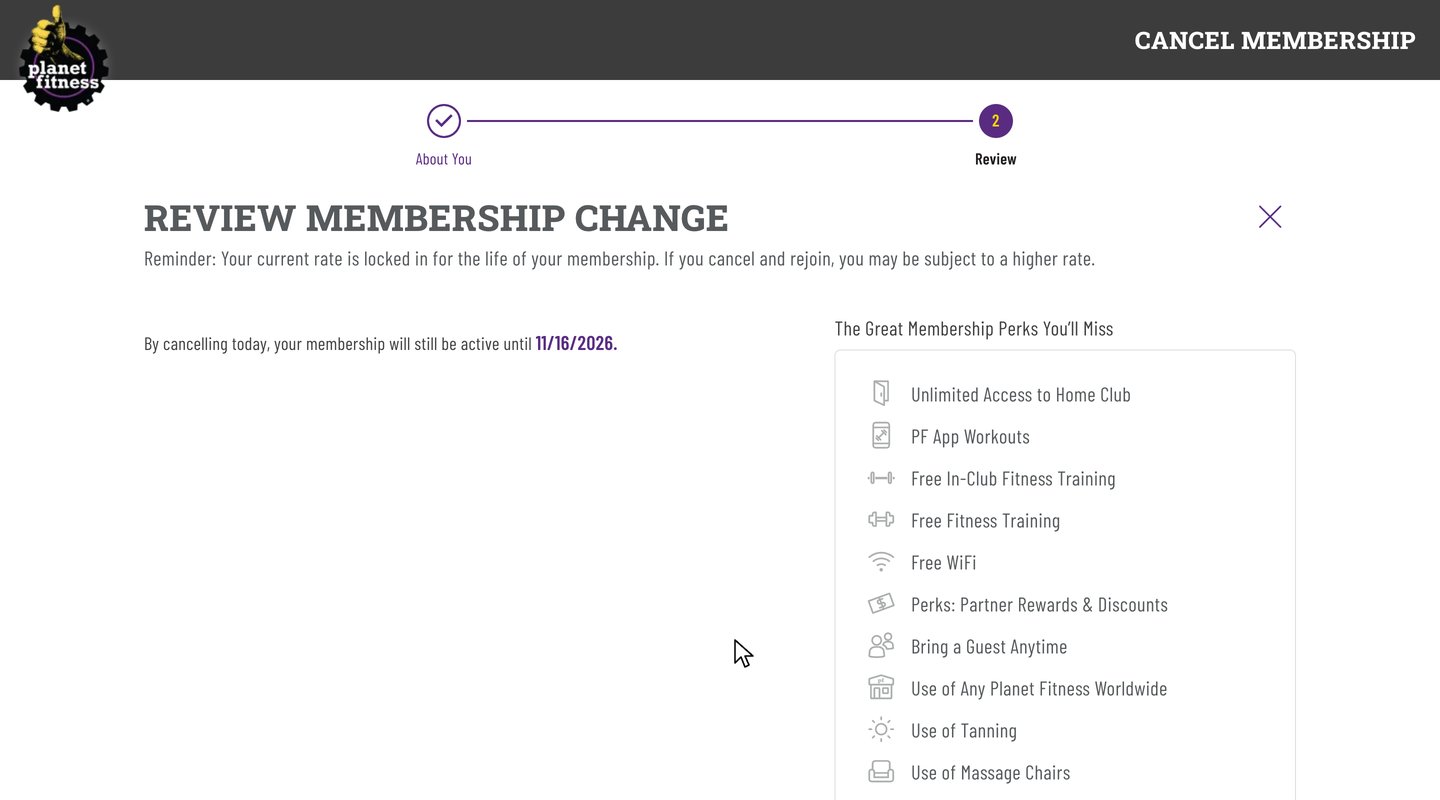
-
Say no to the rate lock
Offer to stay 2Planet Fitness offers to keep your current rate. Click No thanks, I still want to cancel. This only closes the pop-up.
You're still a member at this point.
Watch this step · 1:45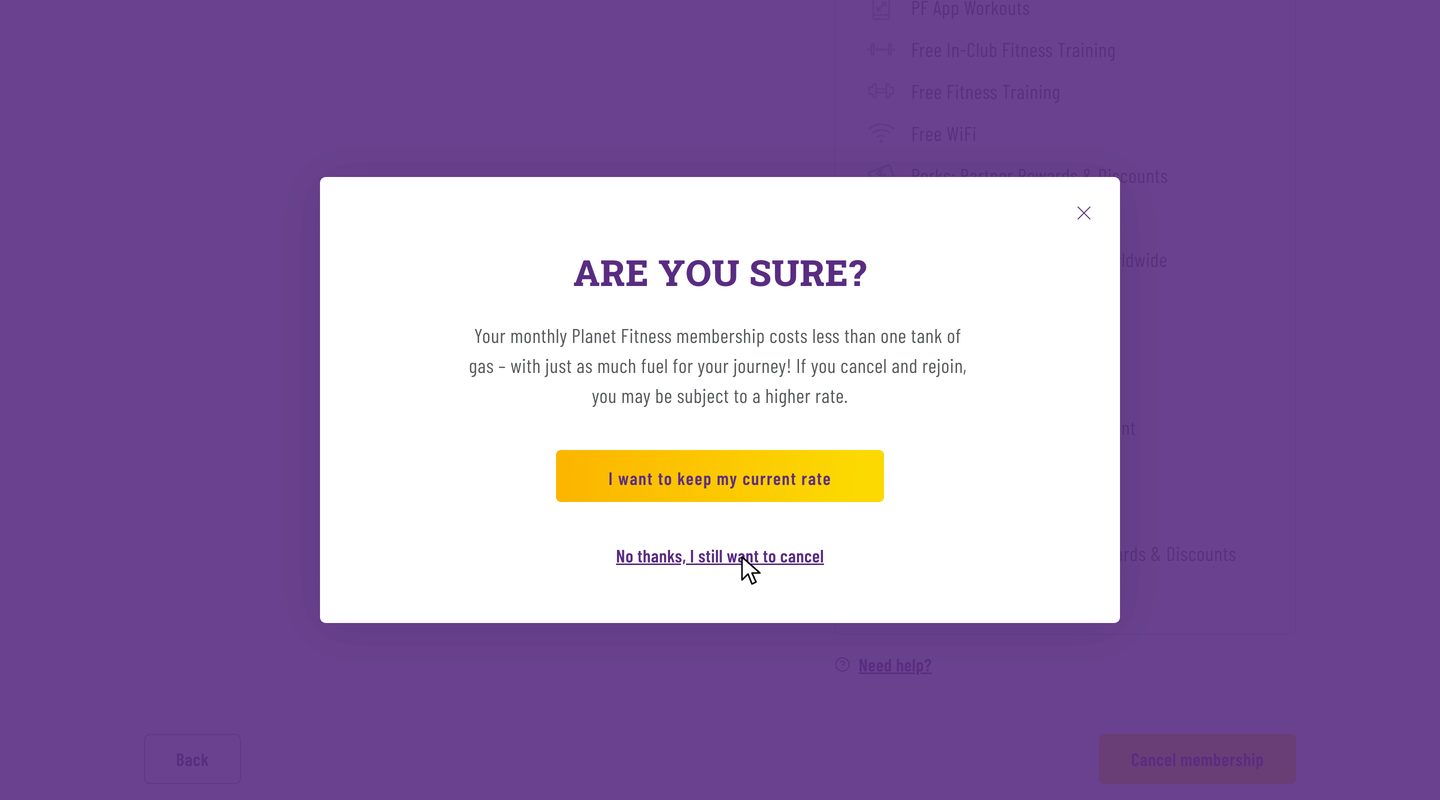
-
Click Cancel membership again
This is the click that cancelsYou're back on the review page. Click Cancel membership one more time.
Watch this step · 1:59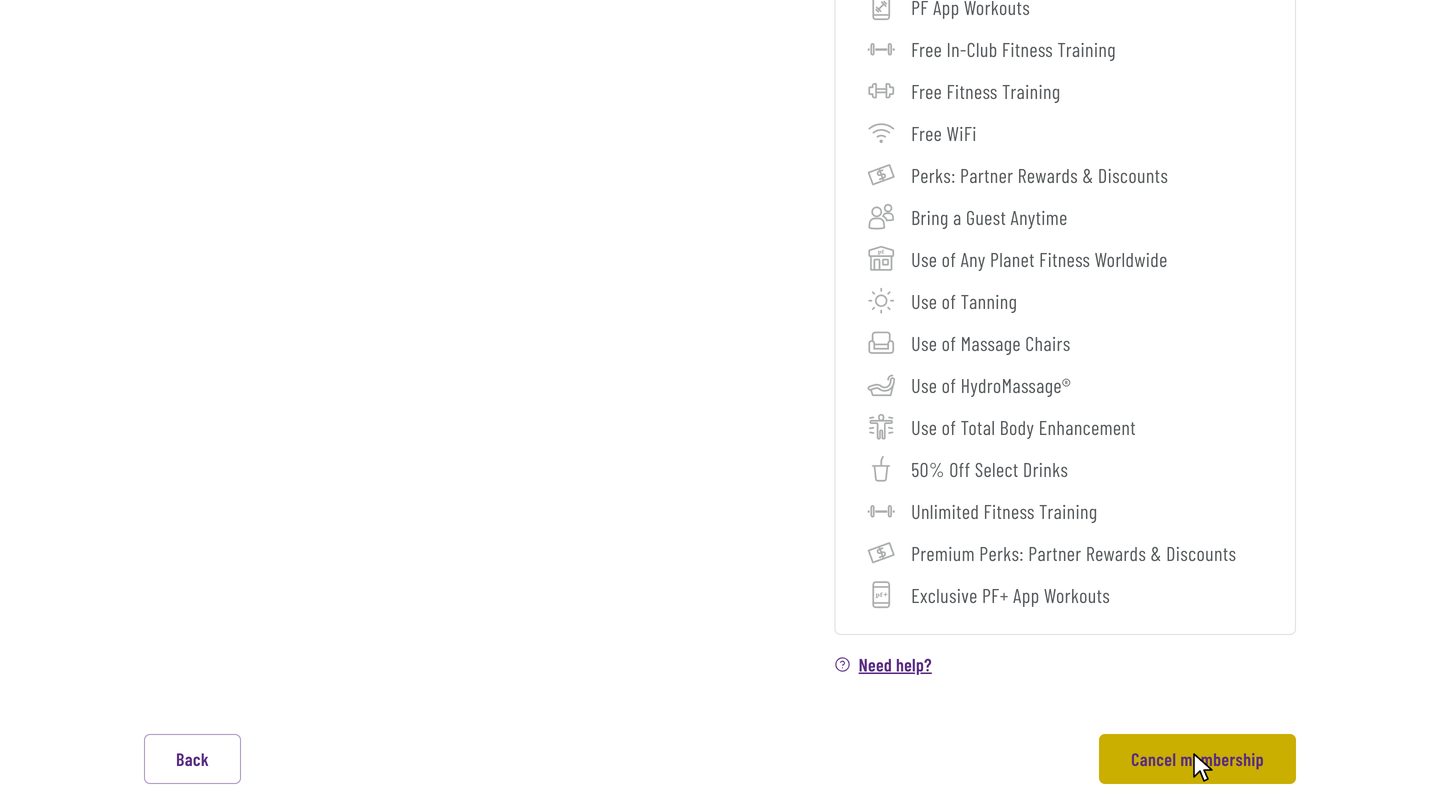
-
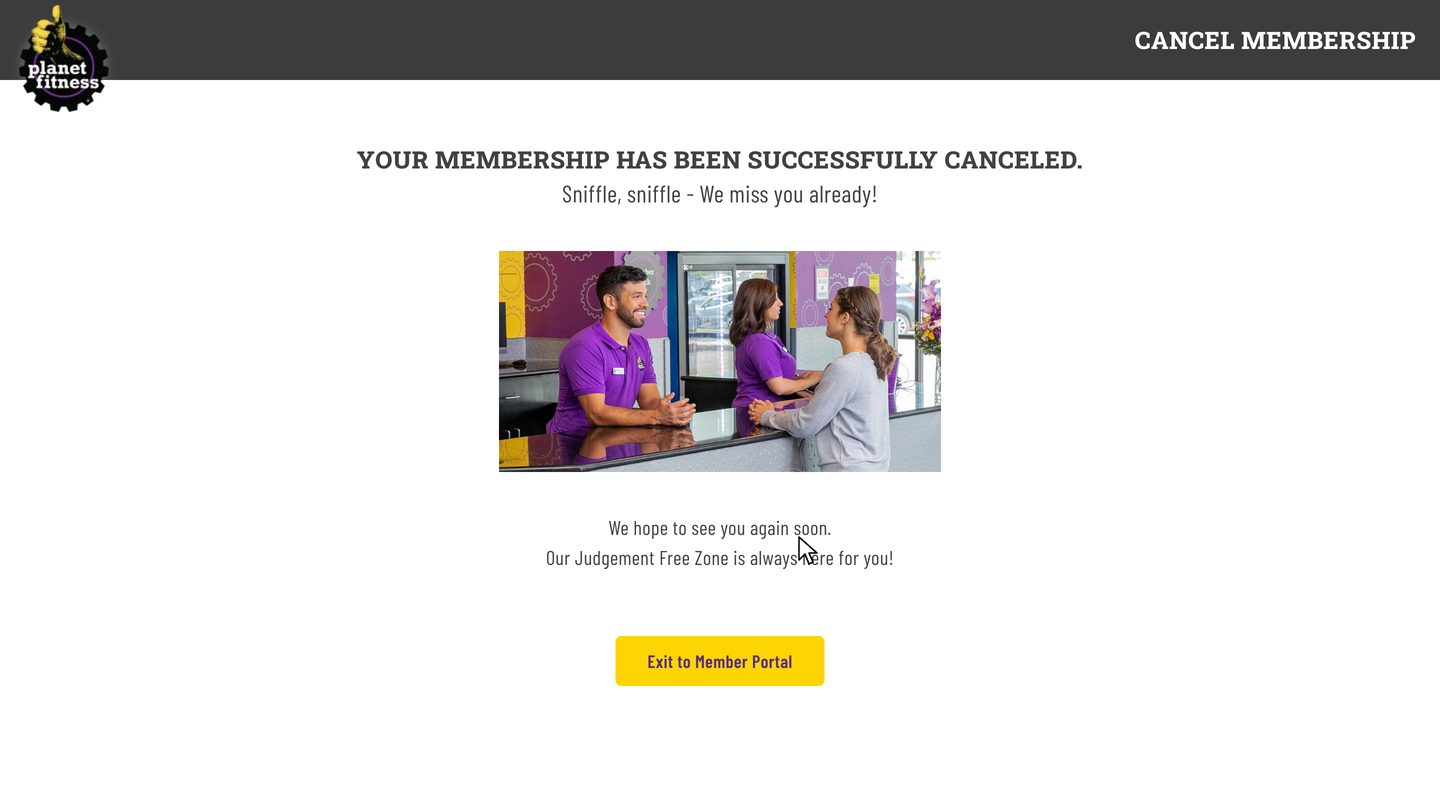
Save the confirmation
DoneTake a screenshot of the confirmation page in case you need proof later.
Watch this step · 2:03More detail on this step
The confirmation page says your membership has been canceled but doesn't show your end date, so keep this screenshot together with the one from the review page. Your account then shows Cancel Scheduled until your end date, and you can keep using the club until then.
Is it hard to cancel Planet Fitness?
No, once you know where the catch is. Online it's 10 steps, and the recorded cancellation took 2 min 13 s. What makes it feel hard is the extra screens: the cancel form opens in new tabs, and Planet Fitness makes two offers to keep you, a freeze and a rate lock, before the final Cancel membership click.
Say no to both offers and click Cancel membership a second time, and you're done. If you can't sign in, you can still cancel in person at your home club or by letter. If you'd rather not click through any of it, text zuzu and it's handled.
After you cancel your Planet Fitness membership
You keep access until your end date
The review page shows the date. In the recording, the membership was canceled on Nov 2 and access ran until Nov 16, the day before the next billing date.
Your account shows Cancel Scheduled
That's normal. It stays like this until your end date.
Changed your mind?
The website has no undo button. Contact your home club to keep your membership.
Keep your screenshots of the review page, which shows your end date, and of the confirmation page until that date has passed. After it, check your bank or card statement once to make sure no new monthly charge shows up. If one does, those screenshots are what you show Planet Fitness or your bank.
Do you have to cancel Planet Fitness in person?
No. Planet Fitness also lets you cancel online or with a letter. If you'd rather go in, go to your home club and ask the front desk to end your membership. Planet Fitness's customer service FAQ names your home club for this, even if your PF Black Card lets you work out at other locations.
Ask for a written confirmation that shows your end date, and keep it until that date has passed. A spoken promise is hard to prove later, so if the desk can't print a confirmation, ask for it by email or write down the name of the person you spoke to and the date.
How to cancel Planet Fitness by mail with a cancellation letter
Planet Fitness accepts a written request mailed to your home club. Its FAQ doesn't say what the letter must include, so the letter below sticks to what identifies you and asks for your end date in writing. Mail it early, because the 7-day cutoff before your billing date still applies. Keep a copy of the signed letter and your mailing receipt.
[Date]
[Your name]
[Your address]
[Your phone number]
[Your membership number]
Please end my Planet Fitness membership and confirm my end date in writing.
[Your signature]
Don't want to visit or mail anything? zuzu cancels online for you.
Can you cancel Planet Fitness over the phone?
Planet Fitness doesn't list the phone as a way to cancel. Its customer service FAQ lists three ways: the member portal online, your home club in person, or a letter mailed to your home club. Email isn't on the list either.
For billing or membership questions, the FAQ says to contact your home club first. If your home club is closed, the FAQ points you to Planet Fitness's member services department, which is open Monday to Friday, 9 am to 6 pm Eastern. The FAQ doesn't give a phone number for it. If you call anyway, ask for your end date in writing, and don't count on a call alone to stop the next charge.
How to cancel a Planet Fitness Black Card membership
The recording on this page is a PF Black Card cancellation, so the 10 steps above are the Black Card steps. Your plan name shows under Membership details in the member portal, with Manage next to it. Click Manage, then Cancel under More options, and follow the steps. You're canceled only after the second Cancel membership click.
Planet Fitness cancellation fee and annual fee
| What | Amount | When it applies |
|---|---|---|
| Buyout fee | $58 | Only if your membership has a minimum term and you end it before the term is over |
| Annual fee | $49 | Charged once a year. Cancel at least 7 days before your annual fee date to skip it |
| Monthly charge | Your plan's rate | Cancel at least 7 days before your billing date to stop the next one. Classic starts at $15 and PF Black Card at $24.99 a month, and prices vary by location |
- TodayCancel any time before the cutoff
- 7 days before billingLast day to cancel and stop the next charge
- Billing dateThe next charge
Both dates are in the member portal and on your membership agreement. No Commitment memberships can be canceled at any time without a fee. Planet Fitness says prices and some policies vary by location.
Can you cancel Planet Fitness in the app?
Planet Fitness doesn't list the PF App as a way to cancel. Its 3 ways are the member portal on its website, your home club in person, or a letter to your home club. On your phone, open planetfitness.com in the browser and follow the 10 steps above, or text zuzu and skip the browser.
The app does show your billing details under My Billing Info & Balance, which helps you time the 7-day cutoff.
Planet Fitness cancellation FAQ
Common questions about canceling Planet Fitness. Sources checked Nov 10, 2026.
How do I cancel my Planet Fitness membership?
On planetfitness.com, open My Account and log into your account, click Manage next to your membership, then Cancel. Answer the 2 required questions, say no to the freeze and the rate lock, and click Cancel membership twice. It works the same whether you call it your membership, your account or your subscription. You can also cancel in person at your home club or with a letter to your home club.
Can you cancel Planet Fitness online?
Yes. The member portal on planetfitness.com is one of the 3 ways Planet Fitness lists. The recorded cancellation of a PF Black Card membership on Nov 2, 2026 took 10 steps and 2 min 13 s.
Can you cancel Planet Fitness anytime?
Planet Fitness says No Commitment memberships can be canceled at any time without a fee. If your membership has a minimum term and you end it early, Planet Fitness charges a $58 buyout fee. Either way, cancel at least 7 days before your billing date to stop the next monthly charge.
Is there a fee to cancel Planet Fitness, and how much does it cost?
Not for a No Commitment membership. Planet Fitness charges a $58 buyout fee only when a membership with a minimum term ends before the term is over. The $49 annual fee is a separate yearly charge, and you skip it by canceling at least 7 days before your annual fee date.
What happens if I cancel Planet Fitness before the annual fee?
If you cancel at least 7 days before your annual fee date, you skip the $49 annual fee. If you cancel later, the fee still goes through. Your billing dates are in the member portal and on your membership agreement.
How do I cancel a PF Black Card membership?
The same way. The recording on this page is a PF Black Card cancellation, so the 10 steps are the Black Card steps. To cancel in person, Planet Fitness says to go to your home club, even though a Black Card works at every location.
Is it hard to cancel Planet Fitness, and why can't I cancel online?
It takes 10 steps once you know the two offers to stay. If it seems not to go through, the cancellation may not be finished yet. In the recording, saying no to the rate lock only closed the pop-up, and the membership was canceled only after a second Cancel membership click. The cancel form also opens in a new tab, so check your other tabs if a page seems stuck.
How long does it take to cancel Planet Fitness?
The recorded cancellation took 2 min 13 s on the website, for 10 steps. Texting zuzu takes less than a minute of your own time.
What happens when I cancel Planet Fitness, and when does my membership end?
You can keep going to the club until the end date shown on the review page, and your account shows Cancel Scheduled until then. In the recording, the membership was canceled on Nov 2 and stayed active until Nov 16, the day before the next billing date.
Can I freeze my membership instead of canceling?
Yes. The first offer in the cancel flow is a freeze for two months in a row, once a year. Click Freeze Now on that pop-up to freeze instead, or No thanks, I still want to cancel to keep canceling.
Can I undo a cancellation?
Not on the website. Contact your home club if you want to keep your membership.
Can an app or service cancel Planet Fitness for me?
zuzu can. Text zuzu that you want to cancel Planet Fitness, then send it the login code Planet Fitness texts you. zuzu goes through the same steps, says no to both offers and texts you when it's done, with your end date.
Fees, deadlines and the ways to cancel come from Planet Fitness's customer service FAQ and membership page. The rest comes from the recorded cancellation on Nov 2, 2026.
How this guide was made
- Recorded click by click on planetfitness.com on Nov 2, 2026, canceling a paid PF Black Card membership.
- Fees, deadlines and the ways to cancel come from Planet Fitness's customer service FAQ and membership page, checked on Nov 10, 2026.
Checked by Harsh, zuzu.
Cancel more subscriptions you don't use and save money
Each guide follows one real cancellation on the company's own website, with every click recorded.
 Cancel ChatGPT
6 steps · 33 s on the website
 Cancel Netflix
5 steps · 44 s on the website
 Cancel Paramount+
5 steps · 27 s on the website
 Cancel Peacock
4 steps · 20 s on the website
Cancel your Planet Fitness membership easily and start saving today
Text zuzu and it's handled.
You'll need the login code Planet Fitness texts you.