 Last updated Nov 19, 2026
How to cancel your Amazon Music subscription
Once you're signed in at music.amazon.com, click your profile picture, open Your Amazon Music Settings and click Cancel subscription, then again on the next screen: 5 steps, 43 s.
Watch zuzu cancel an Amazon Music subscription
4 ways to cancel your Amazon Music subscription
Amazon's cancel help lists 3 ways to cancel. Texting zuzu is a 4th: zuzu does the online route for you.
Online
In Your Amazon Music Settings on music.amazon.com. You need your Amazon login.
43 s, 5 steps See howAlexa
With Alexa on an Echo or other Alexa device, if you signed up through Amazon.
1 request See howApple, Google or carrier
With the App Store, Google Play or your mobile carrier, if one of them bills you.
Their account See howCan you cancel your Amazon Music subscription in Amazon Music Settings?
Yes, you can cancel your Amazon Music subscription online in Your Amazon Music Settings. Click your profile picture on music.amazon.com, then Your Amazon Music Settings and Cancel subscription, and click Cancel subscription again on the next screen.
The recorded cancellation on Nov 19, 2026 took 5 steps and 43 s. You can also ask Alexa to cancel or contact Amazon customer service, and if Apple, Google Play or your mobile carrier bills you, cancel with them instead.
Before you start, have your Amazon login ready. If you subscribed in the Amazon Music app on an iPhone or iPad, Apple bills you and Amazon can't cancel it, so cancel in Settings on your iPhone or iPad.
Timing matters more than speed. Amazon Music Unlimited renews automatically unless you cancel before the charge, and Your Amazon Music Settings shows the renewal date. After you cancel, you keep listening until the end of your billing cycle.
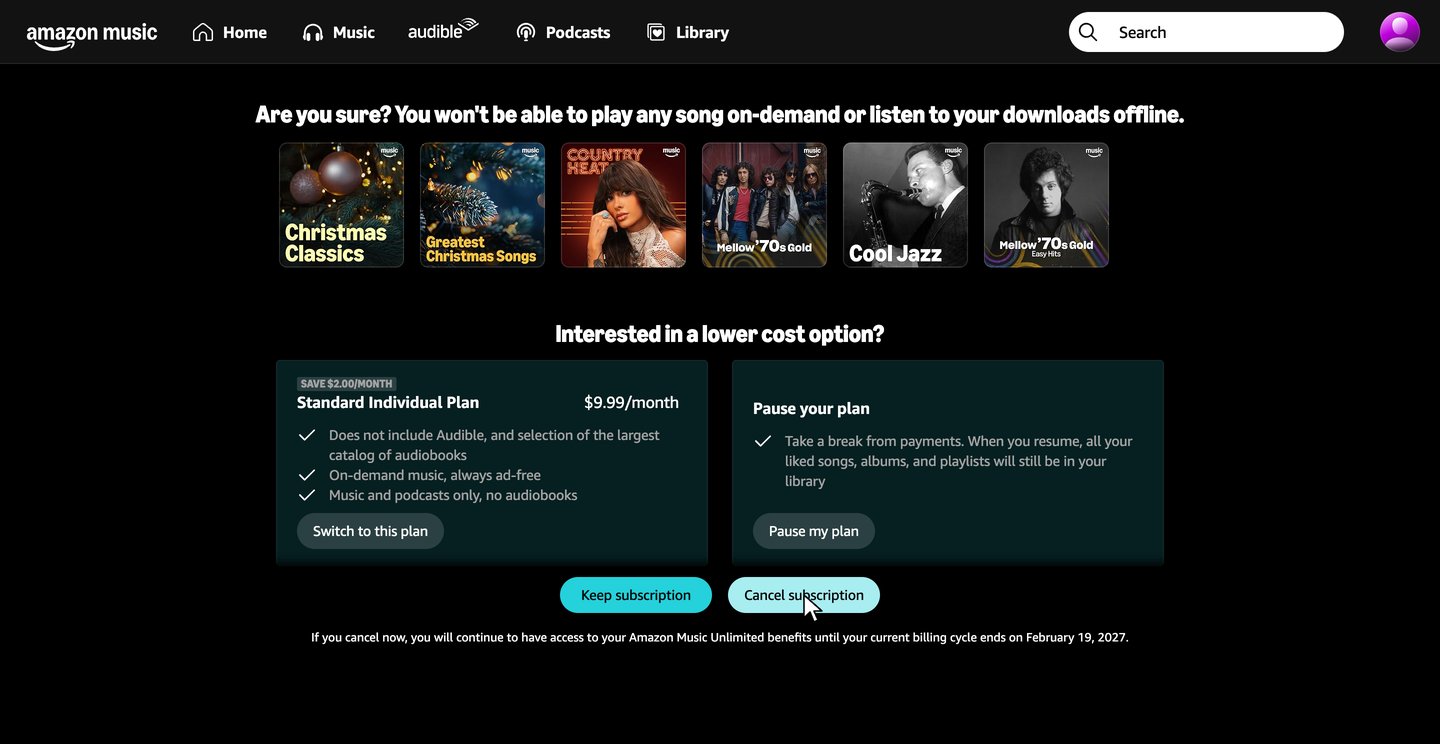
The part people miss is the second screen. After Cancel subscription, Amazon asks Are you sure? and offers the Standard plan or a pause, and you're canceled only when you click Cancel subscription there. Your Amazon Music Settings then shows the date your plan ends.
The 5 steps further down show the online route screen by screen. If you'd rather not click through it, text zuzu and it's handled.
Amazon Music cancellation policy 2026: can you cancel Amazon Music anytime?
Yes, if Amazon bills you, you can cancel Amazon Music Unlimited at any time. The rules that decide what you pay, from the no-refund rule to the offers to stay.
Cancel before your renewal date
Amazon's Music terms say a paid fee usually isn't refunded, even if you didn't use it. You get a refund if you withdraw within 14 days of signing up in the EU, the UK or Brazil, and a prorated one if Amazon discontinues your plan.
You keep listening until your plan ends
After you cancel, Amazon Music Unlimited stays on until your current billing cycle ends.
A paused plan comes back on its own
An eligible monthly plan can be paused and resumes on its own. Amazon's help says annual plans and Apple, Google Play or carrier plans can't.
Your monthly audiobook goes too
Individual and Family plan holders lose the audiobook they picked when the current billing cycle ends.
Cancel where you subscribed
If you signed up through the App Store, Google Play or a mobile carrier, cancel with them, and their refund rules apply.
Say no to the Standard plan and the pause
After Cancel subscription, Amazon offers the Standard plan or a pause. You're canceled once you click Cancel subscription on that screen.
Text zuzu and skip 5 manual steps
zuzu is an assistant you text. It signs in, says no to both offers and cancels for you.
- 1You text: "Hey, cancel my Amazon music subscription."
Use your own words. There's no form to fill in.
- 2zuzu texts you when it's done, with your end date
zuzu goes through the same screens and says no to both offers. You can check the end date in Your Amazon Music Settings afterward.
The old way: cancel Amazon Music step by step
Prefer to do it yourself? You need your Amazon login. Each step shows the screen you'll see.
This is the route Amazon expects you to take if Amazon bills you, and it took 43 s in the recording. One screen asks you to reconsider, so it helps to know what's coming. Open More detail under any step for the full explanation.
Watch the full cancellation by hand · 0:43
The 5 steps · 43 s
-
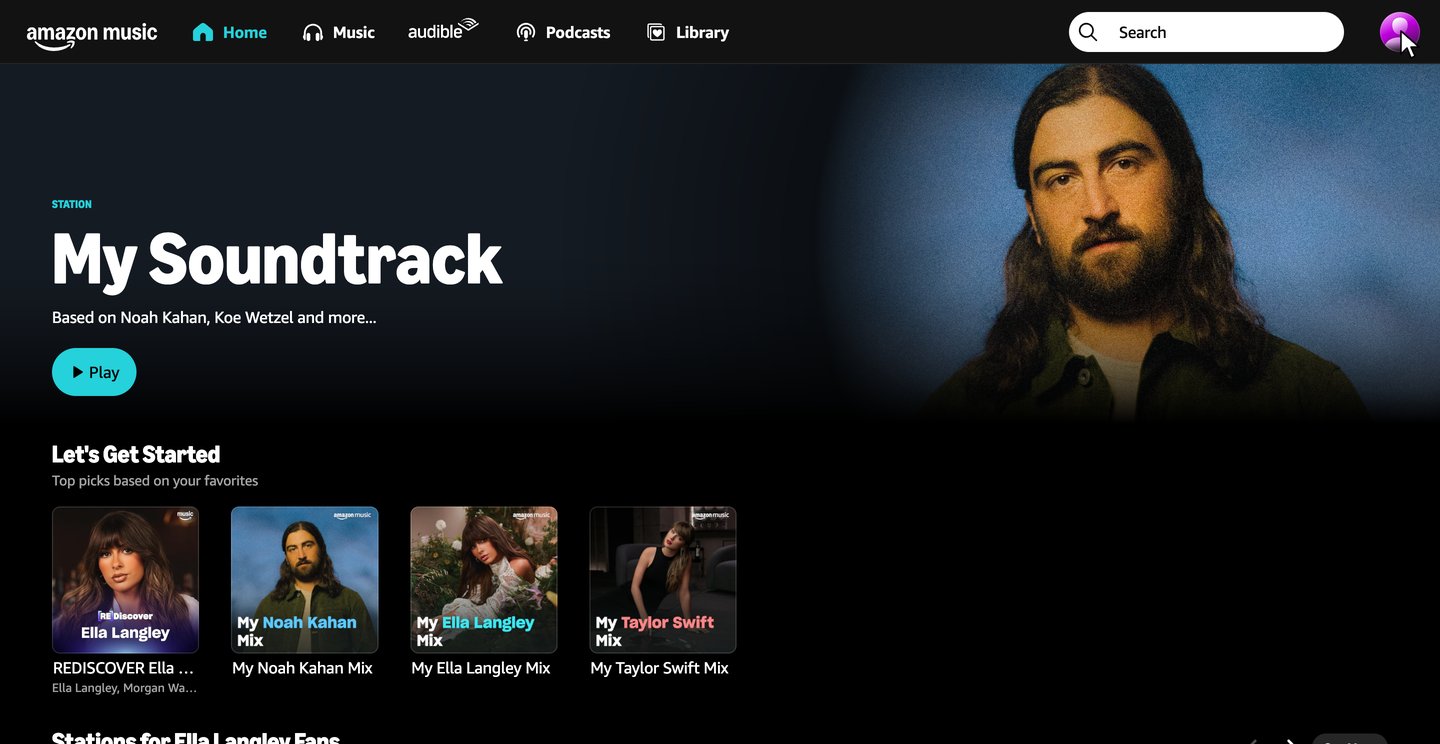
Open your profile menu
Go to music.amazon.com and sign in if it asks. Click your profile picture in the top right.
Watch this step · 0:02More detail on this step
amazon.com/music/settings opens the same settings page directly.
-
Click Your Amazon Music Settings
The menu opens under your profile picture. Select Your Amazon Music Settings.
Watch this step · 0:04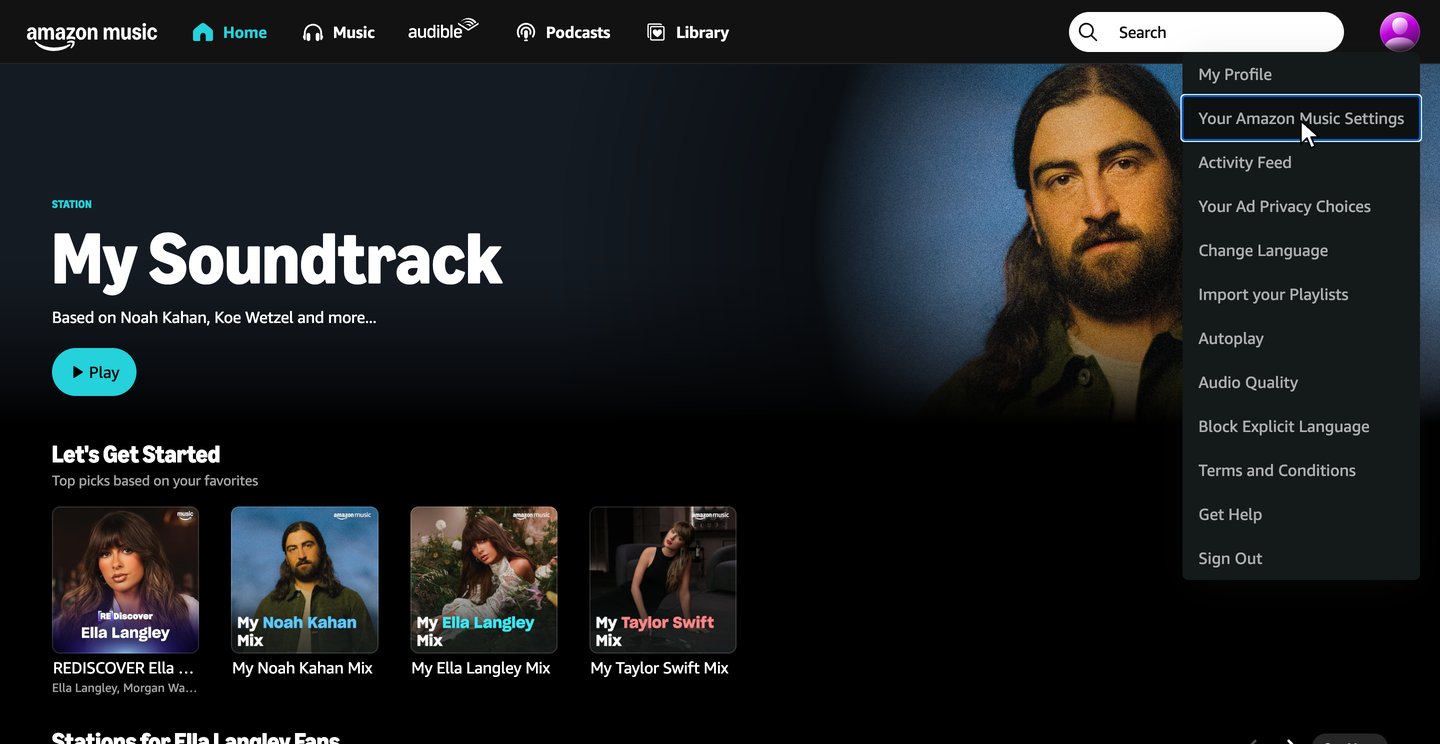
Tired already? zuzu does all 5 steps for you.
-
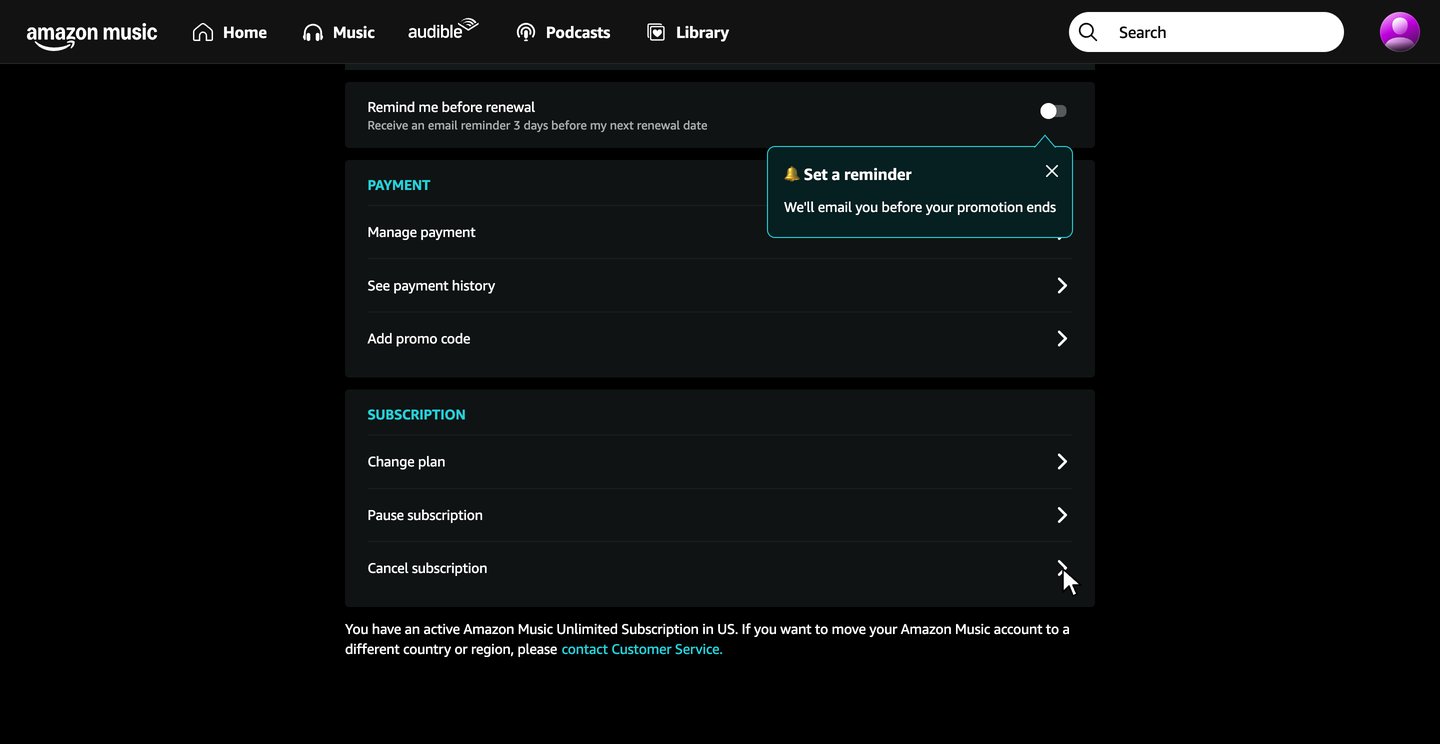
Click Cancel subscription
Your plan shows at the top, with its price and renewal date. Scroll down to Subscription and click Cancel subscription.
If Apple, Google Play or your carrier bills you, cancel with them instead.
Watch this step · 0:14More detail on this step
Pause subscription sits just above it. A paused plan resumes on its own, so it doesn't end your subscription.
-
Click Cancel subscription again
Offer to stayThis is the click that cancelsAmazon offers the Standard plan or a pause and shows the date your access would end. Click Cancel subscription.
zuzu says no to both offers for you Watch this step · 0:19More detail on this step
Cancel subscription is the button that stops the renewal. Switch to this plan keeps a paid Standard plan, for music and podcasts only, and Pause my plan stops payments from the end of your billing cycle until the plan resumes on its own.
-
Check your end date
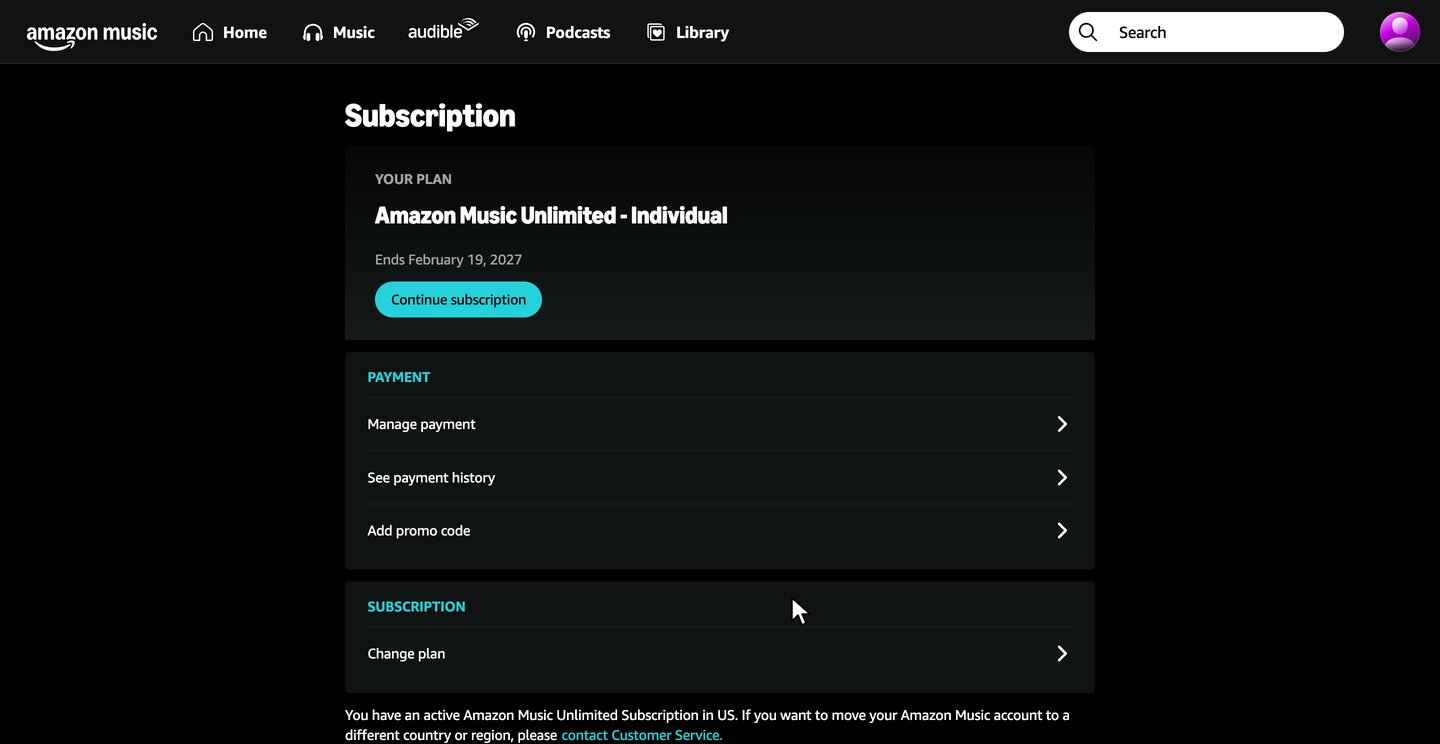
DoneYour plan now says Ends and the date. Take a screenshot in case you need proof later.
Watch this step · 0:33More detail on this step
Amazon briefly shows a notice that your subscription will be canceled at the end of the billing cycle, then takes you back to your settings, with no separate confirmation screen. A Continue subscription button shows under the end date, and the Subscription section keeps only Change plan.
After you cancel your Amazon Music subscription
You keep listening until your end date
Your Amazon Music Settings shows the date right after you cancel. In the recording, the free trial was canceled on Nov 19 and access runs until Feb 19, 2027, the date it would have renewed.
Your plan shows Ends and a date
That's normal. Your Amazon Music Settings shows Ends and your end date, with a Continue subscription button under it.
Your library grays out
When the plan ends, the app grays out the Amazon Music Unlimited songs and podcasts in your Library and removes the Playback option.
Keep a screenshot of Your Amazon Music Settings with your end date until that date has passed. After it, check your bank or card statement once to make sure no new charge shows up. If one does, check whether Apple, Google Play or your carrier bills you for Amazon Music.
How to cancel an Amazon Music free trial
If Amazon bills your trial, cancel it the same way as a paid plan, in Your Amazon Music Settings, before the trial ends. Amazon's Music terms say some trials turn into a paid plan unless you cancel before the trial ends.
Canceling a trial doesn't end it at once. In the recording, the plan was a free trial, and after the cancel it stayed on until its renewal date.
If Apple or Google Play bills the trial, cancel it with them, the same way as a paid plan in the FAQ below. Apple says to cancel a trial at least 24 hours before it ends.
How to cancel an Alexa music subscription
If you signed up through Amazon, say "Alexa, cancel my Amazon Music Unlimited subscription." to your Amazon Echo or Alexa-enabled device. On Amazon Music Standard, say "Alexa, cancel my Amazon Music Standard subscription."
Amazon gives the Alexa request for plans you signed up for through Amazon. If Apple, Google Play or a mobile carrier bills you, cancel with them.
How to cancel Amazon Prime Music
Amazon Music Prime comes with Amazon Prime, Prime Student and their free trials at no additional cost, so there's no separate Prime Music subscription to cancel. Amazon's pages give no way to cancel it on its own.
If you pay for Amazon Music Unlimited on top of Prime, cancel Unlimited in Your Amazon Music Settings with the steps above. To stop paying for Prime itself, see how to cancel Amazon Prime.
Amazon Music cancellation FAQ
Common questions about canceling Amazon Music. Sources checked Nov 19, 2026.
How do I cancel my Amazon Music subscription?
Click your profile picture on music.amazon.com, then Your Amazon Music Settings and Cancel subscription. Amazon then offers the Standard plan or a pause: click Cancel subscription again. You can also ask Alexa or contact Amazon customer service, or cancel with Apple, Google Play or your carrier if they bill you.
How do I cancel Amazon Music on my iPhone or Android phone?
If you subscribed in the Amazon Music app on your iPhone, Apple bills you: open Settings, tap your name, tap Subscriptions, tap Amazon Music and tap Cancel Subscription. If Google Play bills you, go to your subscriptions in Google Play, select Amazon Music, tap Cancel subscription and follow the steps. Uninstalling the app doesn't cancel it. If Amazon bills you, open amazon.com/music/settings in your phone's browser. In the recording's phone-size check, it opened the same settings page as on a computer.
Why won't Amazon let me cancel my music subscription?
Usually because Apple, Google Play or a mobile carrier bills you, and Amazon can't cancel a plan bought through Apple. Cancel with whoever bills you.
Can I cancel Amazon Music and get a refund?
Usually not. Amazon's Music terms say a paid Amazon Music Unlimited fee isn't refunded, even if you didn't use it. The exceptions are withdrawing within 14 days of signing up in the EU, the UK or Brazil, a prorated refund if Amazon discontinues your plan, and plans billed by Apple, Google Play or a carrier, which follow their own refund rules.
How do I cancel an Amazon Music Family plan?
The account holder manages the Family plan, so the account holder cancels it in Your Amazon Music Settings. A family member who only wants to leave can remove themselves from the plan.
Can I cancel Amazon Music through customer service?
Yes, if you signed up through Amazon. Amazon's Music terms list contacting Amazon customer service as a way to cancel. Its Help & Contact Us page asks you to sign in first.
Can an app or service cancel Amazon Music for me?
zuzu can. Text zuzu that you want to cancel Amazon Music, and it goes through the same steps, says no to both offers and texts you when it's done, with your end date.
The ways to cancel, billing, free trials, Alexa and what happens after come from Amazon's help on canceling Amazon Music Unlimited, canceling Amazon Music Standard, Amazon Music for Prime members, the Unlimited audiobook, grayed out music, the Family plan and contacting Amazon, its Amazon Music FAQ and its Amazon Music Terms of Use, with Apple's help on canceling a subscription and Google's on Google Play subscriptions. The rest comes from the recorded cancellation on Nov 19, 2026.
How this guide was made

Researched, written and tested by Harsh at zuzu.
- Recorded click by click on music.amazon.com on Nov 19, 2026, canceling a free trial of Amazon Music Unlimited Individual.
- Billing, refund, trial, Alexa and Apple rules come from Amazon's help pages and Amazon Music Terms of Use and from Apple's and Google Play's help, checked on Nov 19, 2026.
Cancel more subscriptions you don't use and save money
Each guide follows one real cancellation on the company's own website, with every click recorded.
 Cancel Amazon Prime
6 steps · 45 s on the website
 Cancel Audible
5 steps · 48 s on the website
 Cancel ChatGPT
6 steps · 33 s on the website
 Cancel DashPass
6 steps · 47 s on the website
 Cancel Fubo
7 steps · 1 min 1 s on the website
 Cancel Netflix
5 steps · 44 s on the website
 Cancel Paramount+
5 steps · 27 s on the website
 Cancel Peacock
4 steps · 20 s on the website
Cancel your Amazon Music subscription easily and start saving today
Text zuzu and it's handled.