 Last updated Nov 21, 2026
How to cancel NFL Plus
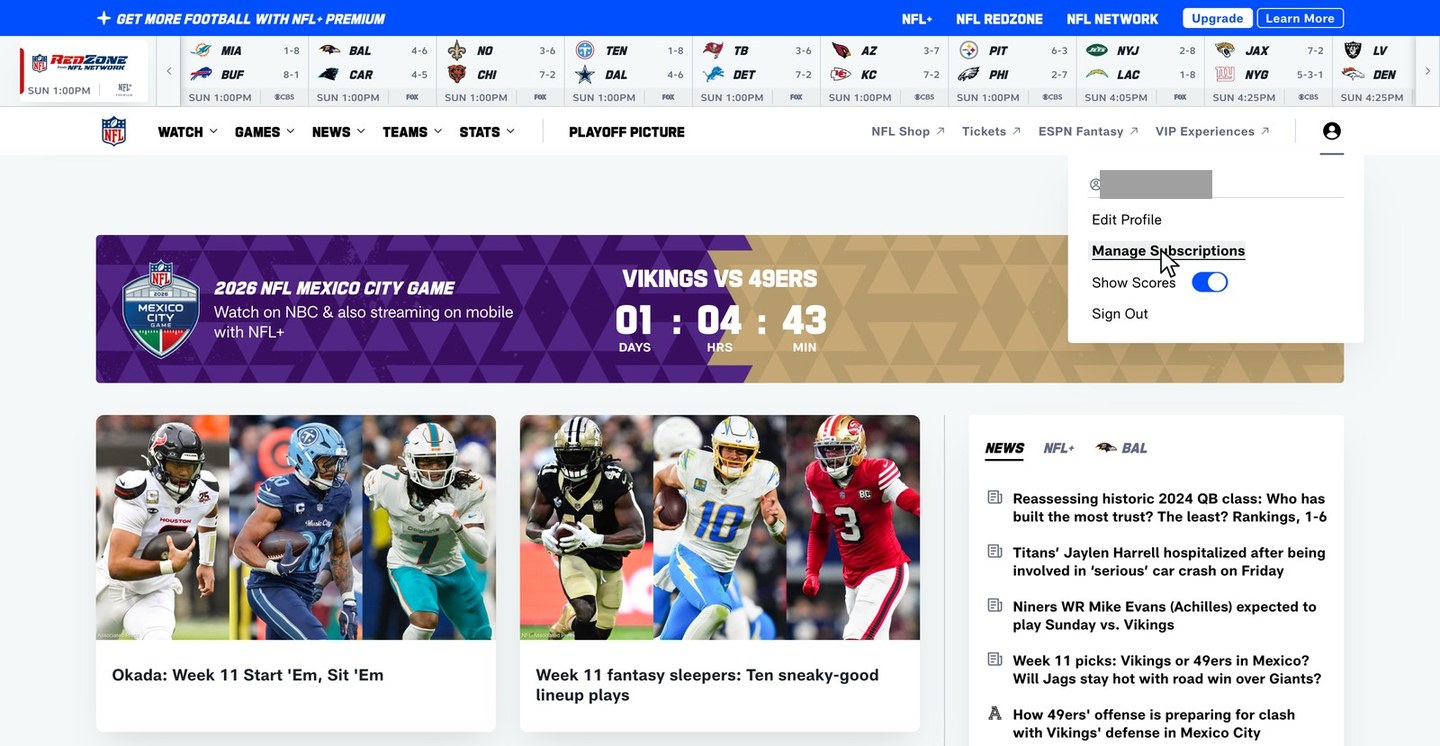
If you signed up on NFL.com, point at your profile icon there, click Manage Subscriptions, then Cancel on your plan and Cancel again: 4 steps, 50 s.
Watch zuzu cancel an NFL+ subscription
6 ways to cancel your NFL+ subscription
NFL's help pages say where you cancel depends on where you signed up: on NFL.com, or with the app store that bills you, which NFL names as Apple, Google Play, Roku and Amazon. Texting zuzu is a 6th: zuzu does the online route for you.
Can you cancel your NFL+ subscription online?
Yes, you can cancel your NFL+ subscription online, whether you have NFL+ or NFL+ Premium. If you signed up on NFL.com, sign in there and open Manage Subscriptions from the menu under your profile icon. Click Cancel on your current plan, then Cancel again in the box that asks you to confirm.
The recorded cancellation on Nov 21, 2026 took 4 steps and 50 s. If Apple, Google Play, Roku or Amazon bills you, cancel with that store instead, because NFL says an app store subscription is canceled under the store's own terms.
Before you start, have your NFL.com login ready, and check where you signed up, because NFL says that decides where you cancel. If you're not sure whether Apple bills you, Apple suggests searching your email for "receipt from Apple".
Timing matters more than speed. NFL+ renews on its own until you cancel, so cancel before the renewal date shown on Manage Subscriptions to avoid the next charge. If the App Store bills you, cancel at least 24 hours before that date, because Apple says it can charge a renewal up to 24 hours before the new period starts. Whenever you cancel, you keep access through the end of the billing period you're in, and that period isn't refunded. If you signed up with NFL for a yearly subscription, NFL notifies you at least 30 days before it renews.
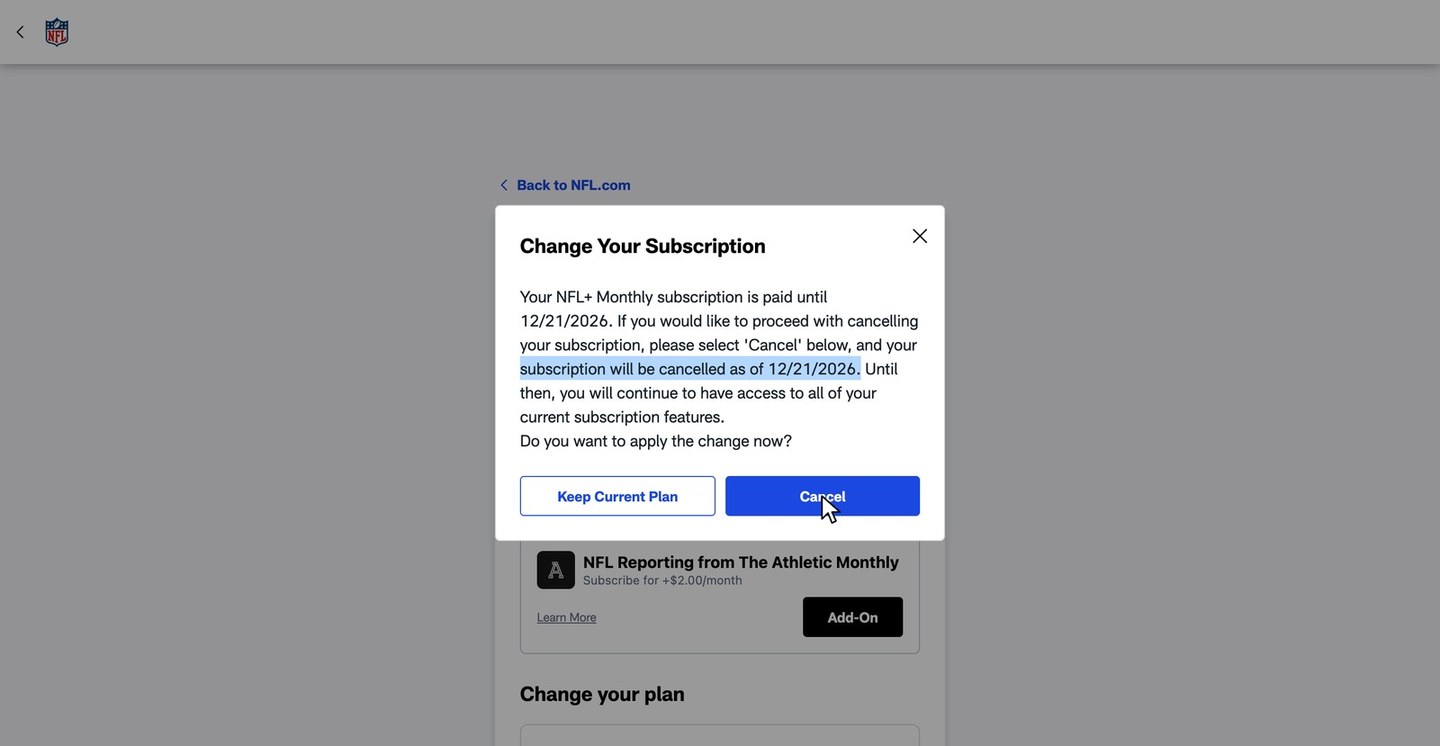
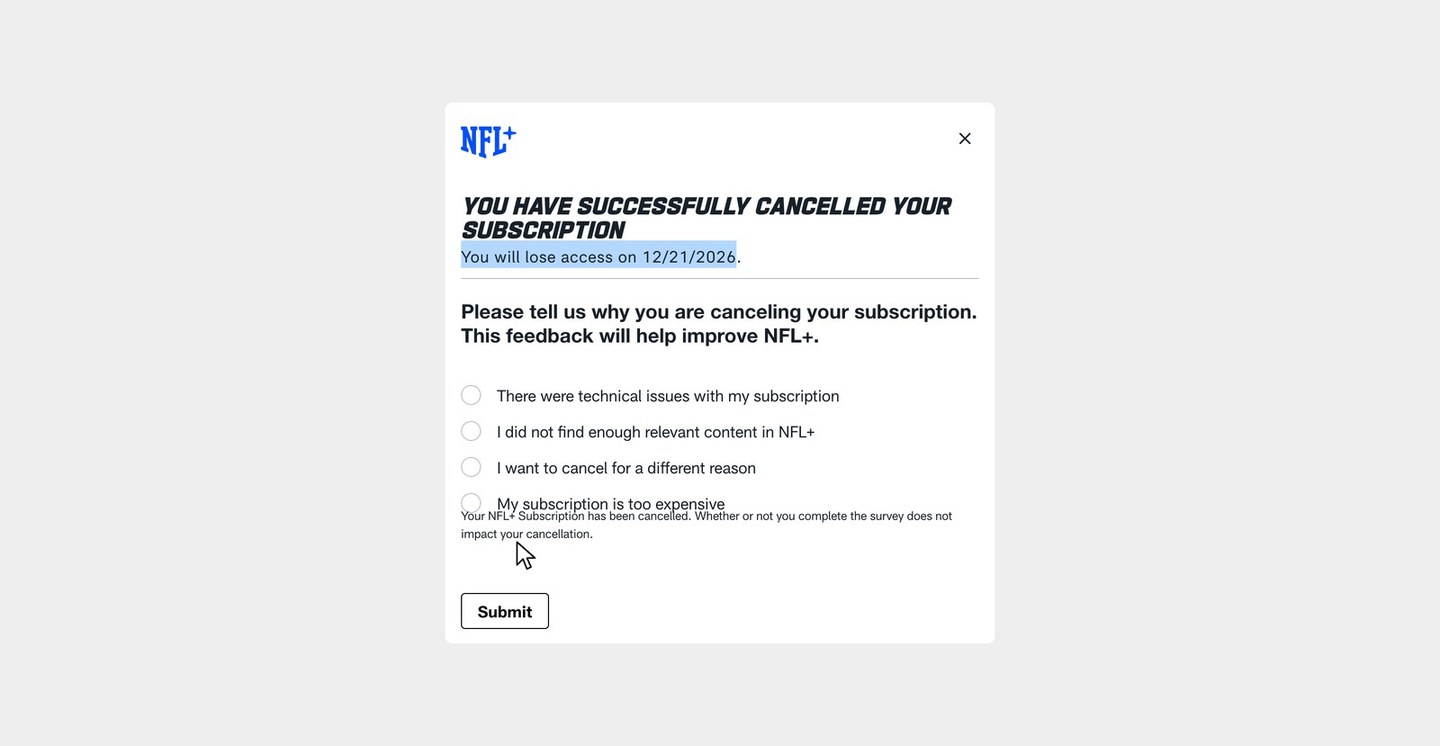
The part people miss is the second Cancel. The first one, on your plan, only opens a box that says your subscription will be canceled as of your renewal date and asks "Do you want to apply the change now?", and your subscription is canceled only when you click Cancel there. NFL then says "You have successfully cancelled your subscription", shows the date you lose access and asks why you're canceling. Answering is optional: NFL says the survey doesn't affect your cancellation.
The 4 steps further down show the online route screen by screen. If you'd rather not click through it, text zuzu and it cancels for you.
NFL+ cancellation policy 2026: what to know before you cancel
The rules that decide what you pay, from the renewal deadline to the full fee after a free period.
Cancel before your renewal date
NFL+ and NFL+ Premium renew until you cancel. Cancel before the renewal date on Manage Subscriptions to skip the next charge. If the App Store bills you, cancel at least 24 hours before that date, because Apple says it can charge a renewal up to 24 hours before the new period starts.
Access lasts to the end of your billing period
Canceling stops the recurring charges. You keep access through the end of the billing period you've already paid for.
The period you're in isn't refunded
NFL's terms make payments nonrefundable, with no credit for a partly used period. NFL may refund duplicate purchases made with more than one login, or a serious, ongoing technical problem.
A free or discounted period moves to the full fee
When a free period, discount or promotional offer ends, NFL charges the full fee right away unless you've canceled.

Text zuzu and skip 4 manual steps
zuzu is an assistant you text. It signs in and cancels for you.
- 1You text: "Hey zuzu, cancel my NFL+ subscription."
Use your own words. Text before your renewal date to skip the next charge.
- 2zuzu texts you when it's done, with your end date
zuzu goes through the same screens on NFL.com. You can check your subscription on Manage Subscriptions afterward.
The old way: cancel NFL+ step by step
Prefer to do it yourself? You need your NFL.com login. Each step shows the screen you'll see.
This is the route NFL expects you to take if you signed up on NFL.com, and it took 50 s in the recording. Open More detail under any step for the full explanation.
Watch the full cancellation by hand · 0:50
The 4 steps · 50 s
-
Click Manage Subscriptions
Sign in at NFL.com, point at your profile icon at the top right and click Manage Subscriptions in its menu.
Watch this step · 0:02More detail on this step
These steps are for a subscription you signed up for on NFL.com. If Apple, Google Play, Roku or Amazon bills you, NFL says to cancel under that store's terms instead.
-
Click Cancel on your plan
The Manage Your Subscriptions page shows your current plan and the date it renews. Click Cancel on that plan.
Watch this step · 0:09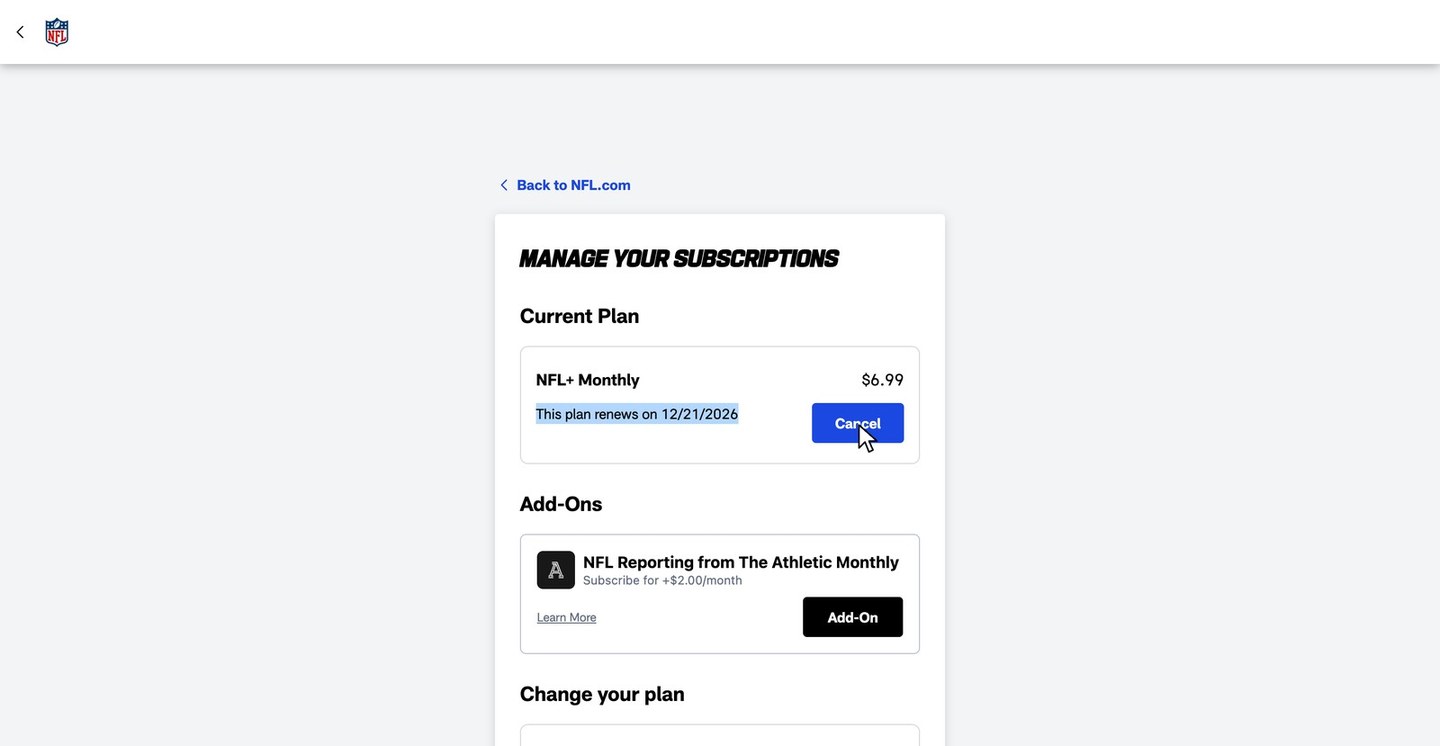
Tired already? zuzu does all 4 steps for you.
-
Click Cancel again
This is the click that cancelsNFL says your subscription will be canceled as of your renewal date and asks "Do you want to apply the change now?" Click Cancel.
Watch this step · 0:20More detail on this step
Until that date, you keep everything your plan includes. To keep your subscription instead, click Keep Current Plan, which closes the box.
-
Check the date you lose access
DoneNFL says "You have successfully cancelled your subscription" and shows the date you lose access. Take a screenshot in case you need proof later.
Watch this step · 0:41More detail on this step
Under it, NFL asks why you're canceling. Picking a reason and clicking Submit is optional, because NFL says the survey doesn't affect your cancellation.
After you cancel your NFL+ subscription
You keep NFL+ until your end date
Note the renewal date on Manage Subscriptions before you cancel. Your access runs until then, the end of the billing period you paid for, and NFL+ doesn't renew. Once you cancel, NFL shows that date again as the day you lose access. In the recording, a monthly NFL+ subscription was canceled on Nov 21, 2026 and access runs until Dec 21, 2026, the day it was due to renew.
You see a survey from NFL
That's normal. It opens once your subscription is canceled, and NFL says your cancellation stands whether or not you answer it.
Changed your mind?
Sign up again at NFL.com/plus or in the NFL app, which NFL names as the places to sign up or manage your subscription. A new subscription renews on its own until you cancel it.
Keep a screenshot of the screen that shows the day you lose access until that date has passed. After it, check your bank or card statement once to make sure no new charge shows up. If one does, check your account first: NFL's help says your payment history is under Payments in Manage Subscriptions on NFL.com, and if an app store bills you, check your account with that store. If you didn't make the charge, call your card issuer first, at the number on the back of your card. If the charge is yours, ask NFL's customer support team for a refund through the web form on its support site, or ask the app store that bills you if you subscribed through one.
How to cancel NFL Plus on Roku
Turn off auto-renew in your Roku account, if Roku bills you. On the Roku website, go to my.roku.com/subscriptions, then Payments & subscriptions and My subscriptions, select the NFL+ subscription and choose Turn off auto-renew. Roku says that cancels the subscription, and you keep access until your current billing cycle ends.
On a Roku device or Roku TV, press Home on your Roku remote, highlight the app you subscribed through, press the Star button and select Manage subscription, then Turn off auto-renew. If you've set a Roku PIN for subscriptions and purchases, enter it to confirm. You can't cancel inside the Roku App, and Roku sends you to its website instead.
Roku says Manage subscription isn't available from Quick Access, so if you started there, scroll to the Apps section, select the app and press Star. If Manage subscription still doesn't appear, NFL's help says Roku isn't managing your subscription, so cancel on NFL.com or with the app store that does bill you. A refund for a Roku purchase is requested from Roku, under its refund policy.
NFL+ cancellation FAQ
Common questions about canceling NFL+. Sources checked Nov 21, 2026.
How do I cancel my NFL+ subscription?
On NFL.com, if you signed up there: sign in, point at your profile icon at the top right and click Manage Subscriptions. Click Cancel on your plan, then Cancel again when NFL asks "Do you want to apply the change now?", and NFL confirms it with the date you lose access. If you subscribed through Apple, Google Play, Roku or Amazon, cancel with that store under its own terms.
Can you cancel NFL Plus anytime?
Yes, at any point in your billing period. NFL says that if you cancel with time left in the period, you keep access through its end and the recurring charges stop. The time you've already paid for isn't refunded, and a paused monthly subscription can be canceled during the pause too.
How do I cancel NFL Plus on Android or iPhone?
Through the app store that bills you. On an Android device, go to your subscriptions in Google Play, select NFL+, tap Cancel subscription and follow the instructions. On an iPhone or iPad, open Settings, tap your name, then Subscriptions, NFL+ and Cancel Subscription. Do it at least 24 hours before your renewal date, because Apple says it can charge a renewal up to 24 hours before the new period starts. Google says uninstalling an app doesn't cancel its subscription, and if you signed up on NFL.com, you cancel there instead.
How do I cancel NFL Plus through Amazon?
In your Amazon account. Amazon's help for Amazon Appstore subscriptions says to go to Your Account, select Your Apps under Digital content and devices, then Your Subscriptions under Manage, and turn off auto-renewal; access continues until the current period ends. NFL's help adds the route for a subscription bought with Subscribe and Discover on Fire TV or Fire Stick: Your Memberships and Subscriptions, then Manage Subscription next to NFL+ and the link under Advance Controls, where you end it.
Why can't I cancel NFL Plus?
Check where you signed up first. A subscription bought through Apple, Google Play, Roku or Amazon is canceled with that store, and one bought on NFL.com is canceled under Manage Subscriptions, in the menu that opens when you point at your profile icon. On an iPhone, Apple says a missing Cancel button or a red expiration message means it's already canceled, and Roku says you can't cancel inside the Roku App. NFL's Contact Us page lists the Submit a Request form, Live Chat in Messenger from 8 a.m. to 5 p.m. Pacific time on weekdays and on game days, email at support@nfl.com and phone support at 1-800-635-5300, which answers with a voice virtual assistant.
How do I cancel my NFL Plus subscription on NFL.com?
From Manage Subscriptions, if you signed up on NFL.com. It's in the menu under your profile icon, and the page it opens shows your current plan with the date it renews and a Cancel button. Click Cancel there, then Cancel again when NFL asks you to confirm. NFL also names NFL.com/plus as a place to manage your subscription.
How do I cancel an NFL Plus free trial?
The same way as a paid subscription, before the free period ends. NFL's terms say a free period, discount or promotional offer moves to the full fee as soon as it ends unless you cancel, on NFL.com or with the app store that bills you. Apple says to cancel a trial at least 24 hours before it ends, and the DraftKings offer of one month of NFL+ Premium renews each month at the then-current price until you cancel.
What is the NFL Plus cancellation policy?
Cancel before the next renewal, and you keep access until the current period ends. NFL's Subscription Terms, updated September 4, 2026, say a cancellation takes effect at the end of your current period and stops the recurring charge, but the current period isn't refunded. An app store subscription follows that store's terms for billing, renewal and canceling. If the App Store bills you, cancel at least 24 hours before your renewal date, because Apple says it can charge a renewal up to 24 hours before the new period starts.
How do I cancel NFL Plus Premium?
The same way as NFL+. NFL's help says an NFL+ or NFL+ Premium subscription renews until you cancel and gives one cancel route for both: Manage Subscriptions on NFL.com, or the app store that bills you. To keep NFL+ and drop only Premium, downgrade instead by choosing the lower plan in the Change your plan section of Manage Subscriptions. The lower plan starts when your current cycle ends.
Can I get a refund if I cancel NFL Plus?
Not for the time you've already paid for. NFL's terms say payments are nonrefundable, with no refund or credit for a partly used period, though NFL may choose to give one. Its refund policy names two cases where it may: duplicate purchases made with more than one login, or serious and ongoing technical difficulties. For a purchase on the web, ask NFL's customer support team through the web form on its support site, and for an in-app purchase, ask the app store under its refund policy.
Where do I cancel my NFL Plus subscription?
Where you signed up. On NFL.com that's Manage Subscriptions in your account, shown in the 4 steps above, and through Apple, Google Play, Roku or Amazon it's your account with that store. Either way, you keep access until the end of your billing period and aren't charged again.
Can an app or service cancel NFL+ for me?
zuzu can. Text zuzu that you want to cancel NFL+. It goes through the same steps on NFL.com and texts you when it's done, with your end date. Text it before your renewal date to stop the next charge.
The ways to cancel or contact NFL and the rules on renewal, refunds, pausing, plan changes and free periods come from NFL's help articles on canceling NFL+, canceling through an app store, when a subscription expires, auto-renewal, pausing, refunds, requesting a refund, plans and prices, signing up, checking your plan and payments, yearly renewals, downgrading, the DraftKings offer and contacting NFL Support, from its Subscription Terms, from Apple's Media Services Terms, and from the help pages of Apple on canceling a subscription and trials and carrier billing, Google Play, Roku and the Amazon Appstore. The card issuer advice comes from the FTC's what to do if you were scammed. The rest comes from the recorded cancellation on Nov 21, 2026.
How this guide was made

Written by Harsh Bhati
- Recorded click by click on NFL.com on Nov 21, 2026, canceling a paid monthly NFL+ subscription.
- The ways to cancel and the renewal, refund, pause and plan rules come from NFL's help articles and Subscription Terms, and from the Apple, Google Play, Roku and Amazon help pages, checked on Nov 21, 2026.
Cancel more subscriptions you don't use and save money
Each guide follows one real cancellation on the company's own website, with every click recorded.
 Cancel Paramount+
5 steps · 27 s on the website
 Cancel Peacock
4 steps · 20 s on the website
 Cancel Planet Fitness
10 steps · 2 min 13 s on the website
 Cancel Tinder Gold
7 steps · 49 s on the website
 Cancel Uber One
8 steps · 45 s on the website
 Cancel Walmart+
8 steps · 1 min 17 s on the website
 Cancel YouTube Premium
7 steps · 44 s on the website
 Cancel Amazon Music
5 steps · 43 s on the website
Cancel your NFL+ subscription easily and start saving today
Text zuzu and it's handled.