 Last updated Nov 20, 2026
How to cancel Walmart Plus
Once you're signed in at walmart.com, open Account, then Walmart+ and Manage membership, and click Manage, Cancel and Confirm cancellation: 8 steps, 1 min 17 s.
Watch zuzu cancel a Walmart+ membership
4 ways to cancel your Walmart+ membership
The Walmart+ terms list 3 ways to cancel. Texting zuzu is a 4th: zuzu does the online route for you.
Online
In your Walmart account on walmart.com, if Walmart bills you. You need your login.
1 min 17 s, 8 steps See howBy phone
With Walmart Customer Care at (800) 924-9206, if Walmart bills you.
Walmart Customer Care See howSam's Club
In your Sam's Club account on samsclub.com, if you have Walmart+ with Sam's Club Plus.
Your Sam's Club account See howCan you cancel your Walmart Plus membership online?
Yes, you can cancel your Walmart+ membership online, whether you call it Walmart Plus, your Walmart membership or your subscription. On walmart.com, sign in and open Account, then Walmart+ and Manage membership. Click Manage beside your Walmart+ plan, then Cancel beside Cancel membership, and pick Confirm cancellation.
The recorded cancellation on Nov 20, 2026 took 8 steps and 1 min 17 s. You can also cancel by calling Walmart Customer Care at (800) 924-9206, and Walmart+ with Sam's Club Plus cancels at samsclub.com too, under Account and Manage Membership: click Cancel beside Cancel membership, then confirm the cancellation. Canceling that plan on walmart.com or at samsclub.com ends both its Walmart+ and Sam's Club Plus benefits on the expiration date.
Before you start, have your Walmart login ready, and sign in to the Walmart account that pays for Walmart+. Walmart's help says a membership that came through a partner such as Verizon or Tracfone has to be ended through that partner.
Timing matters more than speed. Walmart+ renews on its own each month or year, so cancel before your current term ends to stop the next charge. On a paid plan, you keep your benefits until that date. On a trial, Walmart may end them right away.
The part people miss is the last screen. After you click Cancel, Walmart shows what your benefits are worth and offers Pause membership for one month, next to Confirm cancellation and Keep membership. Walmart's terms limit the pause to paid members without Plus Up benefits, certain sponsored memberships or Walmart+ with Sam's Club Plus. On that screen, only Confirm cancellation ends the membership. Afterward, Manage membership shows Reactivate membership until your end date, which is normal.
The 8 steps further down show the online route screen by screen. If you'd rather not click through it, text zuzu and it's handled.
Walmart+ cancellation policy 2026: what to know before you cancel
The rules that decide what you pay, from the end of your term to the two offers on the last screen.
Cancel before your current term ends
Walmart+ renews on its own for another month or year until you cancel. Cancel before your term ends to skip the next charge.
You keep your benefits until your term ends
Canceling a paid plan only stops the next renewal. Walmart+ and any Plus Up keep working until the end of your current term.
Walmart+ fees aren't refunded
Walmart's billing help says it can't offer refunds on Walmart+. A paid member who switches to Walmart+ Student gets a prorated refund, Walmart's Student page says.
Canceling a trial can end it right away
You can cancel any time during a trial, but Walmart may end your benefits at once, and it doesn't refund the trial.
Say no to the savings pitch and the pause
Walmart shows what your benefits are worth, then offers Pause membership for one month, which its terms limit to paid members without Plus Up benefits, certain sponsored memberships or Walmart+ with Sam's Club Plus. You're canceled once you click Confirm cancellation.

Text zuzu and skip 8 manual steps
zuzu is an assistant you text. It signs in, says no to both offers and cancels for you.
- 1You text: "Hey zuzu, cancel my Walmart+ subscription."
Use your own words. There's no form to fill in.
- 2zuzu texts you when it's done, with your end date
zuzu goes through the same screens and says no to both offers. You can check Manage membership afterward, where Reactivate membership shows until your end date.
The old way: cancel Walmart+ step by step
Prefer to do it yourself? You need your Walmart login. Each step shows the screen you'll see.
This is the route Walmart expects members to take, and it took 1 min 17 s in the recording. One screen asks you to reconsider, so it helps to know what's coming. Open More detail under any step for the full explanation.
Watch the full cancellation by hand · 1:17
The 8 steps · 1 min 17 s
-
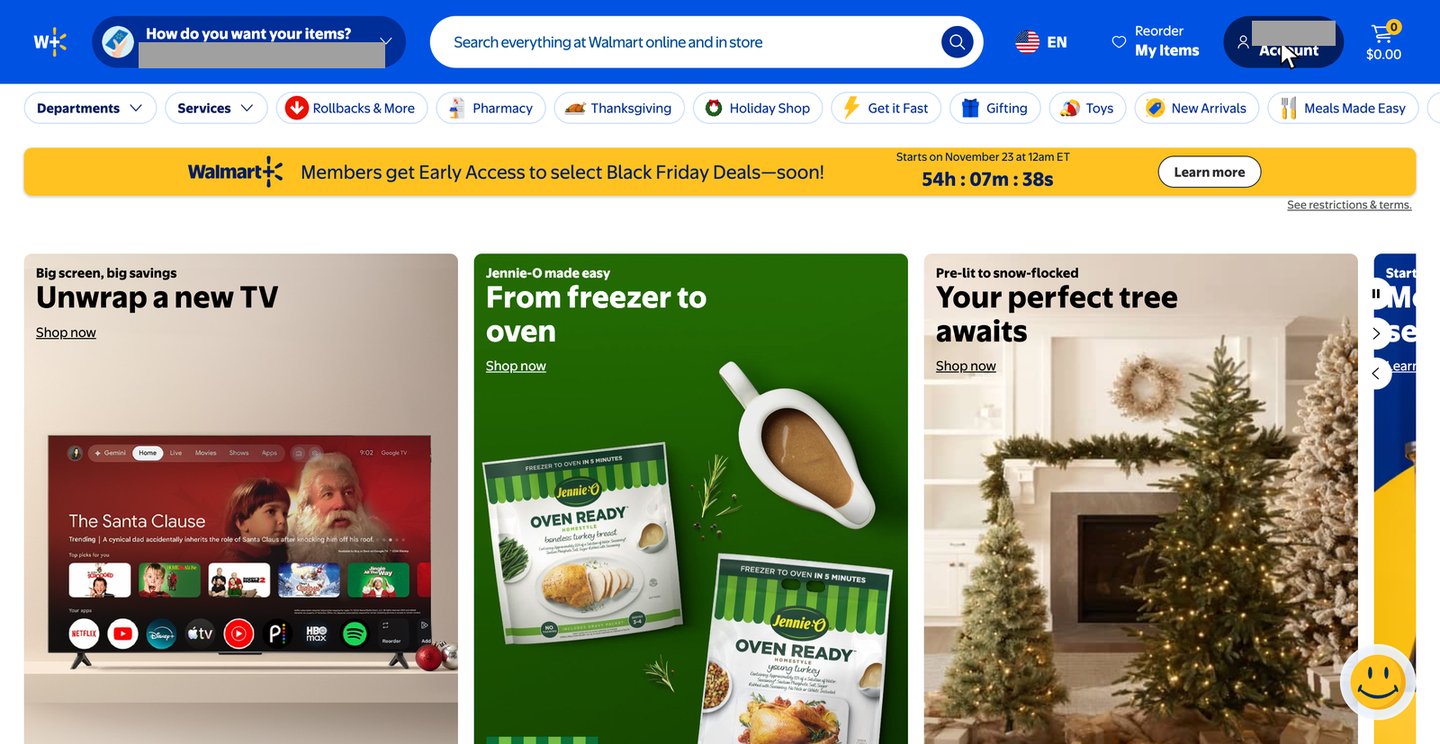
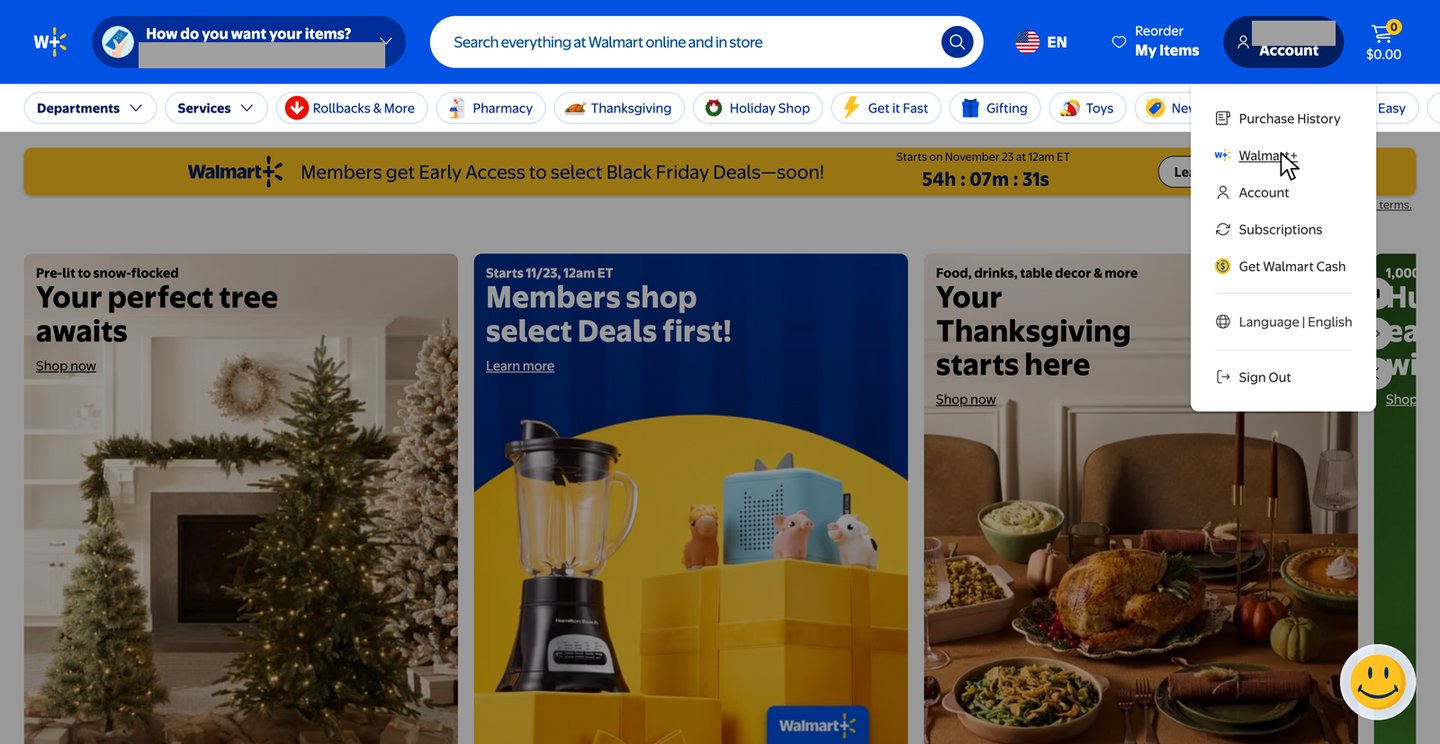
Open Account
Go to walmart.com, sign in and click Account at the top right.
Watch this step · 0:03More detail on this step
Sign in with the Walmart account that pays for Walmart+. If you have Walmart+ with Sam's Club Plus, you can also cancel it from your Sam's Club account.
-
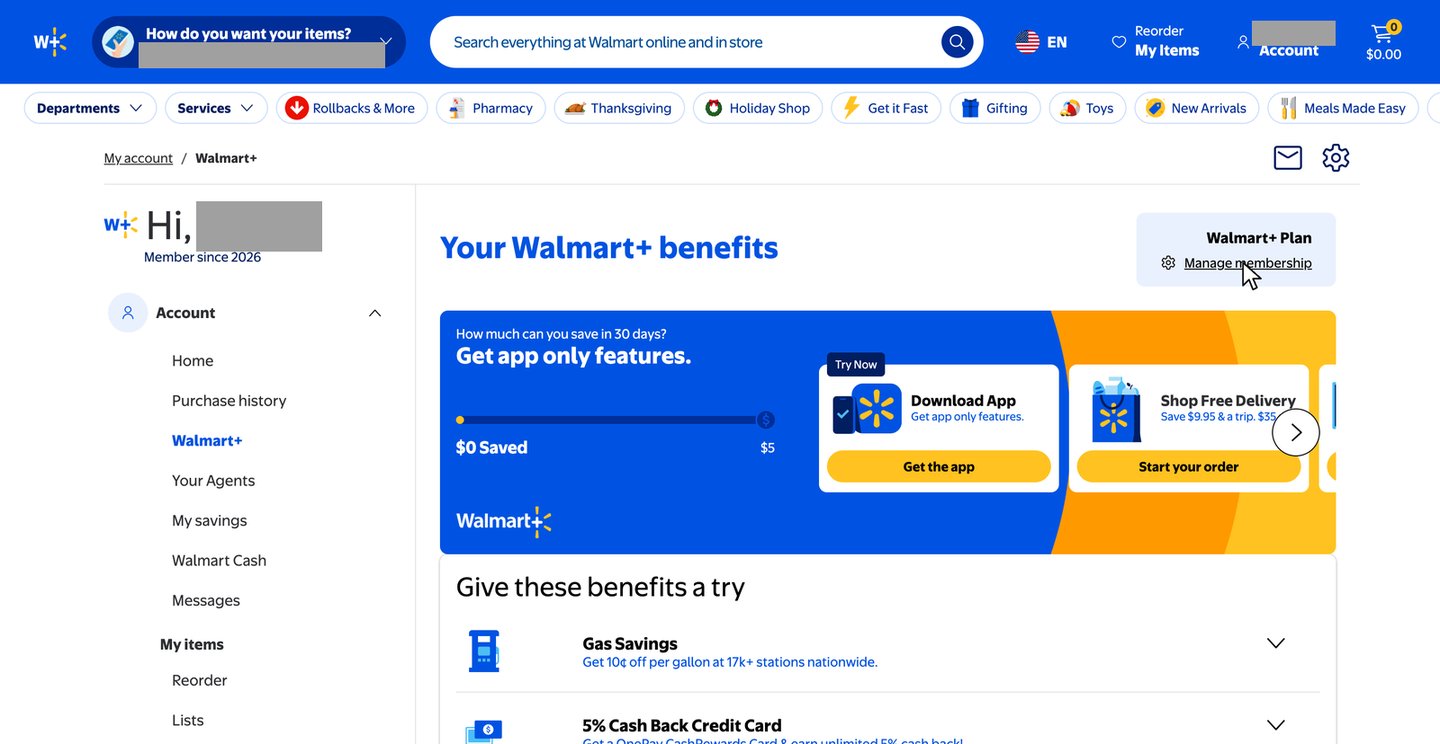
Click Manage membership
Your Walmart+ page opens. Click Manage membership at the top right.
Watch this step · 0:08More detail on this step
If a tip about Account Settings covers the link, click Close on it first.
-
Click Manage beside your plan
Under Your Membership, your Walmart+ plan shows its price and renewal date. Click Manage beside it.
Watch this step · 0:14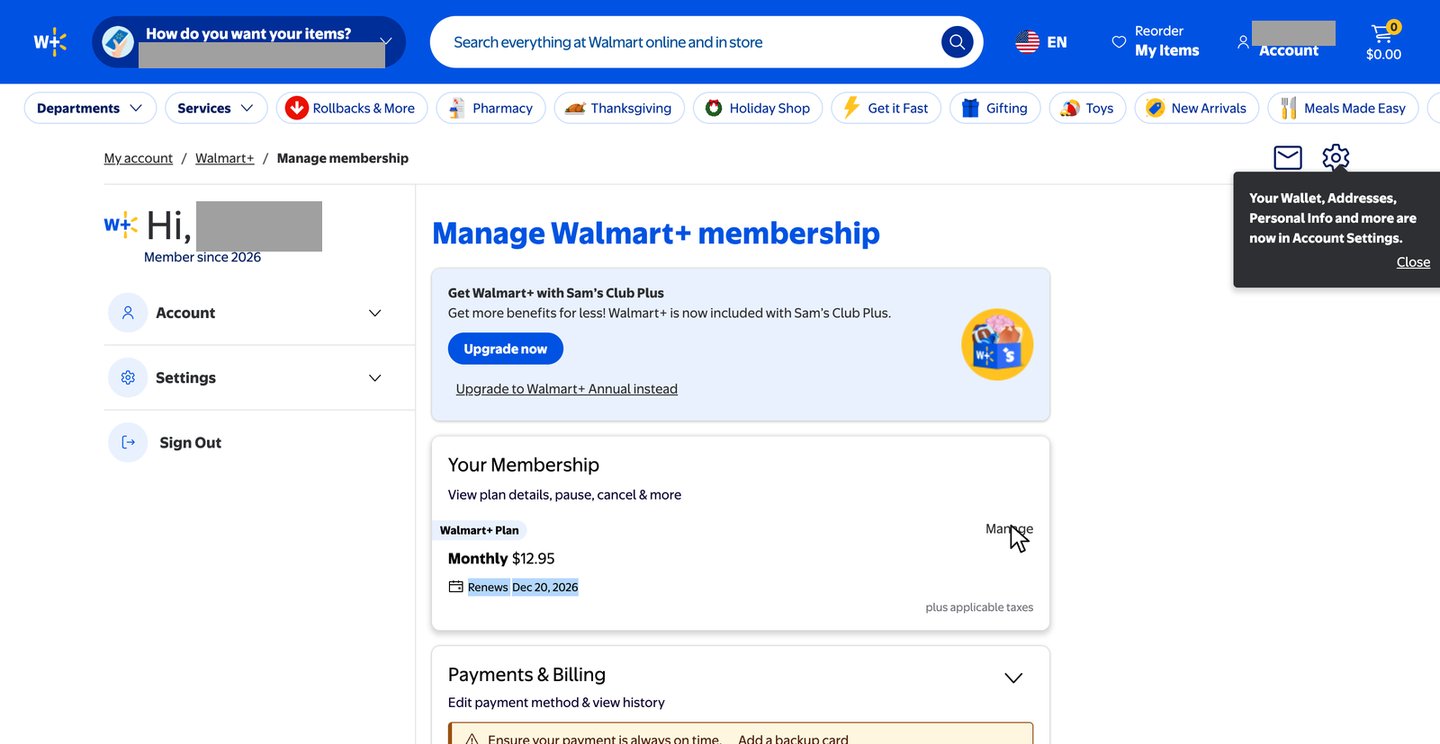
Tired already? zuzu does all 8 steps for you.
-
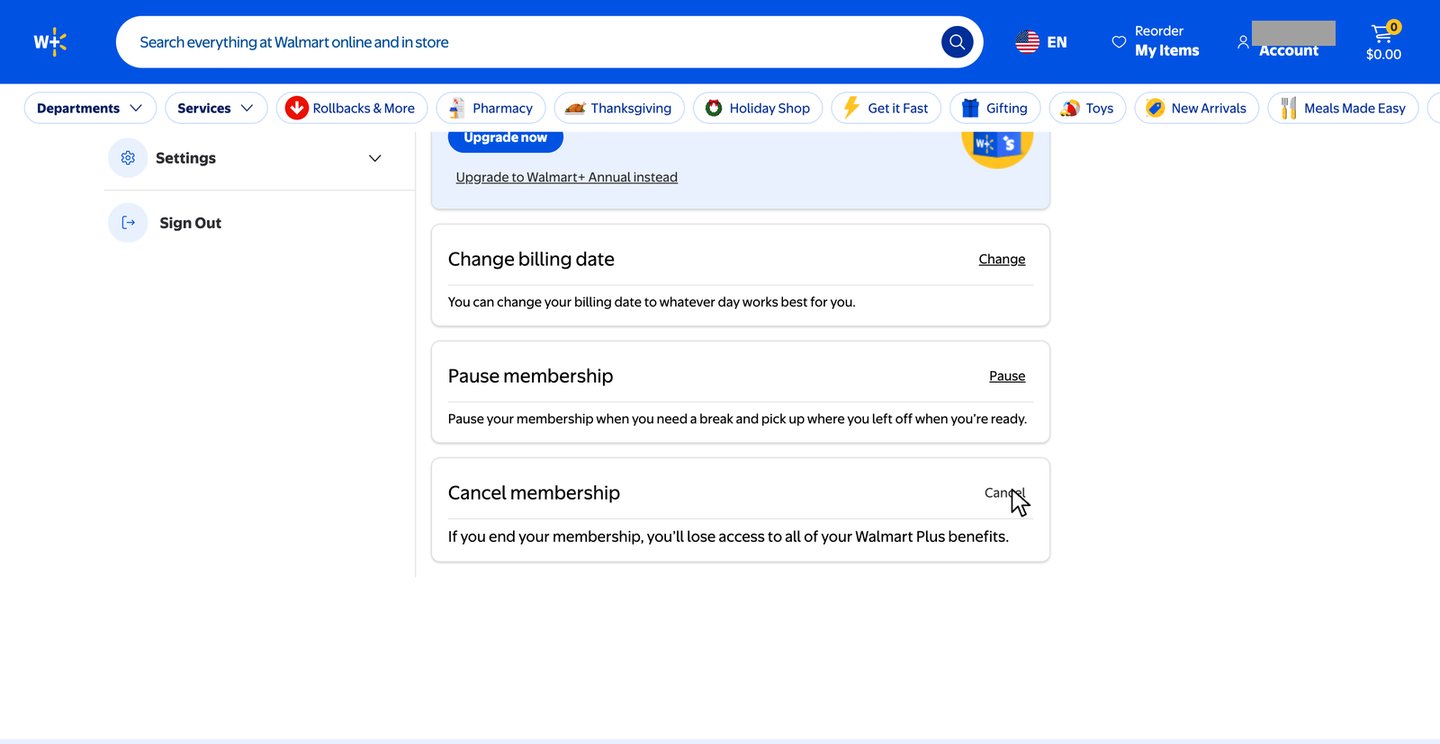
Click Cancel
Manage your plan opens. Scroll down and click Cancel beside Cancel membership.
Watch this step · 0:27More detail on this step
To stop paying for a month instead, click Pause beside Pause membership. Walmart doesn't bill you while your membership is paused, and you don't get member benefits during the pause. Pausing isn't available during a trial, with the Paramount+ Premium upgrade or on Walmart+ with Sam's Club Plus.
-
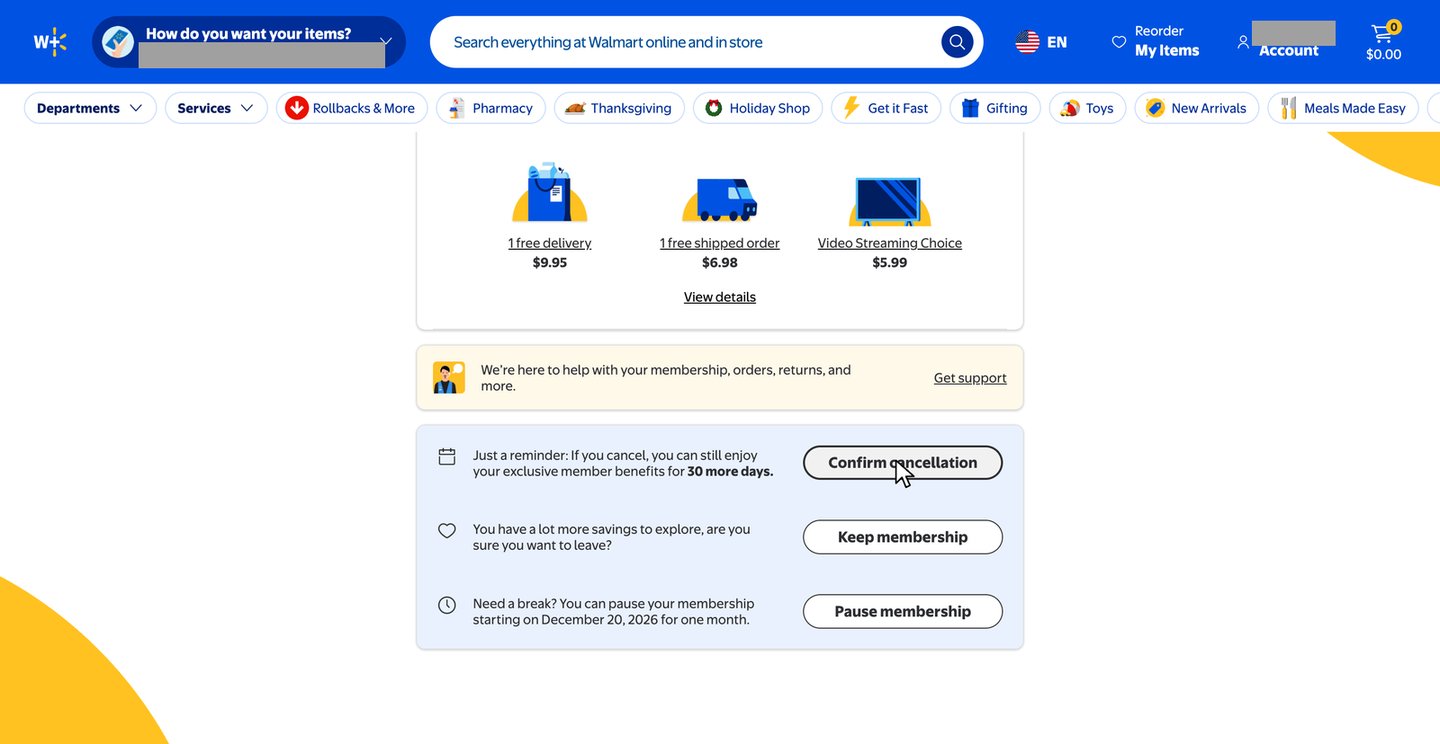
Click Confirm cancellation
Offer to stayThis is the click that cancelsWalmart shows what your benefits are worth and offers a one-month pause. Click Confirm cancellation.
zuzu says no to both offers for you Watch this step · 0:37More detail on this step
The reminder beside the button says you can still enjoy your member benefits for the rest of your term. To stay, click Keep membership. Pause membership pauses it for one month from your renewal date instead.
-
Close the survey
Walmart says "Your membership has been canceled." and asks for feedback. The survey is optional, so close it with the X.
Watch this step · 1:04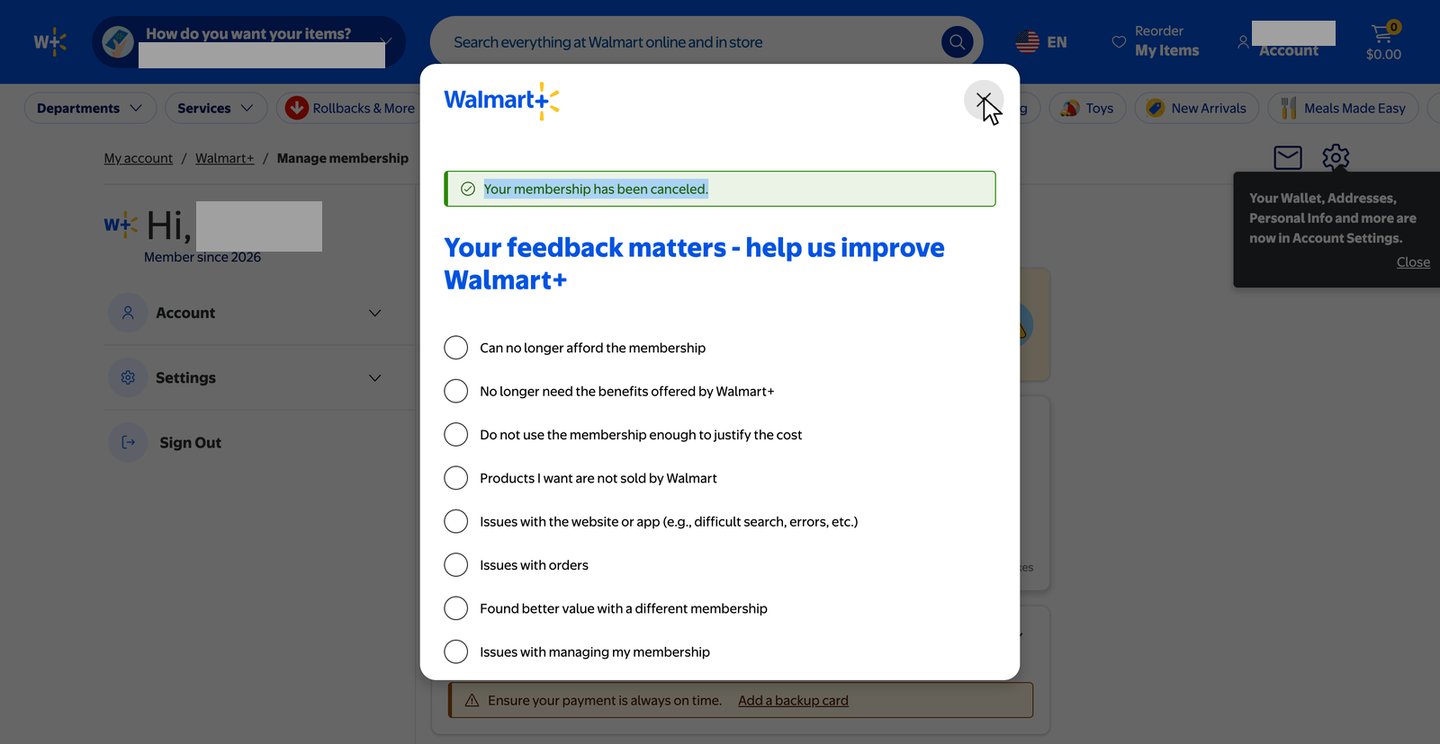
-
Check your end date
DoneManage membership now says you can still enjoy your benefits through your end date and offers Reactivate membership. Take a screenshot in case you need proof later.
Watch this step · 1:14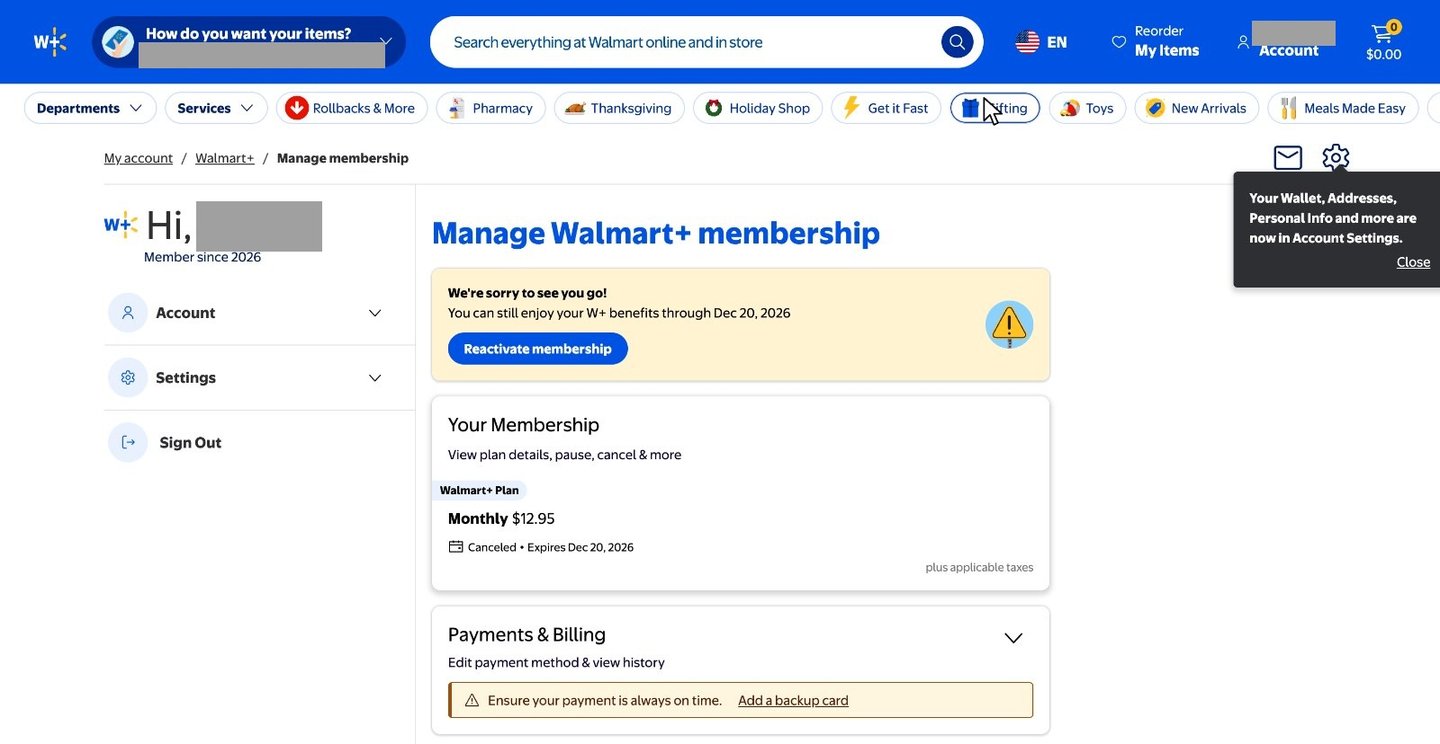
Is it easy to cancel Walmart Plus?
Yes, once you know where each button sits. Online it's 8 steps from walmart.com: Account, Walmart+, Manage membership, Manage beside your Walmart+ plan, Cancel beside Cancel membership, then Confirm cancellation. On that last screen, Walmart shows what your benefits are worth and offers a one-month pause next to the button that cancels.
If you don't see Manage membership, check that you're signed in to the Walmart account that pays for Walmart+, or call Walmart Customer Care at (800) 924-9206, the number Walmart's terms give for canceling. If you'd rather not click through any of it, text zuzu and it's handled.
After you cancel your Walmart+ membership
You keep your benefits until your end date
Manage membership shows the date in "You can still enjoy your W+ benefits through", and the plan shows Canceled with its Expires date. In the recording, the monthly Walmart+ membership was canceled on Nov 20 and benefits run until Dec 20, the date it would have renewed.
Your account shows Reactivate membership
That's normal. Reactivate membership shows under Walmart+ in your account until your billing cycle ends.
Changed your mind?
Before your billing cycle ends, go to Account, then Walmart+, and click Reactivate membership. If it won't reactivate, update an expired or invalid payment method first.
Keep your screenshots of the cancellation and a note of your term's end date until that date has passed. After it, check your bank or card statement once to make sure no new charge shows up. If one does, call Walmart Customer Care at (800) 924-9206, the number Walmart's terms give for canceling, and have your screenshots ready.
How to cancel a Walmart subscription
For Walmart+, Walmart's paid membership, use your Walmart account: open Account, then Walmart+ and Manage membership, click Manage beside your Walmart+ plan, then Cancel and Confirm cancellation. You can also call Walmart Customer Care at (800) 924-9206.
Walmart Subscribe, which sends repeat deliveries of products you choose, is a separate service. Cancel it, or a single product subscription, under Subscriptions in your account, before an order is processed if you don't want to pay for it.
How to cancel Walmart Plus on the app
Through your Walmart account. Walmart's terms say to cancel in your Walmart account under Account, then Walmart+, Manage membership and Manage, the same route the steps above follow on walmart.com.
On an iPhone or Android phone, you can also open walmart.com in your browser and follow those steps, or call Walmart Customer Care at (800) 924-9206.
Can you cancel Walmart Plus anytime?
Yes. Walmart+ renews on its own for another month or year until you cancel, and you can cancel in your Walmart account or by calling Walmart Customer Care at (800) 924-9206 whenever you decide to.
Timing still decides what you pay. Cancel before your current term ends to avoid being charged for the next one, and on a paid plan your benefits last until that date. A trial renews into the monthly or annual plan you picked unless you cancel it first.
How to cancel a Walmart Plus free trial
The same way as a paid membership: in your Walmart account, open Walmart+, then Manage membership, and click Manage, Cancel and Confirm cancellation, or call Walmart Customer Care at (800) 924-9206. Walmart's terms let you cancel at any time during a trial, but Walmart may end the trial's benefits right away, and no refund is given.
If you don't cancel, the trial renews into the monthly or annual plan you picked, and Walmart allows one trial per customer. Walmart+ itself starts with a $1 trial. Walmart+ Assist comes with a free 30-day trial, and Walmart+ Student with a 30-day trial.
If I cancel Walmart Plus, do I get a refund?
No. Walmart's billing help states plainly that Walmart+ isn't refunded, and its terms make membership and Plus Up fees non-refundable apart from the cases they list, such as when Walmart ends a membership and may refund the term that hasn't run out, or when a monthly member moves to Walmart+ with Sam's Club Plus and gets a pro rata refund for the rest of that month. Walmart's Student page adds a prorated refund for a paid member who switches to Walmart+ Student. When you cancel a paid plan, the next renewal stops and your benefits keep working until the end of the term you already paid for.
Canceling a trial doesn't bring a refund either: Walmart's terms say none is issued, and Walmart may end the trial's benefits right away. To avoid paying for a term you don't want, cancel before your current term ends.
Walmart+ cancellation FAQ
Common questions about canceling Walmart+. Sources checked Nov 20, 2026.
How do I cancel my Walmart+ membership?
On walmart.com, sign in and open Account, then Walmart+ and Manage membership. Click Manage beside your Walmart+ plan, Cancel beside Cancel membership, then Confirm cancellation. You can also call Walmart Customer Care at (800) 924-9206, and Walmart+ with Sam's Club Plus can be canceled from your Sam's Club account as well.
What is the Walmart Plus cancellation policy?
You can cancel any time, and the fee you already paid isn't refunded. Walmart+ renews each month or year until you cancel, so cancel before your current term ends to avoid the next charge. On a paid plan, your benefits last until the end of that term.
How do I cancel Paramount Plus through Walmart?
In your Walmart account. Go to Account, then Walmart+, select Paramount+ and click Manage Plan to cancel the streaming benefit or downgrade Paramount+ Premium, and do it before your auto-renewal date to avoid the next charge. A Premium downgrade isn't refunded, and you keep Premium until the end of your billing cycle. Paramount+ through Walmart needs an active Walmart+ membership, so canceling Walmart+ ends it too.
What's the phone number to cancel Walmart Plus?
Call Walmart Customer Care at (800) 924-9206. Walmart's terms name that line as a way to cancel Walmart+ or any Plus Up. Walmart's contact page lists 1-800-925-6278 for customer service in general, without naming it as a way to cancel.
Why can't I cancel Walmart Plus?
Check how you got Walmart+. Walmart+ with Sam's Club Plus can also be canceled from your Sam's Club account, and a membership that came through a partner such as Verizon or Tracfone has to be ended through that partner. For a membership you pay Walmart for, call Walmart Customer Care at (800) 924-9206 if the menus in your account don't work.
What if I forgot to cancel Walmart Plus?
Cancel now to stop the next renewal, because Walmart+ keeps renewing each month or year until you do. Walmart+ fees aren't refunded, so the charge that went through stays, but you keep your benefits until the end of that term.
How do I cancel InHome on Walmart Plus?
Cancel just InHome from your account. Walmart says to open My Account and select Cancel InHome under Your Plus Ups. InHome keeps working until the end of your billing cycle, and your Walmart+ membership stays active. If you cancel Walmart+ itself, InHome ends with it.
How do I cancel a monthly Walmart Plus membership?
The same way as an annual one. The monthly plan costs $12.95 a month plus tax and renews each month until you cancel it in your account or by phone. You keep your benefits until the end of the month you paid for. Walmart lets you switch from monthly to annual at any time, and its help says a switch from annual to monthly isn't currently available.
How do I cancel Showtime on Walmart Plus?
Cancel the Paramount+ Premium upgrade. Walmart's billing help labels the Paramount+ Premium charge as Plus Up for Showtime, with W+Paramount+Prem08/25 as its statement example. To stop it, go to Account, then Walmart+, select Paramount+ Premium and click Manage Plan, then downgrade or cancel the upgrade there before your auto-renewal date. Downgrading to the ad-supported plan keeps your access until the end of that billing cycle, with no charge at the next renewal and no refund.
Can an app or service cancel Walmart+ for me?
zuzu can. Text zuzu that you want to cancel Walmart+, and it goes through the same steps, says no to both offers and texts you when it's done, with your end date.
The ways to cancel, renewal, refunds, trials, pausing and Plus Ups come from Walmart's help on managing Walmart+, billing and payments, Walmart+ plans, Walmart+ Student, Walmart+ with Sam's Club Plus, Walmart+ Assist, streaming benefits and InHome, its Walmart+ Terms of Use and Walmart Subscribe Terms of Use, and its contact page. The rest comes from the recorded cancellation on Nov 20, 2026.
How this guide was made

Researched, written and tested by Harsh at zuzu.
- Recorded click by click on walmart.com on Nov 20, 2026, canceling a monthly Walmart+ membership.
- The ways to cancel and the renewal, refund, trial and Plus Up rules come from Walmart+'s help articles, Terms of Use and contact page, checked on Nov 20, 2026.
Other guides for Walmart+
 Contact Walmart customer service
Number, hours and contact details
 Walmart scam check
Calls, texts and emails
Cancel more subscriptions you don't use and save money
Each guide follows one real cancellation on the company's own website, with every click recorded.
 Cancel YouTube Premium
7 steps · 44 s on the website
 Cancel Amazon Music
5 steps · 43 s on the website
 Cancel Amazon Prime
6 steps · 45 s on the website
 Cancel Audible
5 steps · 48 s on the website
 Cancel Canva
7 steps · 46 s on the website
 Cancel ChatGPT
6 steps · 33 s on the website
 Cancel DashPass
6 steps · 47 s on the website
 Cancel Fubo
7 steps · 1 min 1 s on the website
Cancel your Walmart+ membership easily and start saving today
Text zuzu and it's handled.