 Last updated Nov 21, 2026
How to cancel Instacart
Once you're signed in at instacart.com, click the 3 horizontal lines at the top left, then Your Instacart+ membership, Cancel membership and Confirm cancellation: 5 steps, 34 s.
Watch zuzu cancel an Instacart membership
4 ways to cancel your Instacart membership
Instacart lists 3 ways to cancel: on its website, in its app or by calling customer support. Texting zuzu is a 4th: zuzu does the online route for you.
Online
In your Instacart account on instacart.com, if Instacart bills you. You need your login.
34 s, 5 steps See howInstacart app
In the app on your phone, from the Account icon at the top right, if Instacart bills you.
Your Instacart account See howBy phone
With Instacart customer support at 1-888-246-7822, if Instacart bills you.
Instacart customer support See howCan you cancel your Instacart membership online?
Yes, you can cancel your Instacart+ membership online, whether you call it Instacart Plus, Instacart Express or your Instacart subscription. On instacart.com, click the 3 horizontal lines at the top left and choose Your Instacart+ membership, then scroll down to Cancel membership under Manage your membership. Click Confirm cancellation to finish.
The recorded cancellation on Nov 21, 2026 took 5 steps and 34 s. You can also cancel in the Instacart app or call Instacart customer support at 1-888-246-7822.
Before you start, have your Instacart login ready. On the Instacart+ page, Cancel membership sits below your benefits, so scroll down to Manage your membership to find it. In the app, the steps start from the Account icon at the top right instead of the menu at the top left. Some Instacart pages may still say Instacart Express, which is the old name of Instacart+.
Timing matters more than speed. Instacart+ renews on its own for the monthly or annual term you picked, and Instacart's terms put the charge within 24 hours of the billing date shown on the Your Instacart+ membership page, so cancel at least a day before it. During a free trial, Manage your membership shows that date as "Payment starts on". You keep $0 delivery fees until the end of the period you've paid for or the end of your trial, and an annual fee that has just renewed comes back only if you cancel within 5 calendar days and haven't used any Instacart+ benefits, unless the law where you live requires a refund.
The part people miss is that Cancel membership doesn't cancel yet. Instacart's help puts a Continue to cancel step after it, and in the recording it went straight to a page listing your Instacart+ benefits with Keep membership and Confirm cancellation at the bottom. Confirm cancellation cancels at once. In the recording, Instacart asked for no reason, offered no discount or pause, and showed "You have successfully canceled your membership" with the date the benefits last until.
The 5 steps further down show the online route screen by screen. If you'd rather not click through it, text zuzu and it's handled.
Instacart cancellation policy 2026: what to know before you cancel
The rules that decide what you pay, from the renewal charge to the free trial.
Cancel at least a day before your billing date
Instacart+ renews on its own, and Instacart's terms put the charge within 24 hours of the billing date shown on the Your Instacart+ membership page, so cancel at least a day before it.
You keep $0 delivery until the billing period ends
Canceling stops the renewal. Your $0 delivery fees, and the benefits you share through a family account, last through the end of the billing period you've paid for.
Annual fees come back only in the first 5 days
An annual fee is refunded only if you cancel within the first 5 calendar days of a paid term and haven't used any Instacart+ benefits, unless the law where you live requires a refund. Monthly fees aren't refundable.
Cancel a free trial before it ends
An Instacart+ free trial turns into a paid membership on the date Manage your membership shows. Instacart's terms put the charge within 24 hours of that billing date, so cancel at least a day before it.

Text zuzu and skip 5 manual steps
zuzu is an assistant you text. It signs in and cancels for you.
- 1You text: "Hey zuzu, cancel my Instacart+ membership."
Use your own words. There's no form to fill in.
- 2zuzu texts you when it's done, with your end date
zuzu goes through the same screens. Your membership won't renew, and you keep your Instacart+ benefits until your end date. You can check that date under Your Instacart+ membership afterward.
The old way: cancel Instacart step by step
Prefer to do it yourself? You need your Instacart login. Each step shows the screen you'll see.
This is the route Instacart expects you to take, and it took 34 s in the recording. Open More detail under any step for the full explanation.
Watch the full cancellation by hand · 0:34
The 5 steps · 34 s
-
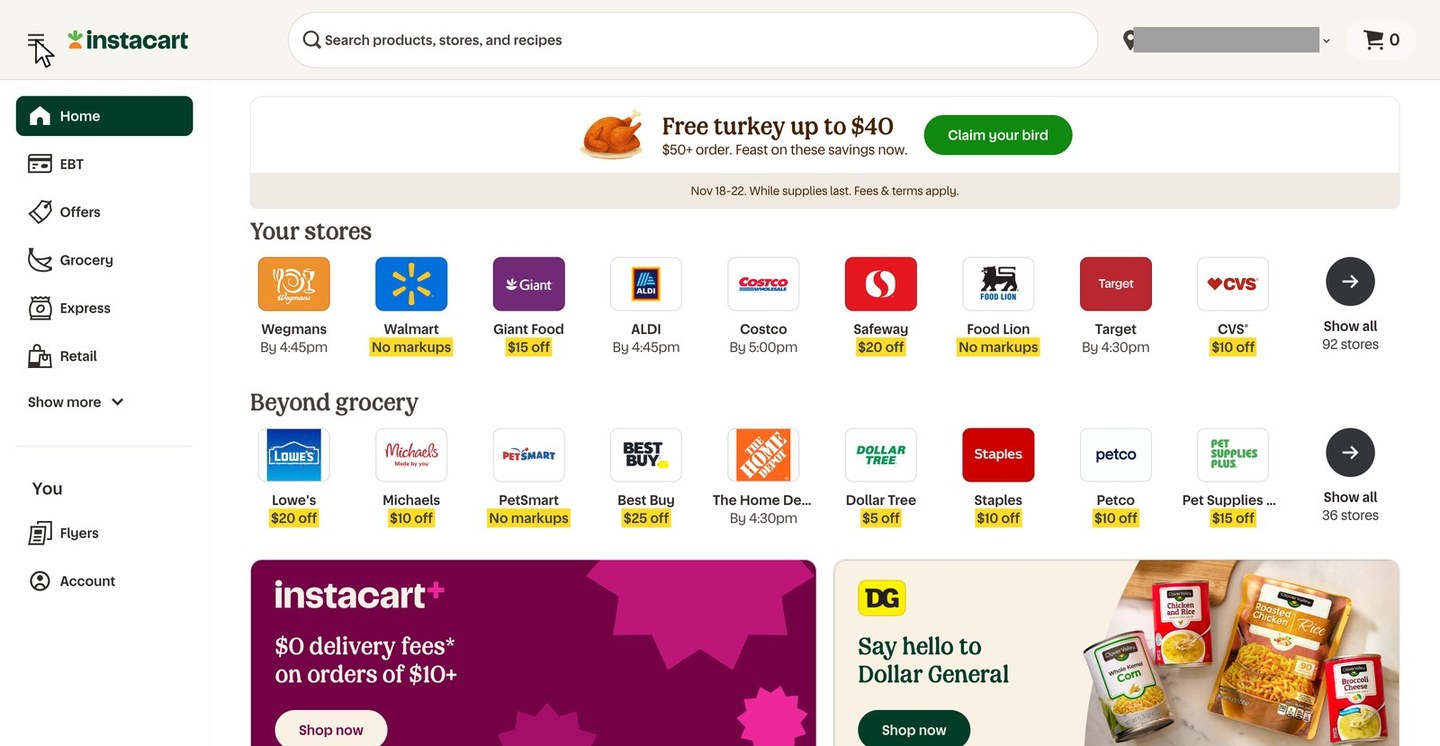
Click the menu at the top left
Go to instacart.com, sign in and click the 3 horizontal lines at the top left of the page.
Watch this step · 0:03More detail on this step
In the Instacart app, Instacart's help says to start from the Account icon in the upper right corner instead.
-
Click Your Instacart+ membership
A menu opens on the left. Under Manage your account, click Your Instacart+ membership.
Watch this step · 0:06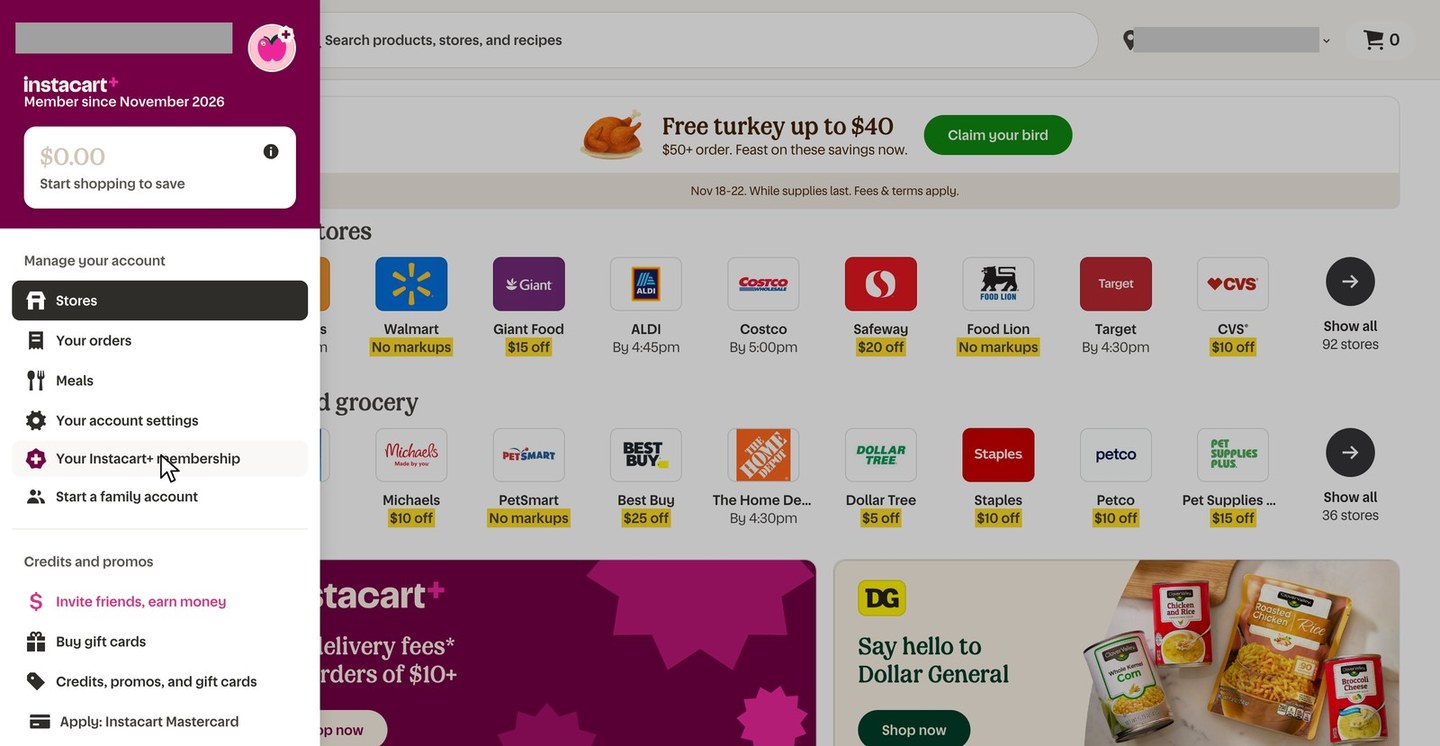
Tired already? zuzu does all 5 steps for you.
-
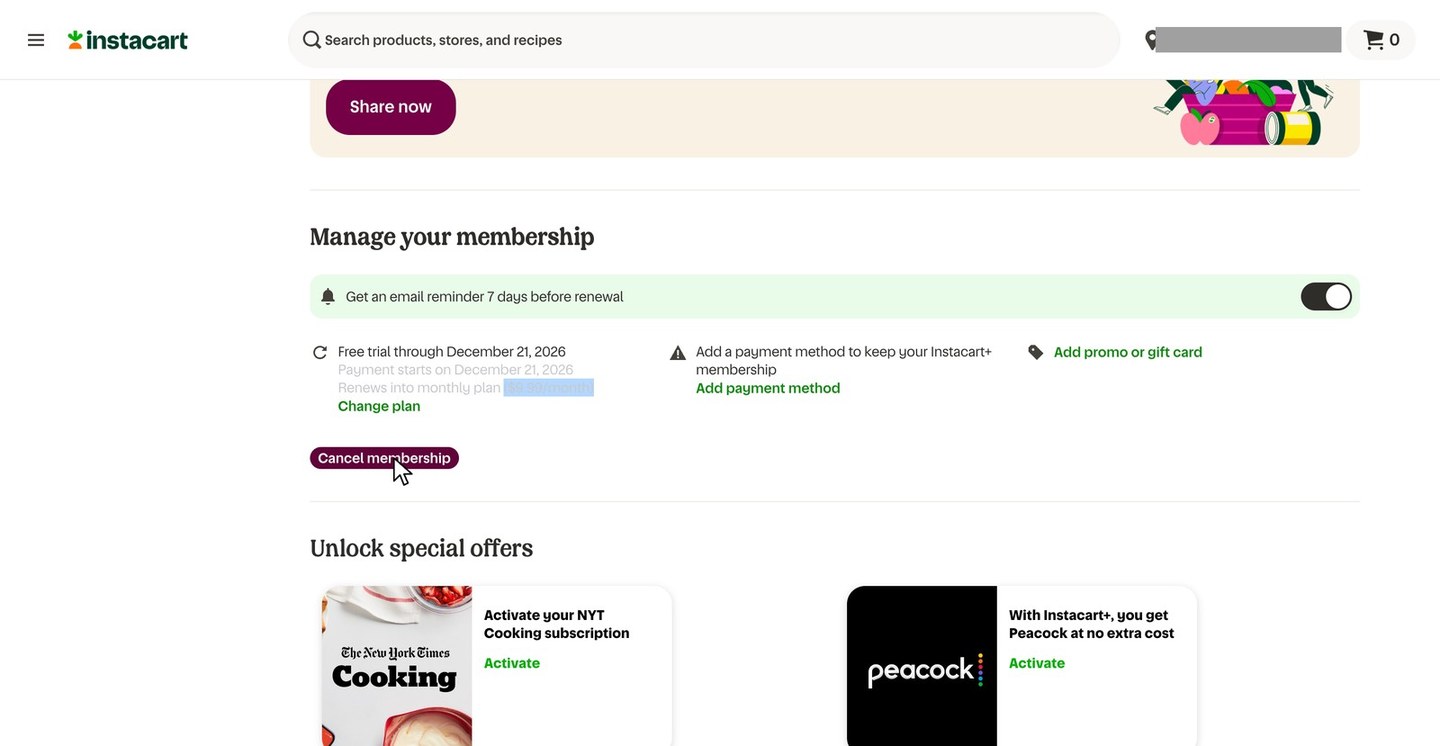
Scroll down and click Cancel membership
The Instacart+ page opens. Scroll down to Manage your membership, which shows your next billing date, and click Cancel membership.
Watch this step · 0:23More detail on this step
Nothing is canceled yet. Instacart's help lists a Continue to cancel step next; if you see it, click it. Then a page lists your Instacart+ benefits before you confirm.
-
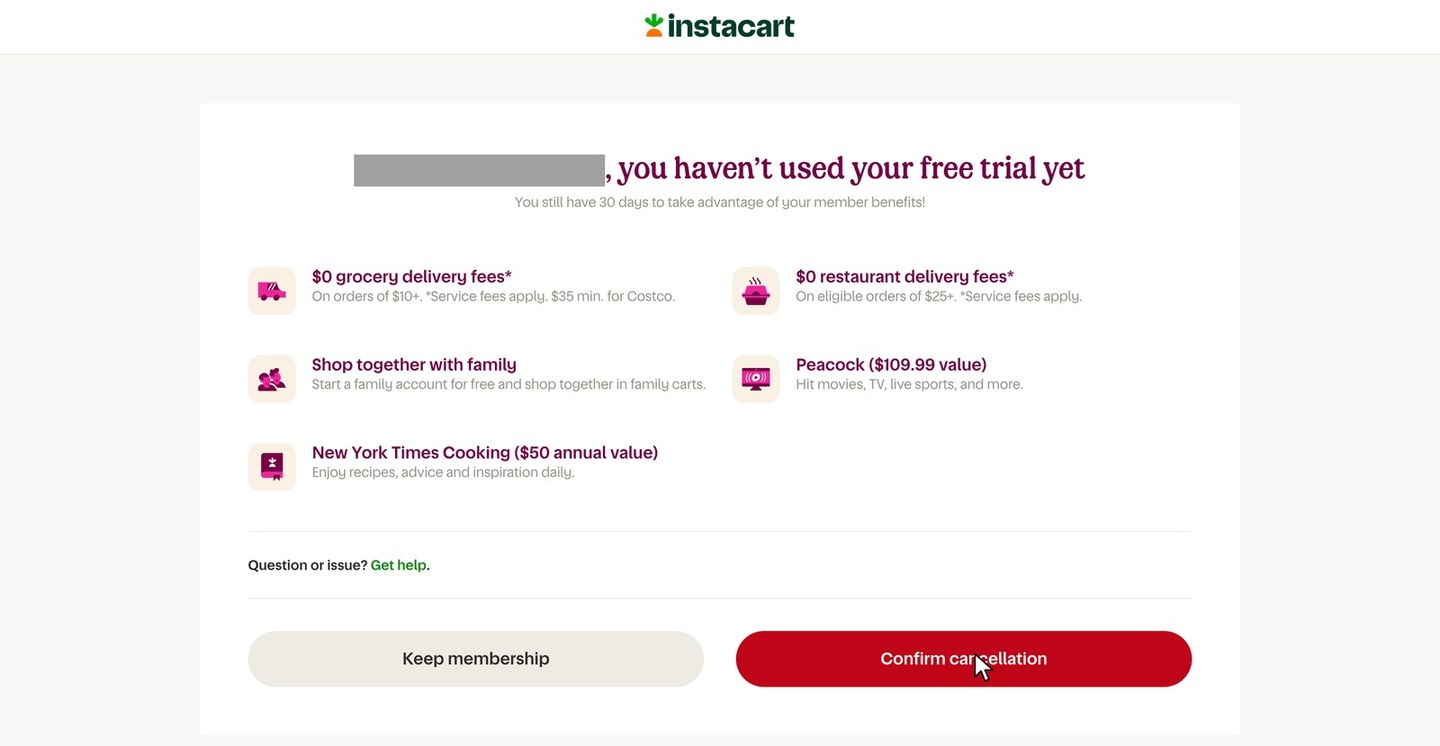
Click Confirm cancellation
This is the click that cancelsInstacart lists your Instacart+ benefits, with Keep membership and Confirm cancellation at the bottom. Click Confirm cancellation.
This cancels right away.
Watch this step · 0:26More detail on this step
To keep your membership, click Keep membership instead.
-
Note your end date
DoneInstacart says "You have successfully canceled your membership" with the date your benefits end. Take a screenshot, then click Done.
Watch this step · 0:27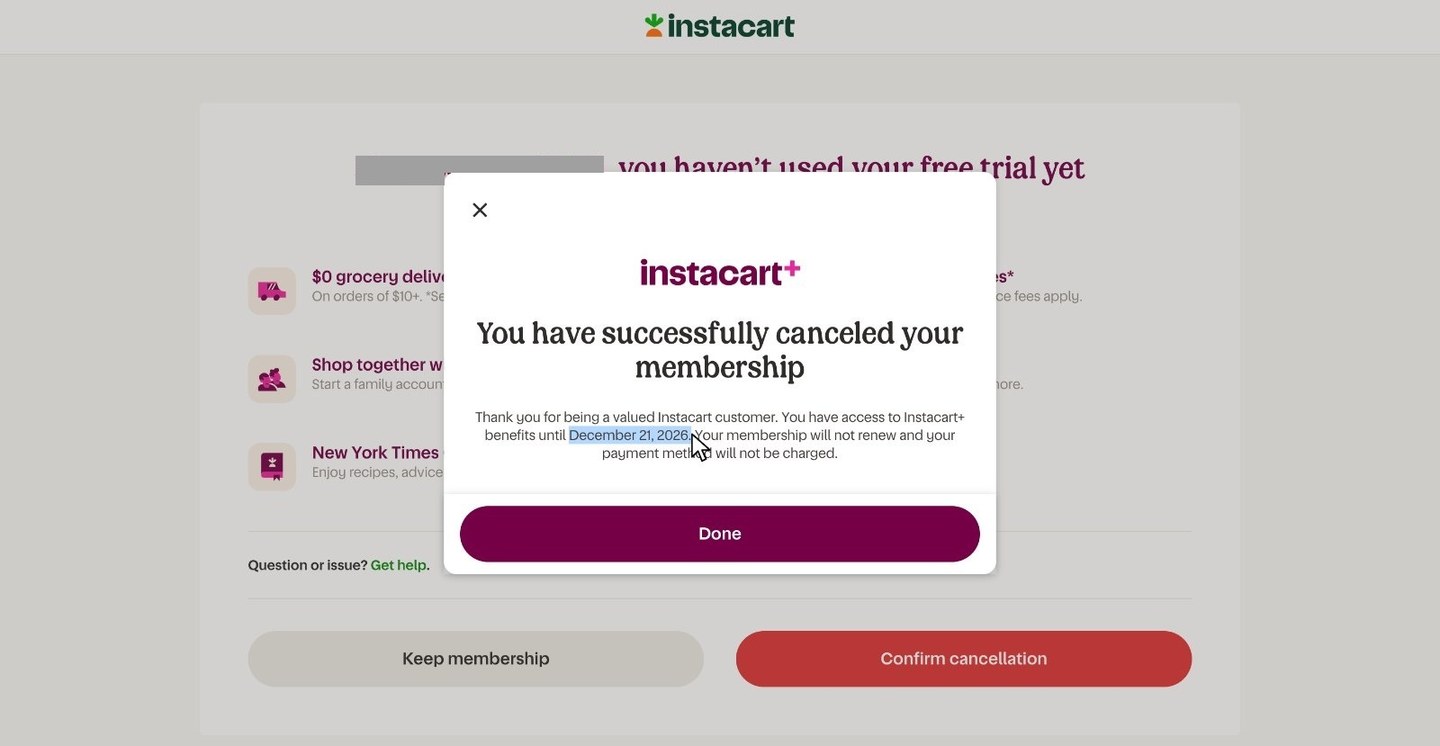
After you cancel your Instacart membership
You keep $0 delivery until your end date
Instacart gives your end date in the message after you cancel, and the Instacart+ page shows when your membership expires. In the recording, a free trial canceled on Nov 21 keeps its benefits until Dec 21, the date its first payment was due.
You're told it's canceled right away
That's normal, and your benefits still run until your end date. After Confirm cancellation, Instacart shows "You have successfully canceled your membership" with that date and says your membership will not renew.
Changed your mind?
Go back to Your Instacart+ membership and select Renew membership. Instacart's help says you can do that at any time to become a member again.
Keep a screenshot of the "You have successfully canceled your membership" message with your end date, and Instacart's confirmation email, which can land in your spam folder, until that date has passed. After it, check your bank or card statement once to make sure no new charge shows up. If one does, check the Instacart+ page first, which shows when your membership expires. If you didn't make the charge, call your card issuer first, at the number on the back of your card. If the charge is for your own membership, call Instacart customer support at 1-888-246-7822.
How to cancel an Instacart free trial
The same way as a paid membership, at least a day before the trial ends: open Your Instacart+ membership from the menu, then click Cancel membership and Confirm cancellation. Instacart's terms say that if you cancel before the trial is over, Instacart doesn't charge you for the next membership term unless you restart your membership. Instacart's help adds that a charge may be applied up to 6 hours before a trial renews to a paid plan, and says that charge is refundable under the Instacart+ Terms. If you see it, still cancel before the trial ends. Its terms put the charge within 24 hours of the billing date. An Instacart Express trial is canceled the same way, since Express is the old name of Instacart+.
Instacart's sign-up page offers a 14-day free trial that renews into a $99 a year paid subscription, and its promotional terms limit the trial to new users. Under Manage your membership, the Instacart+ page shows the date your own trial ends and the plan it renews into. You can still cancel after the trial has turned into a paid membership: you keep $0 delivery fees to the end of the paid period, and an annual fee is refunded only if you cancel within its first 5 calendar days and haven't used any Instacart+ benefits, unless the law where you live requires a refund.
With Instacart's Chase Co-Brand card offer, someone who isn't already a member moves onto a paid $99 a year membership after the 3 complimentary months unless they cancel during them. Instacart's Mastercard offer works the other way: the membership expires after its 3 free months unless you choose to renew. Either one is canceled with Cancel membership on the Your Instacart+ membership page.
Instacart cancellation FAQ
Common questions about canceling Instacart. Sources checked Nov 21, 2026.
How do I cancel my Instacart membership?
Open Your Instacart+ membership from the menu at the top left of instacart.com, scroll down and select Cancel membership under Manage your membership, then Continue to cancel if Instacart shows it and Confirm cancellation. Instacart then shows a message that you canceled and emails you a confirmation. In the app, start from the Account icon in the upper right corner, and if you'd rather call, Instacart's Instacart+ page gives customer support at 1-888-246-7822.
Does canceling Instacart+ delete my Instacart account?
No. Instacart's account deletion help says an account costs nothing to keep open, and asks you to wait for active orders and cancel Instacart+ before you delete it. In the app, tap the Account icon, then Settings, Personal information and Delete account; on the website, submit Instacart's account deletion request, then select Confirm in the email from OneTrust within 7 days. Deleting the account is permanent.
How do I unsubscribe from Instacart?
Cancel Instacart+ to stop the membership charge, and change your notification settings to stop Instacart's marketing emails and texts. On the website, click the 3 horizontal lines in the upper left corner, then Your account settings and Notification settings, and choose which notifications you want, or reply STOP to an Instacart marketing text. Order confirmation emails still come after you unsubscribe from marketing emails.
Can you cancel your Instacart subscription and get a refund?
Only for an annual membership, canceled within the first 5 calendar days of a paid term or renewal. Instacart's help says you get the fee back then only if you haven't placed any orders using Instacart+, and its terms say you must not have used any Instacart+ benefits in that time. The New York Times Cooking terms add that you haven't activated that subscription. After the 5 days, an annual fee isn't refunded unless the law where you live requires it, and monthly fees aren't refundable.
How do I cancel a Costco Instacart membership?
The same way as any Instacart+ membership. Instacart's Costco partnership terms say the discounted Costco plan, $79 a year with an active Costco membership, can be canceled any time with Cancel Membership, which sits under Your Instacart+ membership on instacart.com, and the cancellation takes effect at the start of your next annual billing cycle. If you'd rather call, Instacart customer support is at 1-888-246-7822.
How do I cancel my Instacart membership in the app?
The same way as on the website, starting from the Account icon in the upper right corner, as Instacart's help gives it. Tap Your Instacart+ membership, then Cancel membership, Continue to cancel if it shows, and Confirm cancellation.
How do I cancel Instacart Express?
The same way as Instacart+, because Instacart Express is its old name. Instacart says you may still see Instacart Express in places on its site and app, and a membership labeled Express is canceled from Your Instacart+ membership like any other.
Can an app or service cancel Instacart for me?
zuzu can. Text zuzu that you want to cancel Instacart+, and it goes through the same steps and texts you when it's done, with your end date.
The ways to cancel, account deletion and the renewal, refund, free trial, card offer and partner rules come from Instacart's help on managing Instacart+, Instacart+ promotional terms, the Chase Co-Brand card, the Mastercard offer, the Costco partnership, New York Times Cooking, family accounts, notification settings and account deletion, its Instacart+ page and its Terms of Use. The advice to call your card issuer about a charge you didn't make comes from the FTC's What To Do if You Were Scammed. The rest comes from the recorded cancellation on Nov 21, 2026.
How this guide was made

Written by Harsh Bhati
- Recorded click by click on instacart.com on Nov 21, 2026, canceling an Instacart+ free trial.
- The ways to cancel and the renewal, refund, free trial and card offer rules come from Instacart's Help Center articles, Instacart+ page and Terms of Use, checked on Nov 21, 2026.
Other guides for Instacart
 Instacart scam check
Orders, charges and messages
Cancel more subscriptions you don't use and save money
Each guide follows one real cancellation on the company's own website, with every click recorded.
 Cancel Kindle Unlimited
4 steps · 32 s on the website
 Cancel Netflix
5 steps · 44 s on the website
 Cancel Paramount+
5 steps · 27 s on the website
 Cancel Peacock
4 steps · 20 s on the website
 Cancel Planet Fitness
10 steps · 2 min 13 s on the website
 Cancel Tinder Gold
7 steps · 49 s on the website
 Cancel Uber One
8 steps · 45 s on the website
 Cancel Walmart+
8 steps · 1 min 17 s on the website
Cancel your Instacart membership easily and start saving today
Text zuzu and it's handled.