 Last updated Nov 21, 2026
How to cancel Fortnite Crew
If you bought Crew from Epic, click Subscriptions on the left at epicgames.com/account, then Cancel subscription on your Fortnite Crew card, Cancel subscription again to confirm and Done: 5 steps, 37 s.
Watch zuzu cancel a Fortnite Crew subscription
6 ways to cancel your Fortnite Crew subscription
Epic's help says to cancel Crew on the platform you used to subscribe, and gives the steps for Epic on PC or mobile, Xbox, PlayStation, Nintendo Switch, Apple's App Store and the ONE store. Texting zuzu is a 6th: zuzu does the online route for you.
Online
In your Epic Games account on epicgames.com, if Epic bills you. You need your login.
37 s, 5 steps See howPlayStation
In your PS5 or PS4 settings, on the PlayStation Store website or in the PlayStation App, if PlayStation bills you.
Your PSN account See howNintendo Switch
In Nintendo eShop on your Switch, if Nintendo bills you.
Your Nintendo Account See howApple
In the Settings app on the Apple device you subscribed on, if Apple bills you.
Your Apple account See howCan you cancel a Fortnite Crew subscription?
Yes, you can cancel a Fortnite Crew subscription at any time, whether you call it a subscription or a membership, on the platform you bought it on. If Epic bills you, sign in at epicgames.com/account, click Subscriptions on the left, then Cancel subscription on your Fortnite Crew card and Cancel subscription again in the window that asks "Cancel this subscription?".
The recorded cancellation on Nov 21, 2026 took 5 steps and 37 s. If you subscribed on Xbox, PlayStation, Nintendo Switch or an Apple device, you cancel in that platform's account or settings instead.
Before you start, have the login ready for the account that bills you: your Epic Games account if you bought Crew from Epic, or your Microsoft, PlayStation Network, Nintendo or Apple account. If you aren't sure which, your bank or card statement shows who charged you. Epic's help also points to the Subscriptions tab in your Epic Games account, but that page says subscriptions set up on PlayStation, Xbox and Switch aren't shown there.
Timing matters more than speed. Fortnite Crew renews every month until you cancel, so cancel before your next billing date to stop the next charge. On the web, your Fortnite Crew card shows that date under "Renews on". If the App Store bills you, cancel at least 24 hours before that date, because Apple says it can charge a renewal up to 24 hours before the new period starts. On a Nintendo Switch, turn off automatic renewal at least 48 hours before the period ends, because Nintendo can charge up to 48 hours early. Whenever you cancel, your Crew benefits last until the end of the billing period you're in. If Epic bills you, Epic says canceling doesn't refund that period unless the law where you live requires a refund, and if a console or mobile platform bills you, that platform decides any refund.
The part people miss is that Cancel subscription on your Fortnite Crew card doesn't cancel yet. Epic first asks "Cancel this subscription?" with your next billing date, and Cancel subscription in that window is the click that cancels. In the recording, that click canceled at once, with no reason asked and nothing offered to stay, and afterward the card showed "Cancelled" with an "Expires On" date, which is normal.
The 5 steps further down show the online route screen by screen. If you'd rather not click through it, text zuzu and it's handled.
Fortnite Crew cancellation policy 2026: what to know before you cancel
The rules that decide what you pay, from your next billing date to who decides refunds.
Cancel before your next billing date
Fortnite Crew renews every month until you cancel. Cancel before your next billing date to stop the next charge. If the App Store bills you, cancel at least 24 hours before that date, because Apple says it can charge a renewal up to 24 hours before the new period starts. On a Nintendo Switch, turn off automatic renewal at least 48 hours before the period ends, because Nintendo can charge up to 48 hours early.
Cancel on the platform that bills you
Epic doesn't handle billing or cancellations for Xbox, PlayStation or Nintendo Switch. Cancel Crew on the platform you bought it on.
You keep Crew until your billing period ends
Canceling turns off future renewals. Your Crew benefits last until the end of the billing period you're already in.
Epic doesn't refund Crew it bills unless the law requires it
Epic says Crew bought directly from Epic isn't refundable unless the law where you live requires a refund. If a console or mobile platform bills you, that platform decides refunds.

Text zuzu and skip 5 manual steps
zuzu is an assistant you text. If Epic bills you, it signs in and cancels for you.
- 1You text: "Hey zuzu, cancel my Fortnite Crew subscription."
Use your own words. There's no form to fill in.
- 2You tap Confirm cancellation when zuzu asks
At the last step zuzu tells you the plan and the date it renews, then asks before it cancels. Tap Confirm cancellation, or Keep subscription to stop.
- 3zuzu texts you when it's done, with your end date
zuzu goes through the same screens. If Epic bills you, you can check the Subscriptions page in your Epic Games account afterward, where your Fortnite Crew card says "Cancelled" and shows the date it expires.
The old way: cancel Fortnite Crew step by step
Prefer to do it yourself? You need your Epic Games login. Each step shows the screen you'll see.
This is the route Epic expects you to take if you bought Crew from Epic, and it took 37 s in the recording. Open More detail under any step for the full explanation.
Watch the full cancellation by hand · 0:37
The 5 steps · 37 s
-
Click Subscriptions
Go to epicgames.com/account and sign in. Click Subscriptions under Payment and rewards in the menu on the left.
Watch this step · 0:02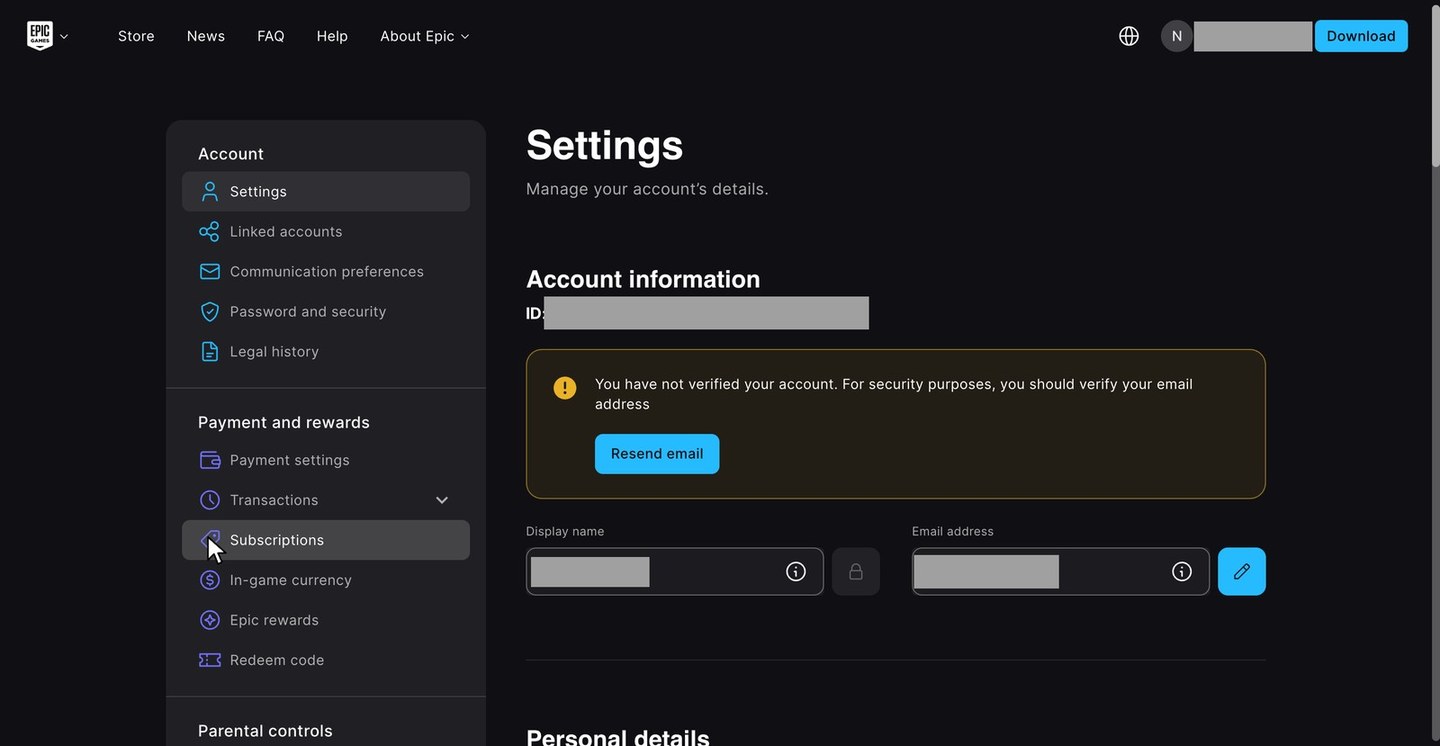
-
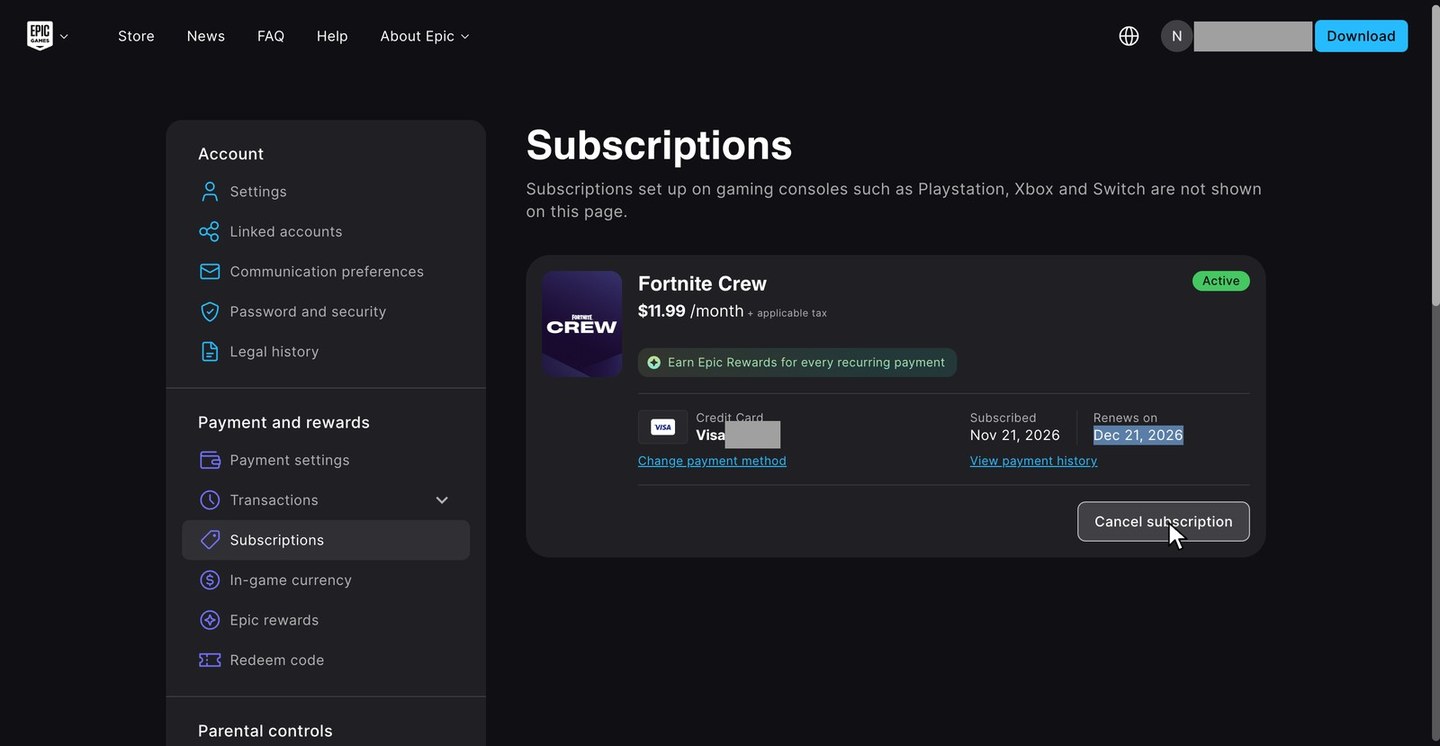
Click Cancel subscription
The Subscriptions page shows your Fortnite Crew card with its price and the date it renews. Click Cancel subscription on the card.
In the recording, Cancel subscription was a button on the card. Epic's help puts it behind a cog icon at the top right of the subscription, so if you see one, select it first.
Watch this step · 0:13More detail on this step
Nothing is canceled yet. Epic asks you to confirm in the next window. This page says subscriptions set up on PlayStation, Xbox and Switch aren't shown here. If you bought Crew on one of those, cancel it on that platform instead.
Tired already? zuzu does all 5 steps for you.
-
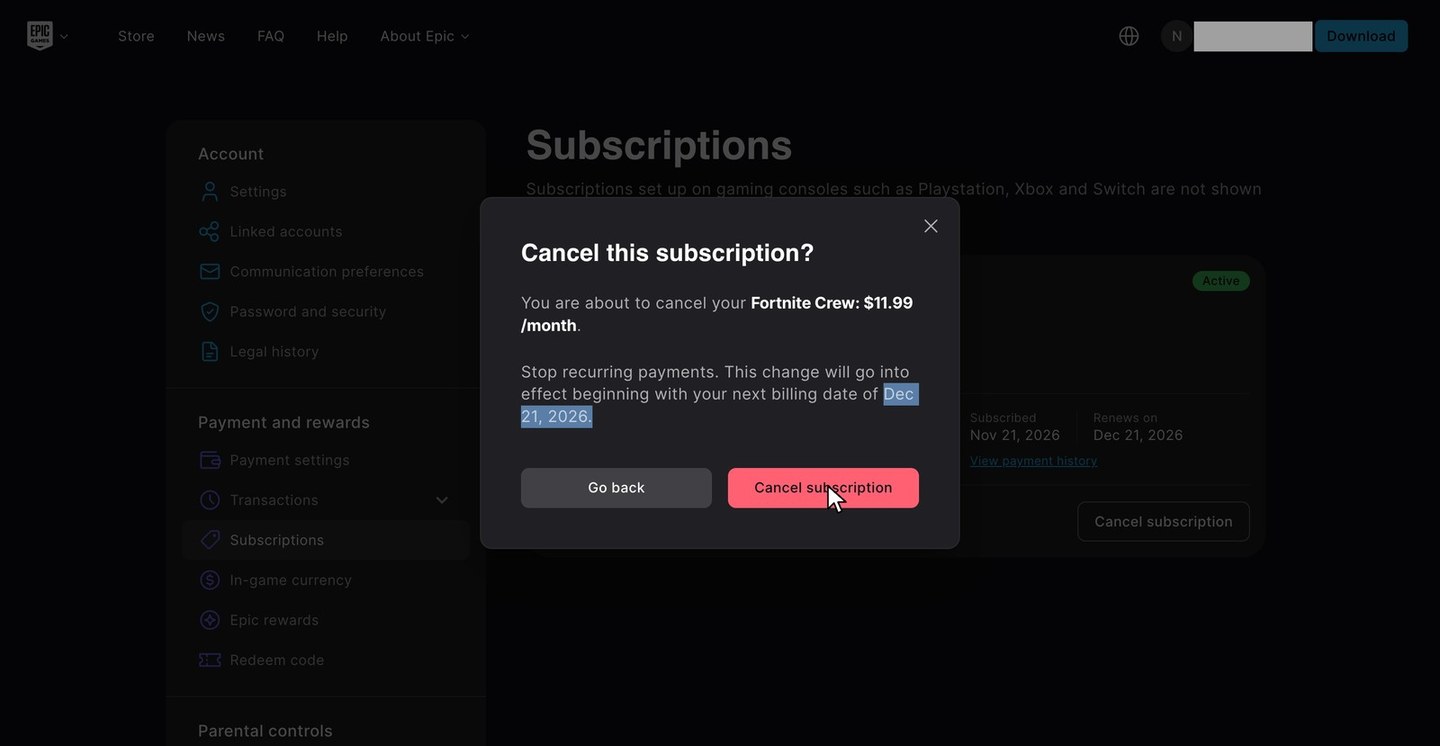
Click Cancel subscription again
This is the click that cancelsEpic asks "Cancel this subscription?" and says the change takes effect from your next billing date. Click Cancel subscription.
In the recording, this canceled right away, with no reason asked and nothing offered to stay.
Watch this step · 0:21More detail on this step
To keep Fortnite Crew, click Go back instead.
-
Note your end date and click Done
Epic says "Subscription cancelled" and gives the date you can use Fortnite Crew until. Take a screenshot, then click Done.
Watch this step · 0:28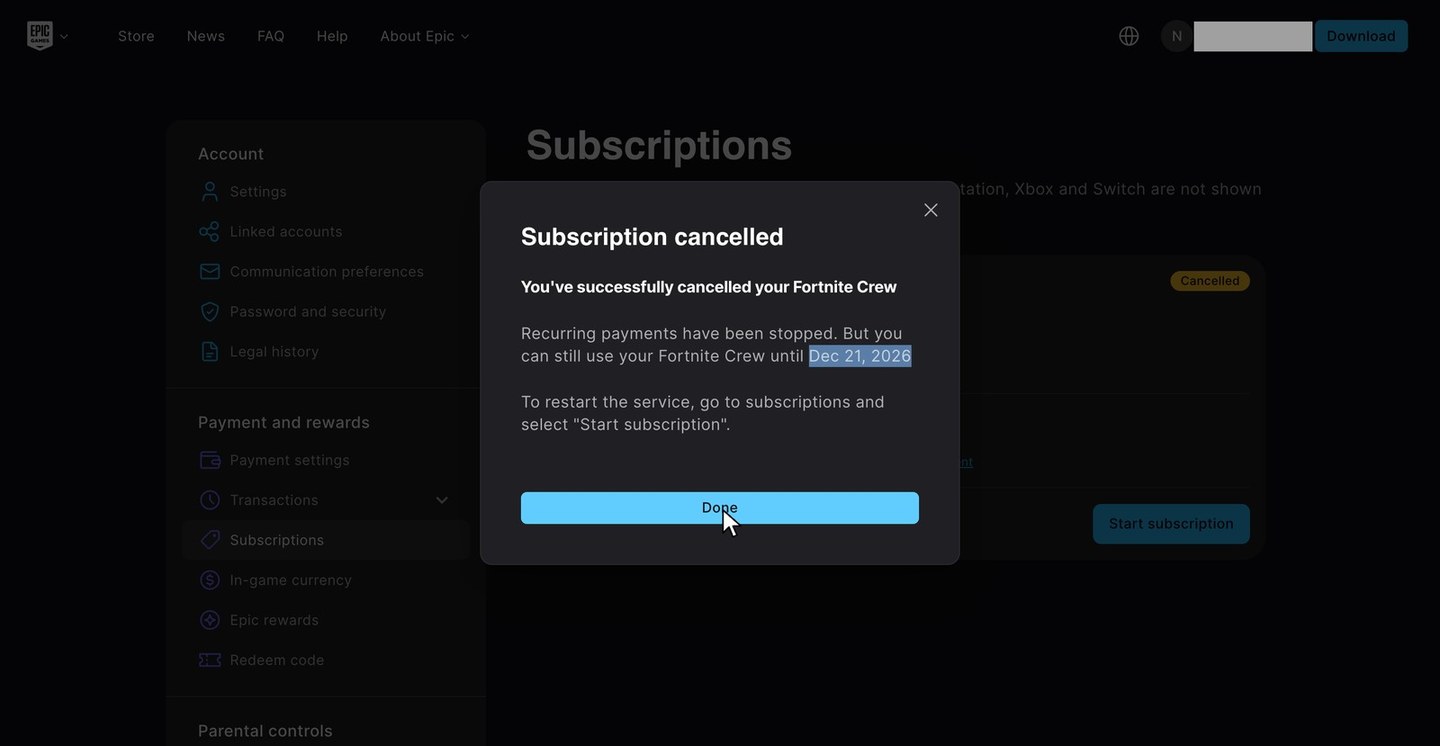
-
Check that your card says Cancelled
DoneBack on the Subscriptions page, your Fortnite Crew card says "Cancelled" and shows your end date under "Expires On".
Watch this step · 0:30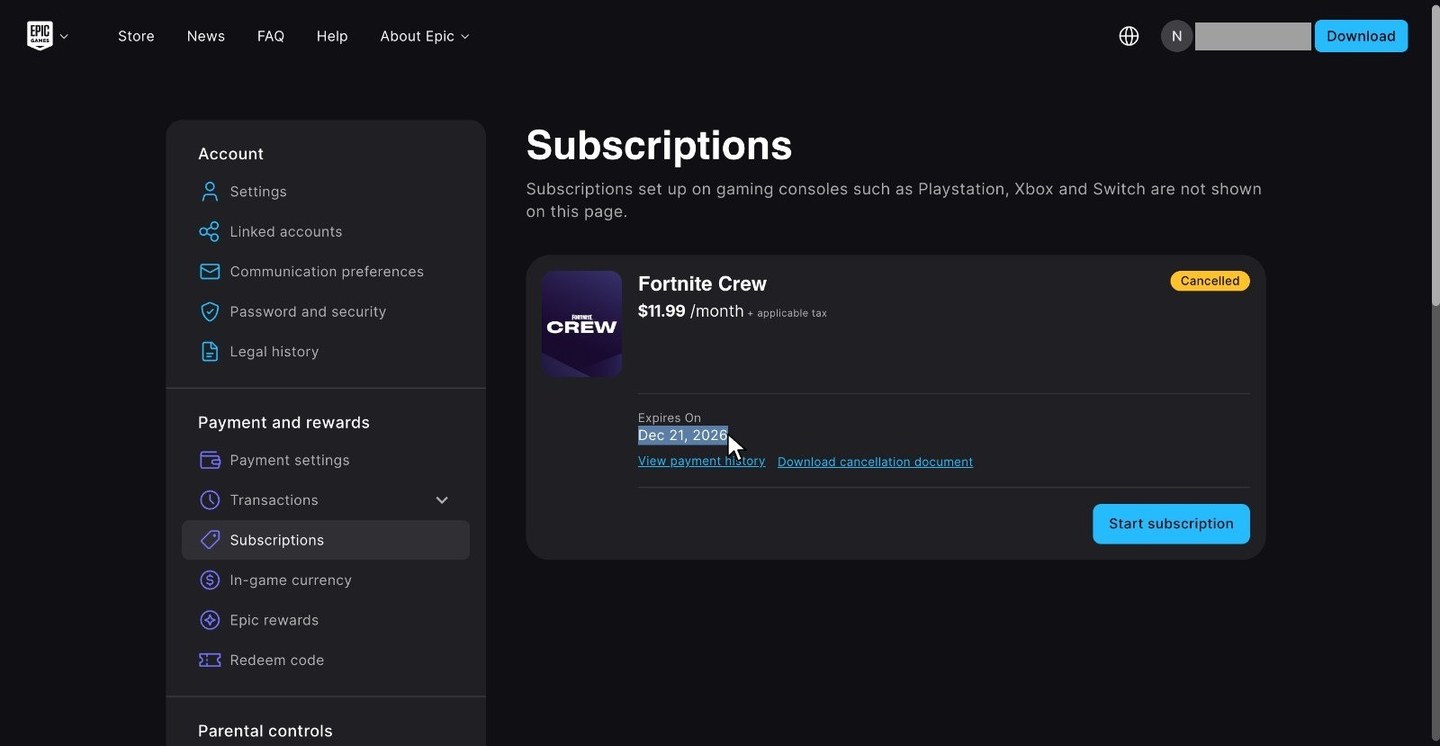
After you cancel your Fortnite Crew subscription
You keep Fortnite Crew until your end date
Epic gives your end date in the "Subscription cancelled" message, and your Fortnite Crew card on the Subscriptions page shows it under "Expires On". Your Crew benefits last until then. In the recording, a Fortnite Crew subscription was canceled on Nov 21 and access runs until Dec 21, the date the card had shown for its renewal.
Your Crew card shows Cancelled
That's normal. Your Fortnite Crew card on the Subscriptions page says "Cancelled" with your "Expires On" date, Download cancellation document shows under it, and Start subscription takes the place of Cancel subscription. Your Crew benefits still run until that date.
Changed your mind?
If Epic bills you, open the Subscriptions page in your Epic Games account and select Start subscription on your Fortnite Crew card, the button Epic's "Subscription cancelled" message names for restarting the service. On the PlayStation website, select Reactivate Subscription, and on a Nintendo Switch, Nintendo's help for in-game subscriptions says automatic renewal can't be turned back on during the current period.
Keep a screenshot of the "Subscription cancelled" message with your end date until that date has passed. After it, check your bank or card statement once to make sure no new charge shows up. If one does, find which platform charged you on the statement or, as Epic's help suggests, on the Subscriptions tab of your Epic Games account, which doesn't show subscriptions set up on PlayStation, Xbox or Switch. Check your Crew subscription on that platform first, because that's where you cancel it. If you didn't make the charge, call your card issuer first, at the number on the back of your card.
How to cancel Fortnite Crew on Xbox
In your Microsoft account, if you bought Crew on Xbox. Sign in at account.microsoft.com/account, select Services & Subscriptions on the left, choose Manage next to Fortnite Crew, then select Turn off recurring billing and follow the prompts.
Microsoft says turning off recurring billing stops future charges and keeps your benefits until the expiration date. Xbox Game Pass Ultimate also includes all current Fortnite Crew benefits, according to Fortnite's Crew page.
How to cancel Fortnite Crew on PS5
In your PS5's settings, if you bought Crew through PlayStation. PlayStation's own help, which names Fortnite Crew, says to go to Settings, then Users and Accounts, Account, Payment and Subscriptions and Subscriptions, select Fortnite Crew and choose Cancel Subscription.
Epic's help gives another path: from Settings, go to Users and Accounts, then Accounts, Payment and Subscriptions, Game and App Services and Fortnite, find Fortnite Crew and select Turn Off Auto-Renew. That screen also shows the date your Crew expires, and PlayStation's help lists this route as an additional cancel method.
Either way, PlayStation deactivates a canceled subscription starting from your next payment date, so Crew keeps working until then. Refunds for a subscription PlayStation bills are PlayStation's decision.
You don't need the console. The PS4 section gives the PlayStation Store website and PlayStation App steps, which work for a PS5 subscription too.
How to cancel the Crew pass in Fortnite
By canceling Fortnite Crew on the platform you bought it on, because the passes come with the subscription. Fortnite's Crew page says $11.99 a month gives subscribers full access to the Battle Pass, OG Pass, LEGO Pass and Music Pass.
Your pass access lasts until the billing period ends, but premium rewards can only be claimed while your subscription is still active, so claim what you've unlocked before then. From December 5, 2026, Crew still includes the Battle Pass, Music Pass, LEGO Pass and Rocket Pass Premium, and the OG Pass ends that day, at the end of Fortnite Chapter 1: OG Season X.
How to cancel Fortnite Crew on PS4
In your PS4's settings, if PlayStation bills you. From the home screen, go to Settings, then Account Management, Account Information and Services List, choose Fortnite, then Fortnite Crew and Turn Off Auto-Renew.
You don't need the console to cancel. On the web, sign in to PlayStation Network at store.playstation.com, click your profile picture, select Subscriptions Management and choose Turn Off Auto Renew next to Fortnite Crew. In the PlayStation App, tap the PlayStation Store icon, then the menu icon at the top right, Subscriptions Management and Cancel below Fortnite Crew. Both work for a PS5 subscription too.
How to cancel Fortnite Crew through Epic Games
In one of three places, if you bought Crew from Epic on PC or mobile: your Epic Games account on the web, the game itself or the Epic Games Store app. In Fortnite, select the Passes tab, then Manage Subscription, Cancellation Info and Cancel Subscription. On the web, it's Subscriptions in your Epic Games account, then Cancel subscription on your Fortnite Crew card and Cancel subscription again to confirm.
Epic's help says to cancel through the platform you bought Crew on, and Epic doesn't handle billing or cancellations for Xbox, PlayStation or Nintendo Switch. To stop the next charge, cancel before your next billing date, which shows on the Passes tab in the game, on the web Subscriptions page and in the Epic Games Store app.
How to cancel Fortnite Crew on PC
In the Epic Games Store app or in your browser, because Crew bought on PC is billed by Epic. In the app, click your profile, select Account, go to the Subscriptions tab and select Cancel. That tab also shows your next payment date. In a browser, use the Subscriptions page of your Epic Games account.
If you play on PC but subscribed somewhere else, such as on Xbox, cancel there. Crew's terms say a subscription stays tied to the platform you bought it on until you cancel it, even though your Crew items work across platforms.
How to cancel Fortnite Crew in your Microsoft account
Under Services & Subscriptions: choose Manage next to Fortnite Crew, then Turn off recurring billing. Microsoft bills a Crew subscription bought on Xbox, and Epic doesn't handle billing or cancellations for it.
Refunds for that subscription are Microsoft's decision too, since Epic leaves refunds on console purchases to the platform. If you can't get into the Microsoft account you subscribed with, Epic's help says to contact Xbox Support.
How to cancel Fortnite Crew on Nintendo Switch
In Nintendo eShop, if you bought Crew on a Switch. Press the Home button, open Nintendo eShop, select your account icon at the top right, then Your Subscriptions, find Fortnite Crew and select Turn Off Automatic Renewal. From a browser, sign in to your Nintendo Account at ec.nintendo.com/my/rights and turn off automatic renewal for Fortnite Crew there. Turn it off at least 48 hours before the period ends, because Nintendo can charge up to 48 hours early. Your Nintendo Account shows that deadline under Passes.
On a Nintendo Switch 2, Nintendo's help puts in-game subscriptions under Passes in your eShop account information, next to Cancel Your Subscription by Turning Off Automatic Renewal. Crew then ends at the end of the current period, and once renewal is off, Nintendo's help for in-game subscriptions says it can't be turned on again until that period is over. V-Bucks from a Nintendo subscription stay on Nintendo.
How to cancel the Crew Pack in Fortnite
By canceling your Fortnite Crew subscription, since the Crew Pack is the Crew-exclusive bundle that comes with it. Fortnite's Crew page says the Crew Pack is yours to keep, and Crew's terms say you keep the content you received while subscribed after you cancel.
The Crew Pack is ending. Epic says the December 2026 Crew Pack is the last one, granted to subscribers throughout December 2026, and in December 2026 you get all Legacy Styles for the Crew Packs you own, whether or not your Crew subscription is active.
What happens if I cancel my Fortnite Crew?
You aren't charged again if you cancel by the deadline of the platform that bills you, and you keep Crew until the end of the billing period you're in. Crew's terms say “If you cancel ahead of the next billing date, your Subscription will not renew, and you will not be charged another Subscription Fee.” If the App Store bills you, cancel at least 24 hours before that date, because Apple's terms say “You will be charged no more than twenty-four (24) hours prior to the start of the latest Subscription period.” On a Nintendo Switch, Nintendo's terms say to turn off automatic renewal “at any time up to 48 hours before the end of the then-current period to avoid the renewal of your subscription and billing of the Subscription Amount.” You also keep the items you received or earned while subscribed, Crew Packs included. If Epic bills you, Crew's terms say you don't get a prorated refund for the rest of the period unless the law where you live entitles you to one, and if a console or mobile platform bills you, that platform decides any refund.
What ends with the period is access. Premium rewards in the Battle Pass can only be claimed while your subscription is active, and the monthly V-Bucks stop with the rest of your Crew benefits.
From December 5, 2026, a break can also cost you V-Bucks. Every subscriber then gets at least 1,000 V-Bucks a month instead of 800, up to 1,600 the longer you stay subscribed, with your tier based on your consecutive months in the past 12 months. If you resubscribe between December 6 and December 31, 2026 at 11:59 pm ET, your starting tier comes from your most recent continuous subscription in the past 12 months. If you resubscribe after December 31, 2026 at 11:59 pm ET, earlier periods don't count, and you start at the Core tier of 1,000 V-Bucks.
Where do you cancel Fortnite Crew?
On the platform you bought it on. Epic's help lists six: Xbox, PlayStation, Nintendo Switch, Epic on PC or mobile, Apple's App Store and the ONE store, an Android app store where you cancel in the ONE store app under My menu, Settings, Subscription, Fortnite, Cancel Subscription and Schedule Cancellation.
If you don't remember which one, look at who charged you on your bank or card statement. Epic's help also says to check the Subscriptions tab in your Epic Games account, and in the recording that page said subscriptions set up on PlayStation, Xbox and Switch aren't shown there.
To move Crew to another platform, cancel it where you subscribed, wait until it expires on what would have been your next billing date, then subscribe on the new platform.
Why did my Fortnite Crew cancel itself?
It may be on hold. Fortnite Crew renews every month until you cancel it, and when Epic can't process a renewal payment, it puts the subscription on hold with the message “Your rewards are temporarily on hold as there was an issue with processing your payment.” While it's on hold, the V-Bucks grant, Crew Pack items and Battle Pass access don't arrive.
If you want Crew back and Epic bills you, make sure your payment method has enough funds, then cancel the current subscription and resubscribe with a valid payment method, and allow 24 to 48 hours for the charge to go through. If PlayStation, Xbox or Nintendo bills you, contact that platform's support to add funds or update your payment method.
Fortnite Crew cancellation FAQ
Common questions about canceling Fortnite Crew. Sources checked Nov 21, 2026.
How do I cancel my Fortnite Crew subscription?
If Epic bills you, sign in at epicgames.com/account, click Subscriptions on the left, then Cancel subscription on your Fortnite Crew card and Cancel subscription again when Epic asks you to confirm. The Passes tab in Fortnite and the Epic Games Store app can cancel it too. If you bought Crew on Xbox, PlayStation, Nintendo Switch or an Apple device, turn off the renewal on that platform instead: your Microsoft account for Xbox, your console's settings or the PlayStation Store website for PlayStation, Nintendo eShop for a Switch and the Settings app for Apple.
How do I cancel Fortnite Crew on mobile?
In the store or app that bills you. For Apple, open Settings on the device you subscribed on, tap your name, then Subscriptions, Fortnite Crew and Cancel Subscription, or sign in at account.apple.com. Do it at least 24 hours before your renewal date, because Apple says it can charge a renewal up to 24 hours before the new period starts. In the PlayStation App, it's under Subscriptions Management. If you bought Crew from Epic on your phone, cancel it in your Epic Games account. If the ONE store bills you on an Android device, open the ONE store app, then My menu, Settings, Subscription, Fortnite, Cancel Subscription and Schedule Cancellation. If you play from Google Play, Epic's help says subscribing to Crew in Google Play isn't supported at this time.
Can you cancel Fortnite Crew anytime?
Yes. Epic's help says you can cancel at any time through the platform you bought Crew on, and Crew's page in the Epic Games Store says the cancellation takes effect at the end of your billing cycle.
Can you cancel Fortnite Crew right away?
You can cancel right away, but Crew keeps running until the end of your billing period. If Epic bills you, Epic says canceling turns off future renewals without refunding the period you're in, unless the law where you live requires a refund. If a console or mobile platform bills you, that platform decides any refund.
Does Fortnite Crew cancel automatically?
No. Fortnite Crew renews automatically every month until you cancel it. If a renewal payment fails, Epic puts the subscription on hold, which holds back your Crew rewards without canceling it.
Can I buy Fortnite Crew and then cancel it?
Yes. You can cancel any time after you subscribe and still keep your Crew benefits until the billing period ends, along with the items you received. If you bought Crew directly from Epic, Epic says that first payment isn't refundable unless the law where you live requires a refund.
Why can't I cancel my Fortnite Crew subscription?
Check where you bought it first. Crew is canceled through the platform you subscribed on, and Epic doesn't handle cancellations for Xbox, PlayStation or Nintendo Switch, so your bank or card statement tells you where to go. Epic's own Subscriptions page says subscriptions set up on those consoles aren't shown there. If you can't get into the console account you subscribed with, Epic says to contact PlayStation, Xbox or Nintendo support. On a Nintendo Switch, a missing cancel button means automatic renewal was never set up or is already off, and Apple says a subscription with no Cancel button is already canceled.
How do I cancel Fortnite Crew on a console?
With the console's own platform, because Epic doesn't handle billing or cancellations for Xbox, PlayStation or Nintendo Switch. On Xbox, it's Turn off recurring billing in your Microsoft account. On a PS5, go to Payment and Subscriptions under Users and Accounts in Settings, and on a PS4, to Services List under Account Management. On a Nintendo Switch, it's Your Subscriptions in Nintendo eShop.
Is it easy to cancel Fortnite Crew?
Yes, once you know which platform bills you. In the recording, canceling on epicgames.com took 5 steps with no offer to stay: Cancel subscription on the Fortnite Crew card opens a window that asks you to confirm, and Cancel subscription there is the click that cancels. If Xbox, PlayStation or Nintendo Switch bills you, Epic doesn't handle the cancel, so you turn off the renewal in that platform's settings.
Can I cancel Fortnite Crew online?
Yes, on the website of the platform that bills you: epicgames.com/account for Epic, account.microsoft.com/account for Xbox, store.playstation.com for PlayStation, ec.nintendo.com/my/rights for Nintendo and account.apple.com for Apple.
How do I turn off auto-renew for Fortnite Crew?
Cancel Crew on the platform that bills you, because canceling is what turns off the renewal. Each platform words it its own way: Turn off recurring billing on Xbox, Turn Off Auto-Renew on PlayStation, Turn Off Automatic Renewal on Nintendo Switch and Cancel subscription on Epic's website. Crew stays active until your billing period ends.
When can you cancel Fortnite Crew?
Any time, but before your next billing date if you want to skip the next charge. In Fortnite, find that date on the Passes tab: select Fortnite Crew, then Manage Subscription and Cancellation Info. In the Epic Games Store app, it's on the Subscriptions tab of your account, and on the web your Fortnite Crew card on the Subscriptions page lists it under "Renews on". Subscriptions set up on PlayStation, Xbox and Switch aren't shown on that page. If the App Store bills you, cancel at least 24 hours before your billing date, because Apple says it can charge a renewal up to 24 hours before the new period starts. On a Nintendo Switch, turn off automatic renewal at least 48 hours before the period ends, because Nintendo can charge up to 48 hours early.
Can you cancel Fortnite Crew without logging in?
No. Each route Epic's help gives starts from an account you're signed in to, whether that's your Epic Games account, your Microsoft account, PlayStation Network, your Nintendo Account or your Apple Account. If you can't get into the Xbox, PlayStation or Nintendo account you subscribed with, Epic says to contact that console's support.
Can an app or service cancel Fortnite Crew for me?
zuzu can, if Epic bills you. Text zuzu that you want to cancel Fortnite Crew, and it goes through the same steps on epicgames.com, asks you to confirm before the last step and texts you when it's done, with your end date.
The ways to cancel, the billing, refund and renewal rules and the December 5, 2026 changes come from Epic Games' help articles on canceling Fortnite Crew, the next billing date, refunds, changing platforms, the December 5, 2026 changes, failed payments and Crew on Android, from the Fortnite Crew terms, the Epic Games Store refund policy, Fortnite's Crew page and Crew's Epic Games Store page. The PlayStation, Xbox, Nintendo and Apple steps also come from PlayStation Support, Xbox Support, Nintendo Support, Nintendo's automatic renewal terms, Apple Support and Apple's Media Services Terms. The card issuer advice comes from the FTC's what to do if you were scammed. The rest comes from the recorded cancellation on Nov 21, 2026.
How this guide was made

Written by Harsh Bhati
- Recorded click by click on epicgames.com on Nov 21, 2026, canceling a monthly Fortnite Crew subscription billed by Epic.
- The ways to cancel and the billing, refund and renewal rules come from Fortnite Crew's terms and Crew page, Epic Games' help articles and PlayStation, Xbox, Nintendo and Apple support, checked on Nov 21, 2026.
Cancel more subscriptions you don't use and save money
Each guide follows one real cancellation on the company's own website, with every click recorded.
 Cancel Fubo
7 steps · 1 min 1 s on the website
 Cancel HBO Max
5 steps · 45 s on the website
 Cancel Kindle Unlimited
4 steps · 32 s on the website
 Cancel Netflix
5 steps · 44 s on the website
 Cancel Paramount+
5 steps · 27 s on the website
 Cancel Peacock
4 steps · 20 s on the website
 Cancel Planet Fitness
10 steps · 2 min 13 s on the website
 Cancel Tinder Gold
7 steps · 49 s on the website
Cancel your Fortnite Crew subscription easily and start saving today
Text zuzu and it's handled.