 Last updated Nov 21, 2026
How to cancel Discord Nitro
If you bought Nitro on desktop or in a browser, click Open Discord on discord.com, then the User Settings cogwheel, Subscriptions, Cancel, Continue and Confirm: 7 steps, 58 s.
Watch zuzu cancel a Discord Nitro subscription
6 ways to cancel your Discord Nitro subscription
Discord's cancel article lists 5 ways to cancel, and the one you use depends on where you bought Nitro. Texting zuzu is a 6th: zuzu does the online route for you.
Online
In your Discord account on discord.com or the desktop app, if Discord bills you for a plan bought there. You need your login.
58 s, 7 steps See howDiscord app
In the Discord app on your Android phone, under Billing Settings and Manage Nitro, if Google Play bills you.
Your Android phone See howApple
In Settings on your iPhone, under your name and Subscriptions, if Apple bills you.
Your Apple account See howGoogle Play
In your Google Play subscriptions, if Google Play bills you.
Your Google Play account See howBilling Support
With Discord's Billing Support, if you can't log in and Discord or Google Play bills you.
Your account email See howCan you cancel your Discord Nitro subscription online?
Yes, you can cancel your Discord Nitro subscription online, and the same steps cancel Nitro Basic, which is a separate plan. If you bought it on desktop or in a browser, click Open Discord at discord.com, or open the desktop app, and click the cogwheel next to your username to open User Settings. Open the Subscriptions tab, click Cancel in your Nitro banner, then Continue and Confirm.
The recorded cancellation on Nov 21, 2026 took 7 steps and 58 s. If you bought Nitro on a phone, cancel it in the Discord app under Manage Nitro, or in your Apple or Google Play account if one of them bills you. If you can't log in, Discord's Billing Support can cancel a desktop, browser or Android plan through its support form.
Before you start, have your Discord login ready, and check where you bought Nitro. Discord only lets you cancel on the type of device you bought it on, so Discord's website and desktop app can't cancel a plan you bought on your phone: cancel it in the Discord app, or with Apple or Google Play if one of them bills you.
Timing matters more than speed. Discord bills Nitro once per billing period, so cancel before the renewal date shown on your Subscriptions tab to stop the next charge. If the App Store bills you, cancel at least 24 hours before that date, because Apple says it can charge a renewal up to 24 hours before the new period starts. You keep Nitro until the end of the period you're in, when the plan ends.
The part people miss is that Cancel in the banner doesn't cancel on its own. Discord first asks "Are you sure you want to cancel?" and lists the perks you'll lose, then "Confirm cancellation" gives the date you lose access, and only Confirm cancels. Afterward the Nitro banner says (Pending Cancellation) and offers Re-subscribe until that date, which is normal. Removing your card or disabling your account doesn't cancel Nitro, and extra Server Boosts you bought are their own subscriptions, which keep renewing until you cancel them on the Server Boost tab.
The 7 steps further down show the online route screen by screen. If you'd rather not click through it, text zuzu and it's handled.
Discord Nitro cancellation policy 2026: what to know before you cancel
The rules that decide what you pay, from the renewal date to extra Server Boosts.
Cancel before your renewal date
Discord bills Nitro once per billing period. Cancel before the renewal date on your Subscriptions tab, and the plan ends on that date. If the App Store bills you, cancel at least 24 hours before that date, because Apple says it can charge a renewal up to 24 hours before the new period starts.
Cancel on the type of device you bought Nitro on
Desktop and browser plans are canceled there, mobile plans in the Discord app or with the store that bills you, and App Store plans only in Apple settings.
You keep Nitro until your billing period ends
Canceling stops the next charge, and Nitro or Nitro Basic stays active until the end of the billing period you're in.
Ask for a refund within 5 days of your first purchase
Discord reviews requests sent within 5 days of the initial purchase, one Nitro refund per person. There's none for a Paysafecard payment, or if you redeemed or received any promotional items from Discord or from a Discord partner promotion, such as free Xbox Game Pass, within 5 days of subscribing or renewing, and Apple handles App Store refunds.
Extra Server Boosts keep renewing
Extra Boosts are their own subscriptions and keep renewing until you cancel them on the Server Boost tab. Nitro's 30% off extra Boosts ends when your Nitro does.

Text zuzu and skip 7 manual steps
zuzu is an assistant you text. It signs in and cancels for you.
- 1You text: "Hey zuzu, cancel my Discord Nitro subscription."
Use your own words. Text before your renewal date to stop the next charge.
- 2You tap Confirm cancellation when zuzu asks
At the last step zuzu tells you the date Nitro renews and that your Nitro access ends that day, then asks before it cancels. Tap Confirm cancellation, or Keep Nitro to stop.
- 3zuzu texts you when it's done, with your end date
zuzu goes through the same screens. You can check the Subscriptions tab afterward, where your Nitro banner says (Pending Cancellation) and offers Re-subscribe until your plan ends.
The old way: cancel Discord Nitro step by step
Prefer to do it yourself? You need your Discord login. Each step shows the screen you'll see.
This is the route Discord expects you to take if you bought Nitro on desktop or in a browser, and it took 58 s in the recording. Open More detail under any step for the full explanation.
Watch the full cancellation by hand · 0:58
The 7 steps · 58 s
-
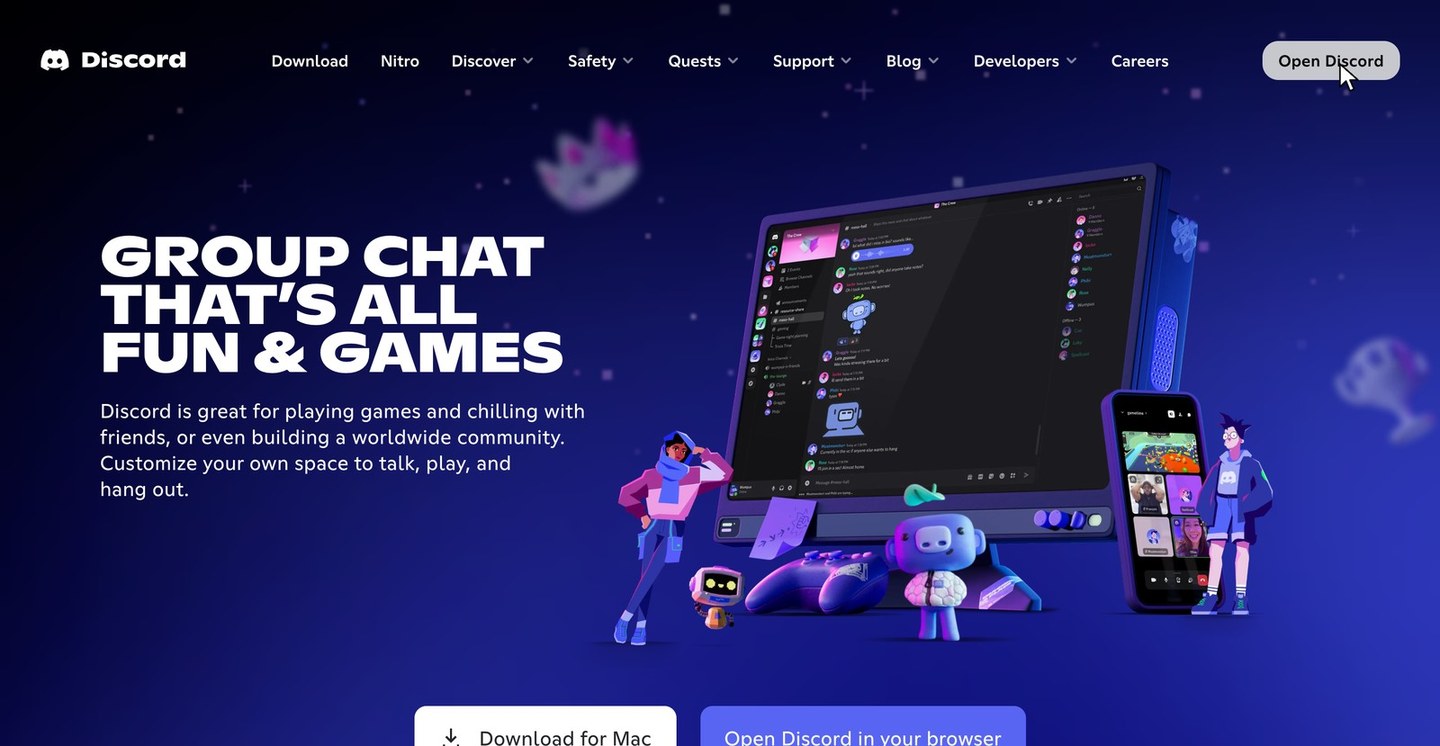
Click Open Discord
Go to discord.com, sign in and click Open Discord at the top right.
Watch this step · 0:01More detail on this step
Use the Discord account that pays for Nitro. If you bought Nitro in the Discord app on your phone, cancel it on your phone or in your Apple or Google Play account, because Discord's website and desktop app can't cancel a plan bought on a phone.
-
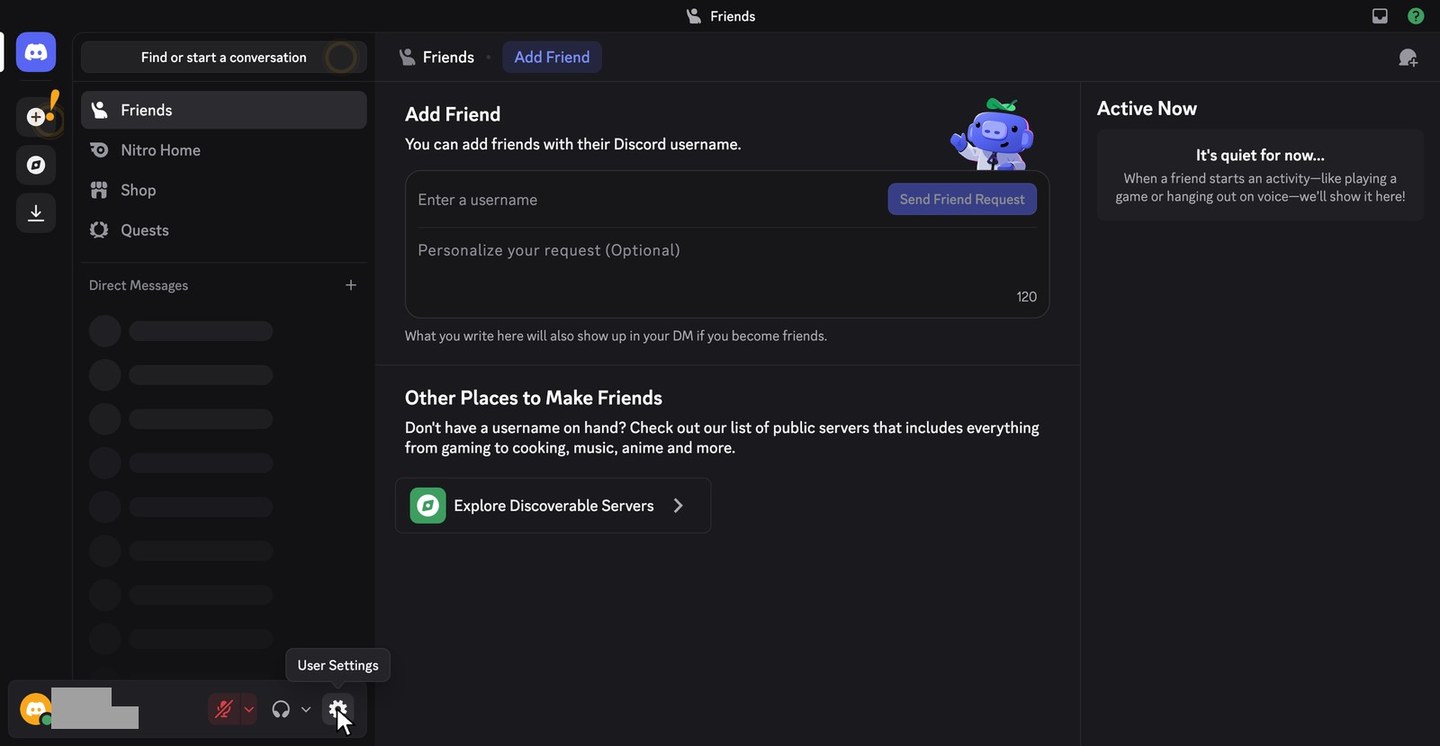
Click the User Settings cogwheel
Discord opens in your browser. Click the cogwheel at the bottom left, next to your name, to open User Settings.
Watch this step · 0:05More detail on this step
In the Discord desktop app, start here: the cogwheel next to your username opens User Settings there too.
-
Click Subscriptions
User Settings opens on your account details. In the list on the left, click Subscriptions.
Watch this step · 0:08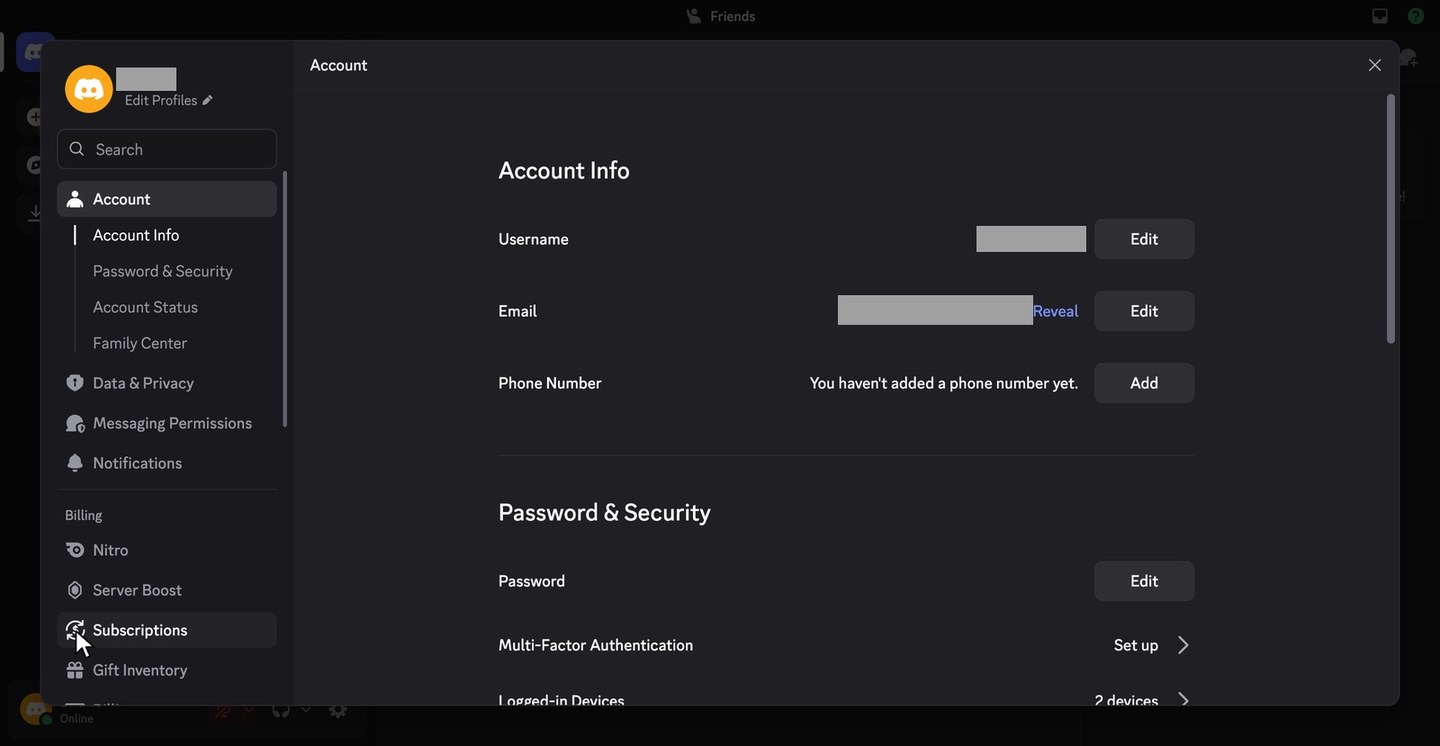
Tired already? zuzu does all 7 steps for you.
-
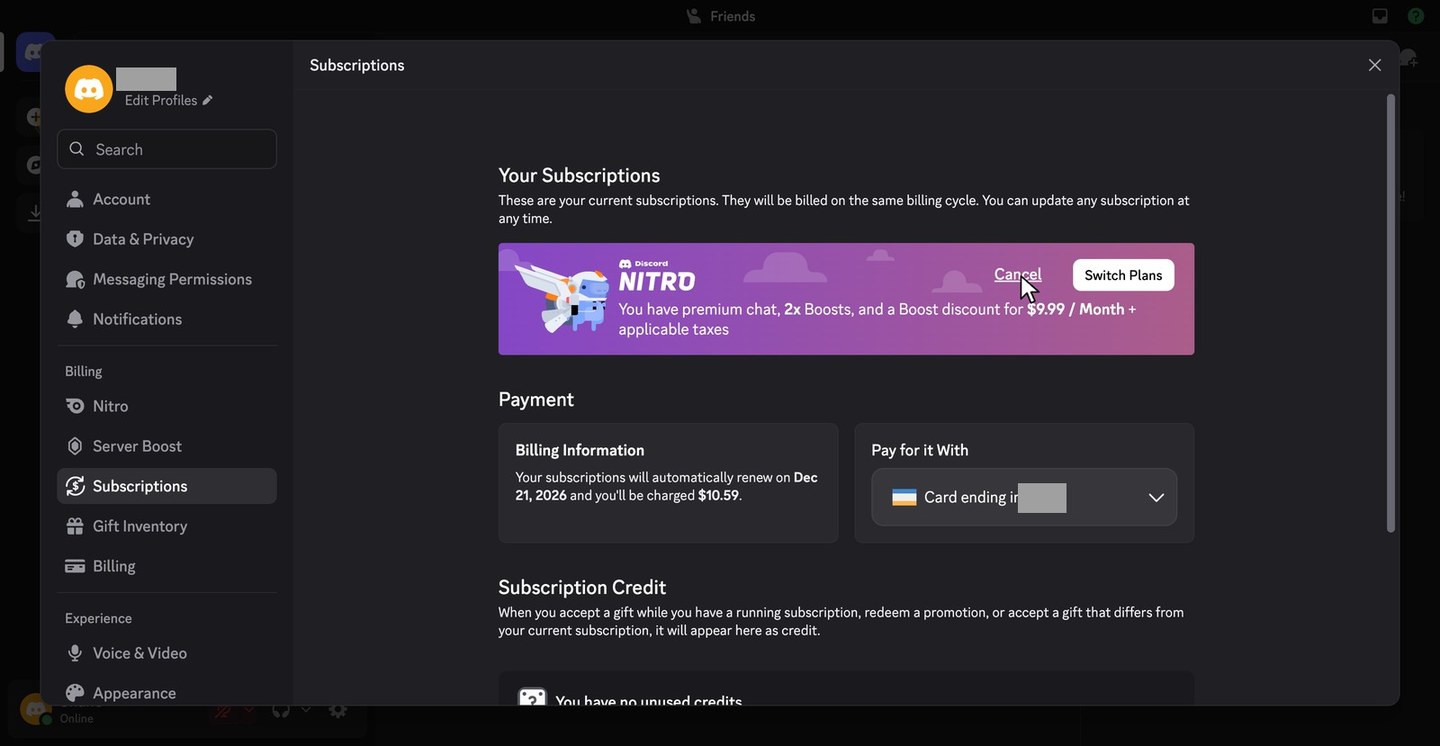
Click Cancel
Billing Information shows the date your plan renews. Click Cancel in the Nitro or Nitro Basic banner at the top.
Watch this step · 0:13More detail on this step
Canceling Nitro doesn't cancel extra Server Boosts you bought: each is its own subscription and keeps renewing. To stop them too, open the Server Boost tab, click the three dots next to each Boost and click Cancel Boost Subscription.
-
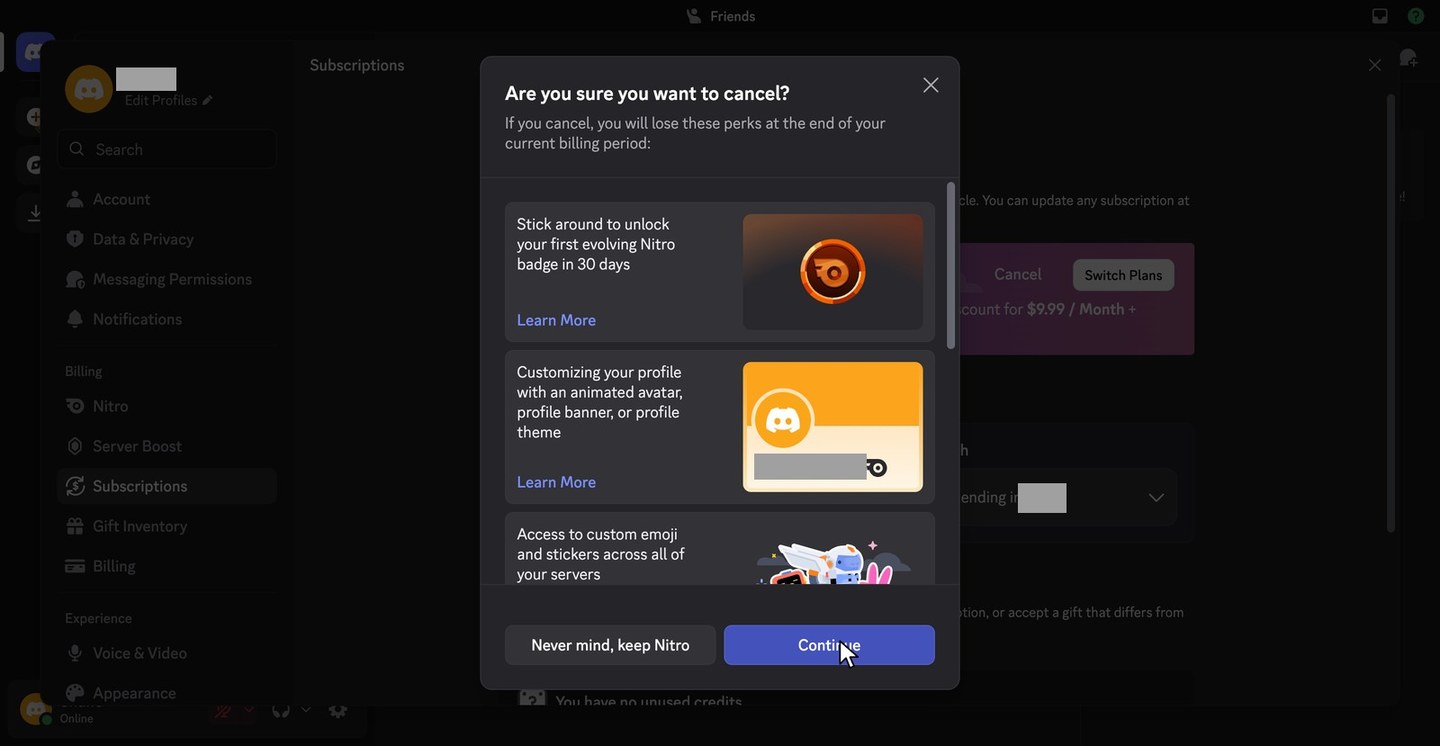
Click Continue
Discord asks "Are you sure you want to cancel?" and lists the perks you'll lose. Click Continue.
Watch this step · 0:29More detail on this step
Nothing is canceled yet. To keep your plan, click Never mind, keep Nitro instead.
-
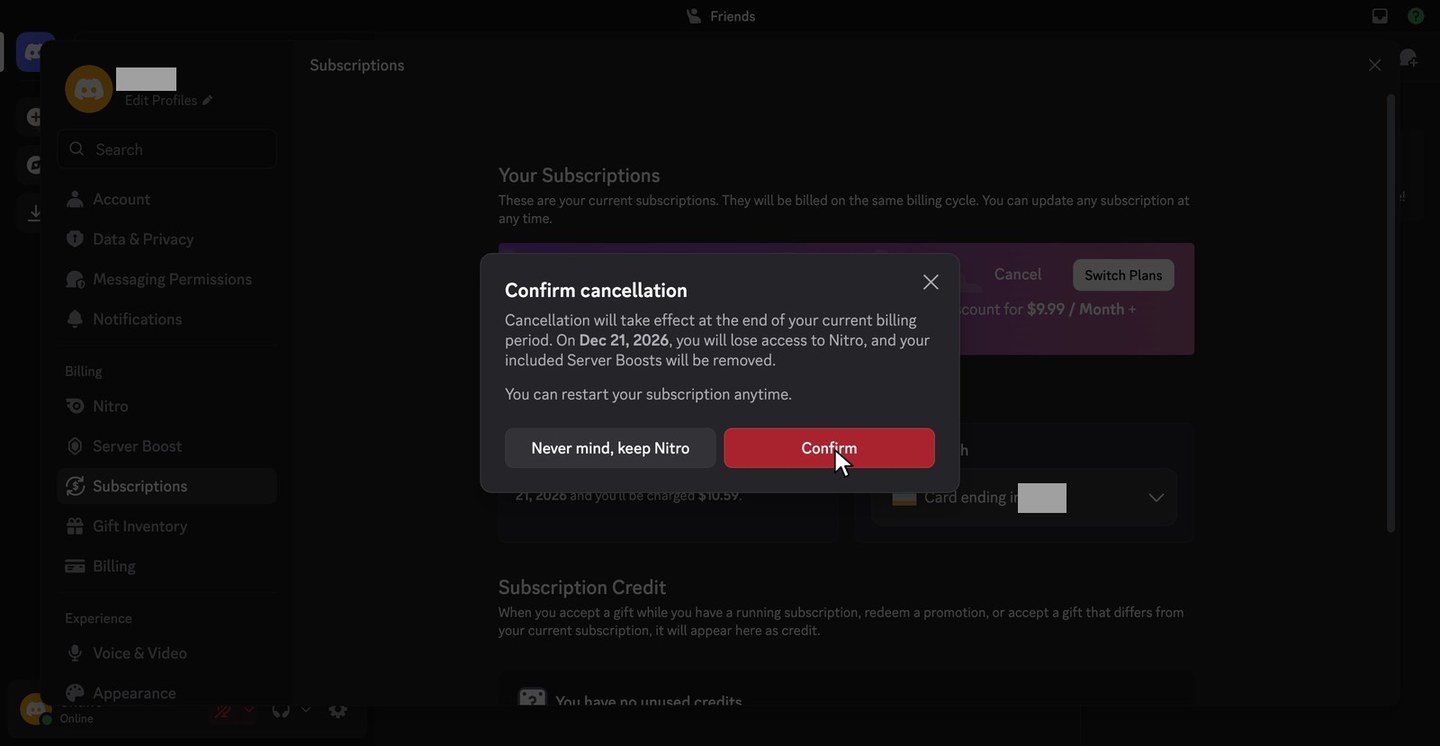
Click Confirm
This is the click that cancelsIn "Confirm cancellation", Discord gives the date you'll lose Nitro, the end of your current billing period. Click Confirm.
Watch this step · 0:37More detail on this step
On that date, the Server Boosts included with Nitro are removed too. To keep your plan instead, click Never mind, keep Nitro.
-
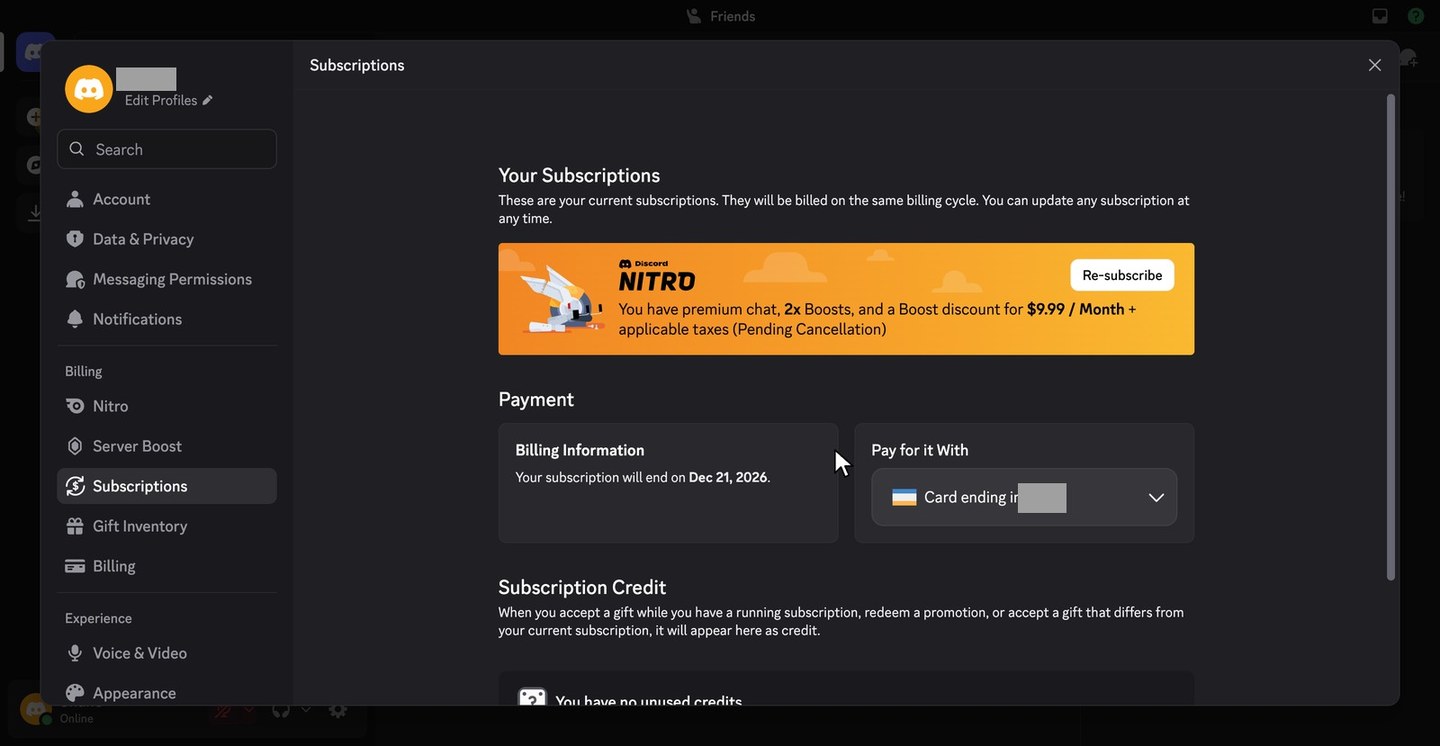
Check your end date
DoneYour Nitro banner now says (Pending Cancellation), and Billing Information says "Your subscription will end on" with your end date. Take a screenshot in case you need proof later.
Watch this step · 0:50More detail on this step
Nitro keeps working until that date. To undo the cancel before then, click Re-subscribe in the banner.
After you cancel your Discord Nitro subscription
You keep Nitro until your end date
On the Subscriptions tab, Billing Information says "Your subscription will end on" that date, the end of your current billing period, and in the Discord app your Manage Nitro settings show it too. Your Nitro or Nitro Basic benefits last until then. In the recording, a monthly Nitro subscription was canceled on Nov 21, 2026 and access runs until Dec 21, 2026, the day it was due to renew.
Your Nitro banner shows Pending Cancellation
That's normal. The plan is canceled but runs until the end of your billing period, and until then the Nitro banner on the Subscriptions tab ends with (Pending Cancellation) and offers Re-subscribe in place of Cancel.
Changed your mind?
Click Re-subscribe in the Nitro banner on the Subscriptions tab before your billing period ends, and your plan carries on. Once the period has ended, you buy a new subscription.
Keep a screenshot of your canceled plan and the date it expires until that date has passed. After it, check your bank or card statement once to make sure no new charge shows up. If one does, check the Billing and Subscriptions tabs in User Settings on each of your Discord accounts first, including any alternate accounts, since it may be a renewal of a plan or an extra Server Boost you still have. For a renewal of your own plan, ask Discord's Billing Support for a refund through its support form before you dispute it with your bank, because Discord says a bank dispute may get your account suspended while it investigates. For an App Store plan, ask Apple for a refund at reportaproblem.apple.com, and for a Google Play charge you don't recognize, request the refund from the Google Play Store. If you didn't make the charge, call your card issuer first, at the number on the back of your card.
How to cancel a Nitro subscription on mobile
In the Discord app under Manage Nitro, or with Apple or Google Play if one of them bills you. In the app, tap your avatar in the bottom right, then the cogwheel in the top right, scroll down to Billing Settings and tap Manage Nitro. Cancel Nitro or Nitro Basic there and follow the prompts until Discord confirms the cancellation. If you bought Nitro on desktop or in a browser, the Discord app on your phone can't cancel it: Discord says to cancel it in the desktop app or a browser, on the Subscriptions tab in User Settings.
If you bought Nitro on an iPhone or iPad through the App Store, Discord can't manage it, and you cancel it only in your Apple settings. Open Settings, tap your name, then Subscriptions, tap the Discord subscription and tap Cancel Subscription. Do it at least 24 hours before your renewal date, because Apple says it can charge a renewal up to 24 hours before the new period starts. If there's no cancel button, or you see an expiration message in red, it's already canceled. Discord can't cancel an App Store plan on an Android device, on desktop or in a browser, but you don't need your iPhone for it: on an Android phone, Apple says to go to account.apple.com, sign in to your Apple Account and follow the onscreen instructions.
If Google Play bills you, tapping Cancel in the Discord app opens the Google Play Store app, where you confirm with Cancel Subscription. You can also do it on a computer: go to your Google Play subscriptions, click Manage next to Discord, then Cancel subscription. Uninstalling the Discord app doesn't cancel it.
How to cancel a Nitro subscription on PC
In User Settings, if you bought Nitro on a computer. In the Discord desktop app or at discord.com, click the cogwheel next to your username, open the Subscriptions tab and click Cancel in your Nitro or Nitro Basic banner, then Continue and Confirm. The same tab shows your renewal date and the amount you'll be charged.
Discord won't cancel a plan you bought on your phone from its desktop app or website, and an App Store plan is canceled only in Apple settings. If Google Play bills you, though, Google lets you cancel in your Google Play subscriptions on a computer.
How to cancel a Discord Nitro free trial
The same way as a paid plan, any time before the trial ends. Open User Settings, select Subscriptions and click Cancel next to your subscription. That only starts the process: follow the prompts until your Nitro banner says Pending Cancellation. You still get the rest of your trial, and Discord doesn't charge you on the renewal date.
If the App Store bills your trial, cancel it in your Apple settings at least 24 hours before the trial ends, as Apple asks. Server Boosts you bought during the trial stay active after you cancel, lose Nitro's 30% Boost discount and renew at their full price, so cancel them too if you don't want them.
If I cancel my Nitro subscription, do I lose Nitro?
Not right away. After you cancel, you keep Nitro or Nitro Basic until the end of your current billing period, and the plan ends on its renewal date with no new charge. Billing Information on the Subscriptions tab, or Manage Nitro in the app, shows the date it expires, and that's the day you lose the benefits, along with the Server Boosts included with Nitro.
A plan Apple bills works the same way: it ends at the end of the current billing period. If you have Subscription Credit from a gift, Discord uses it when you buy the same Nitro plan again on desktop or in a browser, before it charges your card. If you also pay for a separate Server Boost subscription, Discord first charges a prorated amount for the rest of that month and uses the credit at the next renewal. A refund is a separate request: Discord's refund policy gives 5 days from the initial purchase to ask, one Nitro refund per person and none for a Paysafecard payment or if you redeemed or received any promotional items from Discord or from a Discord partner promotion, such as free Xbox Game Pass, within 5 days of subscribing or renewing. Apple handles refunds for a plan it bills.
Discord Nitro cancellation FAQ
Common questions about canceling Discord Nitro. Sources checked Nov 21, 2026.
How do I cancel my Discord Nitro subscription?
If you bought Nitro on desktop or in a browser, click Open Discord at discord.com, or open the desktop app, then click the cogwheel next to your username and go to the Subscriptions tab. Click Cancel in the Nitro or Nitro Basic banner, then Continue and Confirm. If you bought it on a phone, tap your avatar in the Discord app, then the cogwheel, and tap Manage Nitro under Billing Settings. An App Store plan is canceled only in your Apple settings, and if you can't log in, Discord's Billing Support can cancel a desktop, browser or Android plan through its support form.
Why can't I cancel Discord Nitro?
Check where you bought it first. Discord only lets you cancel on the type of device you used to buy Nitro, so a plan bought on your phone can't be canceled in Discord on desktop. An App Store plan is canceled only with Apple, and if you now use an Android phone, Apple says to go to account.apple.com. A plan Google Play bills can also be canceled in your Google Play subscriptions on a computer. A plan that's past due because a payment failed can still be canceled from Subscriptions. If you can't log in at all, ask Discord's Billing Support to cancel it through its support form, from the email address on your account.
Can I cancel Discord Nitro anytime?
Yes. Discord lets you cancel Nitro or Nitro Basic at any time, and the subscription stays active until the end of your current billing period. Cancel it on the same type of device you bought it on.
How do I cancel Discord Nitro auto renew?
Cancel your plan, and it stops renewing. Discord bills Nitro once per billing period, and the Subscriptions tab in User Settings shows your renewal date and the amount you'll be charged. Once you cancel, the plan ends on that renewal date with no new charge. If the App Store bills you, cancel in your Apple settings at least 24 hours before the renewal date, because Apple says it can charge a renewal up to 24 hours before the new period starts.
How do I cancel a Nitro Boost on Discord?
Separately from Nitro. A Nitro subscription, monthly or yearly, includes 2 Server Boosts, but Boosts you buy on top are their own subscriptions. On desktop, open User Settings, go to the Server Boost tab, click the three dots next to the Boost and click Cancel Boost Subscription. It ends at the end of its billing period. If you cancel only Nitro, your extra Boosts keep renewing, and Nitro's 30% off extra Boosts ends when your Nitro does.
How do I cancel Discord Nitro Classic?
From the Subscriptions tab, where Discord lists every active plan with the option to cancel it, but Classic won't come back. Discord says that once you cancel Nitro Classic, you can't subscribe to it again, because it now sells only Nitro and Nitro Basic.
Can you cancel Discord Nitro early?
Yes, but your plan doesn't end early. You can cancel any time, and Nitro keeps working until the end of the billing period you're in. Getting money back is a separate refund request: Discord's refund policy gives 5 days from the initial purchase to ask, one Nitro refund per person and none for a Paysafecard payment or if you redeemed or received any promotional items from Discord or from a Discord partner promotion, such as free Xbox Game Pass, within 5 days of subscribing or renewing. Apple handles App Store refunds.
What if I forgot to cancel Discord Nitro?
Cancel now to stop the next renewal. The period you've already been charged for runs to its end. Discord's refund policy gives 5 days from the initial purchase to ask for a refund, one Nitro refund per person and none for a Paysafecard payment or if you redeemed or received any promotional items from Discord or from a Discord partner promotion, such as free Xbox Game Pass, within 5 days of subscribing or renewing. Apple handles App Store refunds. If a renewal charged you, you can still ask Discord's Billing Support for a refund through its support form, and Discord reviews each request case by case. For a Google Play charge you don't recognize, Discord says to request the refund from the Google Play Store. Discord's renewal refund article says a refund outside its standard refund policy may get your Discord account disabled.
Can you cancel a Discord Nitro gift?
Not once someone else has claimed it. Discord can't refund a Nitro gift after another user claims it, and for an unclaimed gift bought on desktop, web or Android, you have 5 days from the purchase to ask its support team for a refund, unless you paid with a Paysafecard, and Discord gives only one refund in each purchase category. A gift you receive while you have a plan becomes Subscription Credit, which Discord uses for a matching Nitro plan on desktop or in a browser.
How do I cancel monthly Discord Nitro?
The same way as a yearly plan. Nitro and Nitro Basic come as monthly or annual subscriptions, and either one is canceled from the Subscriptions tab and runs to the end of its billing period. On a monthly plan, cancel before the monthly renewal date to stop the next month's charge, or at least 24 hours before it if the App Store bills you, because Apple says it can charge a renewal up to 24 hours early.
How do I cancel a Discord Nitro payment?
Cancel the subscription itself, because removing your card doesn't end it. Discord says to cancel first, on the Subscriptions tab, then remove your payment method if you want it gone. Disabling your Discord account doesn't stop the charges either.
How do I cancel Discord Nitro on my phone?
In the Discord app on that phone, under Manage Nitro. Discord asks you to cancel a mobile purchase on a mobile device, and a plan Google Play bills can also be canceled in your Google Play subscriptions on a computer. If the App Store bills you, your Apple settings are the only place to cancel it, on your iPhone or on the web. Do it at least 24 hours before your renewal date, because Apple says it can charge a renewal up to 24 hours before the new period starts.
Can I get a refund if I cancel Discord Nitro?
Within 5 days of the initial purchase, under Discord's refund policy. Send the request through Discord's support form, and Discord reviews it case by case and gives each person one Nitro refund at most. There's no refund for a Paysafecard payment, or if you redeemed or received any promotional items from Discord or from a Discord partner promotion, such as free Xbox Game Pass, within 5 days of subscribing or renewing. If a renewal charged you, you can still ask Discord's Billing Support through the same form. For a Google Play charge you don't recognize, Discord says to request the refund from the Google Play Store. Discord's renewal refund article says a refund outside its standard refund policy may get your Discord account disabled. On Android, give the GPA number from your Google Play confirmation email, which Discord's refund article says gets a quicker answer than a payment ID. For an App Store purchase, ask Apple at reportaproblem.apple.com: choose I'd like to, then Request a refund, and expect an update in 24 to 48 hours.
How do I cancel Discord Nitro without logging in?
Ask Discord's Billing Support. Send a request through its support form from the email address on your Discord account, and it can cancel a desktop, browser or Android plan for you. The form first asks you to sign in to Discord Support: if you're new to it, choose Sign up and use that same email address. Discord can't manage App Store subscriptions, so cancel those with Apple, in your iPhone's Settings under your name and Subscriptions. A charge marked DISCORD* or PAYPAL DISCORD on your statement is a Discord payment and may be your own plan renewing. For a renewal of your own plan, ask Discord's Billing Support for a refund through the same form before you dispute it with your bank, because a bank dispute may get the account suspended while Discord investigates. For an App Store plan or a Google Play charge you don't recognize, ask that store for the refund. If you didn't make the charge, call your card issuer first, at the number on the back of your card.
Can an app or service cancel Discord Nitro for me?
zuzu can. Text zuzu that you want to cancel Discord Nitro, and it goes through the same steps and texts you when it's done, with your end date. Text it before your renewal date to stop the next charge.
The ways to cancel and the rules on billing, refunds, trials, gifts and Server Boosts come from Discord's help articles on canceling Nitro, Nitro and Nitro Basic, managing subscriptions, refunds, refund requests, iOS purchases, Google Play purchases, free trials, Subscription Credit, past-due plans, canceling Server Boosts, refunds without account access, reporting an unrecognized charge and disabling an account, from Apple Support's pages on canceling a subscription and requesting a refund and Apple's Media Services Terms, and from Google Play Help's article on canceling a subscription. The advice on a charge you didn't make comes from the FTC's page on what to do if you were scammed. The rest comes from the recorded cancellation on Nov 21, 2026.
How this guide was made
Written by Harsh Bhati
- Recorded click by click on discord.com on Nov 21, 2026, canceling a paid monthly Discord Nitro subscription.
- The ways to cancel and the billing, refund, trial, gift and Server Boost rules come from Discord's help articles, and from Apple Support and Google Play Help, checked on Nov 21, 2026.
Other guides for Discord Nitro
 Discord scam check
DMs, gift links and QR codes
Cancel more subscriptions you don't use and save money
Each guide follows one real cancellation on the company's own website, with every click recorded.
 Cancel Fortnite Crew
5 steps · 37 s on the website
 Cancel Fubo
7 steps · 1 min 1 s on the website
 Cancel HBO Max
5 steps · 45 s on the website
 Cancel Instacart
5 steps · 34 s on the website
 Cancel Kindle Unlimited
4 steps · 32 s on the website
 Cancel Netflix
5 steps · 44 s on the website
 Cancel NFL+
4 steps · 50 s on the website
 Cancel Paramount+
5 steps · 27 s on the website
Cancel your Discord Nitro subscription easily and start saving today
Text zuzu and it's handled.