 Netflix · Updated Nov 4, 2026
How to cancel Netflix
See every click it takes to cancel Netflix, recorded on a real account.
 ZuzuBusiness Account
Sign in once in this secure form: https://app.zuzu.ai/b/••••••••••
Cancel Netflix step by step
You'll need your Netflix login.
-
1
Open Account
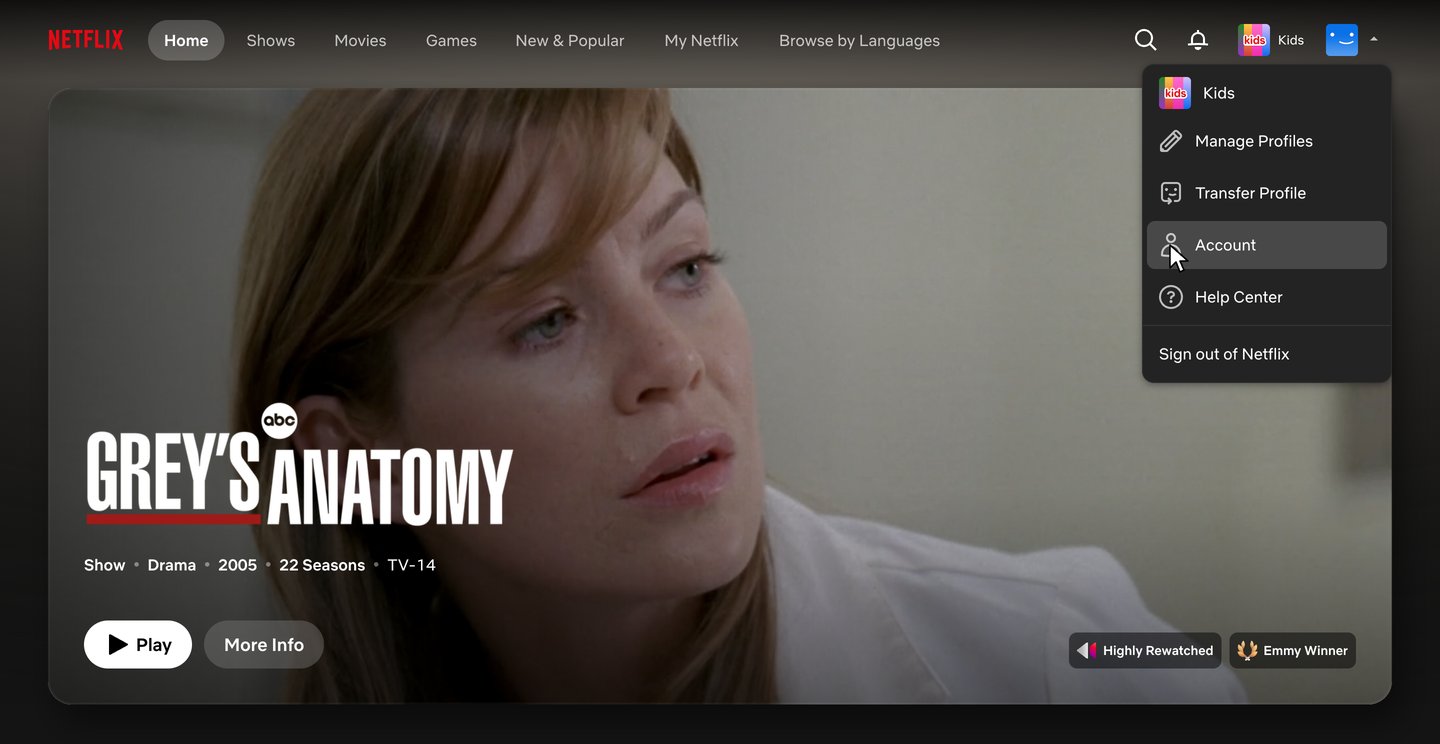
Go to netflix.com. On the home page, click your profile icon in the top right, then click Account.
-
2
Click Manage membership
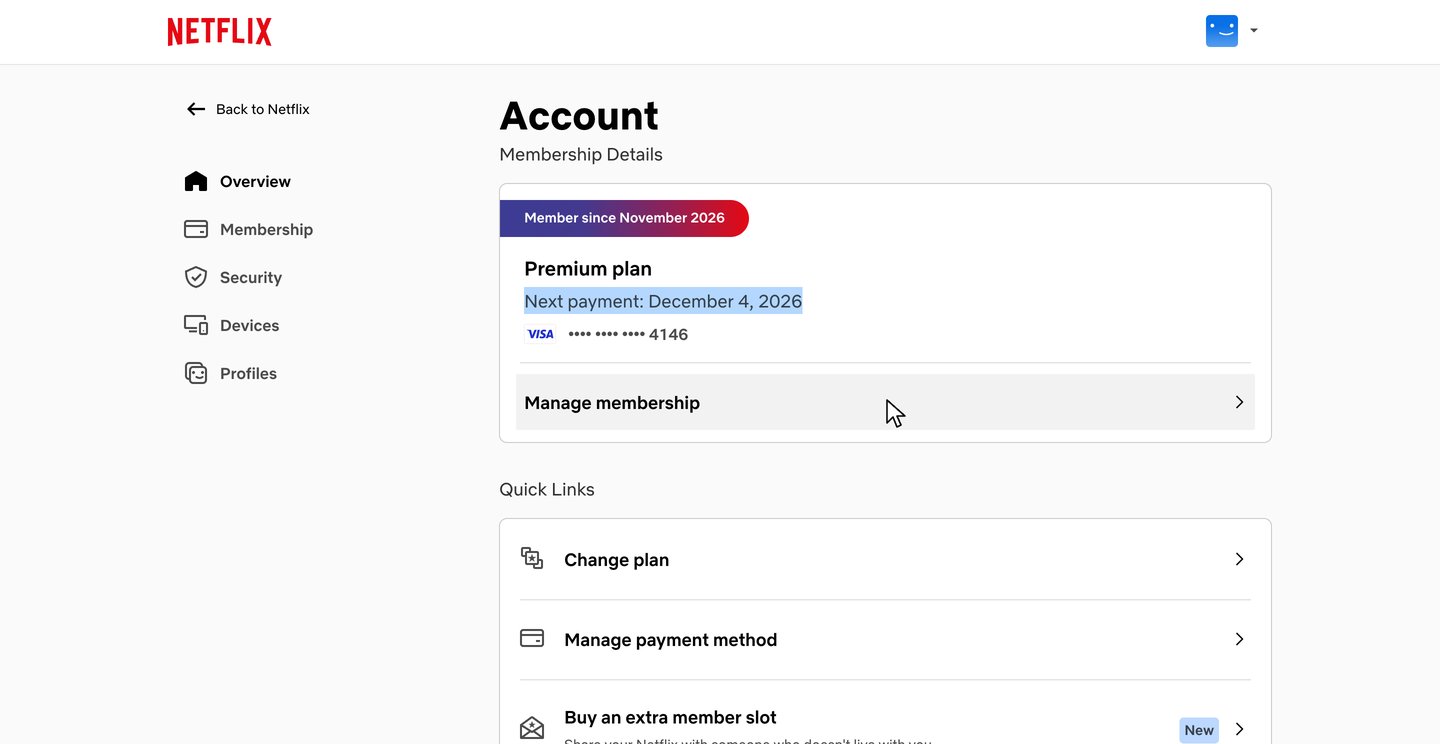
The Account page shows your plan and next payment date under Membership Details. Click Manage membership.
-
3
Click Cancel Membership
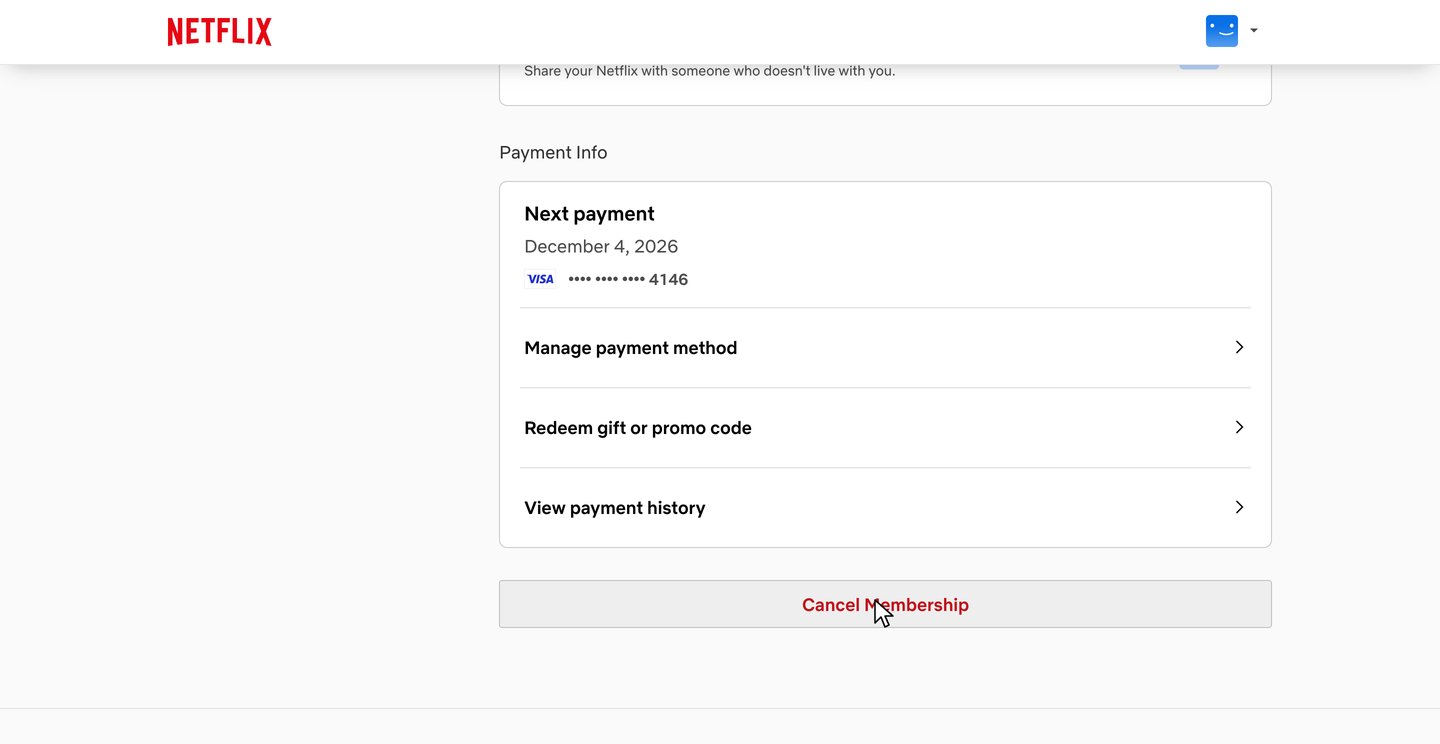
The Membership page lists your plan details and payment info. Scroll to the bottom and click Cancel Membership.
-
4
Open Cancel and click Finish Cancellation
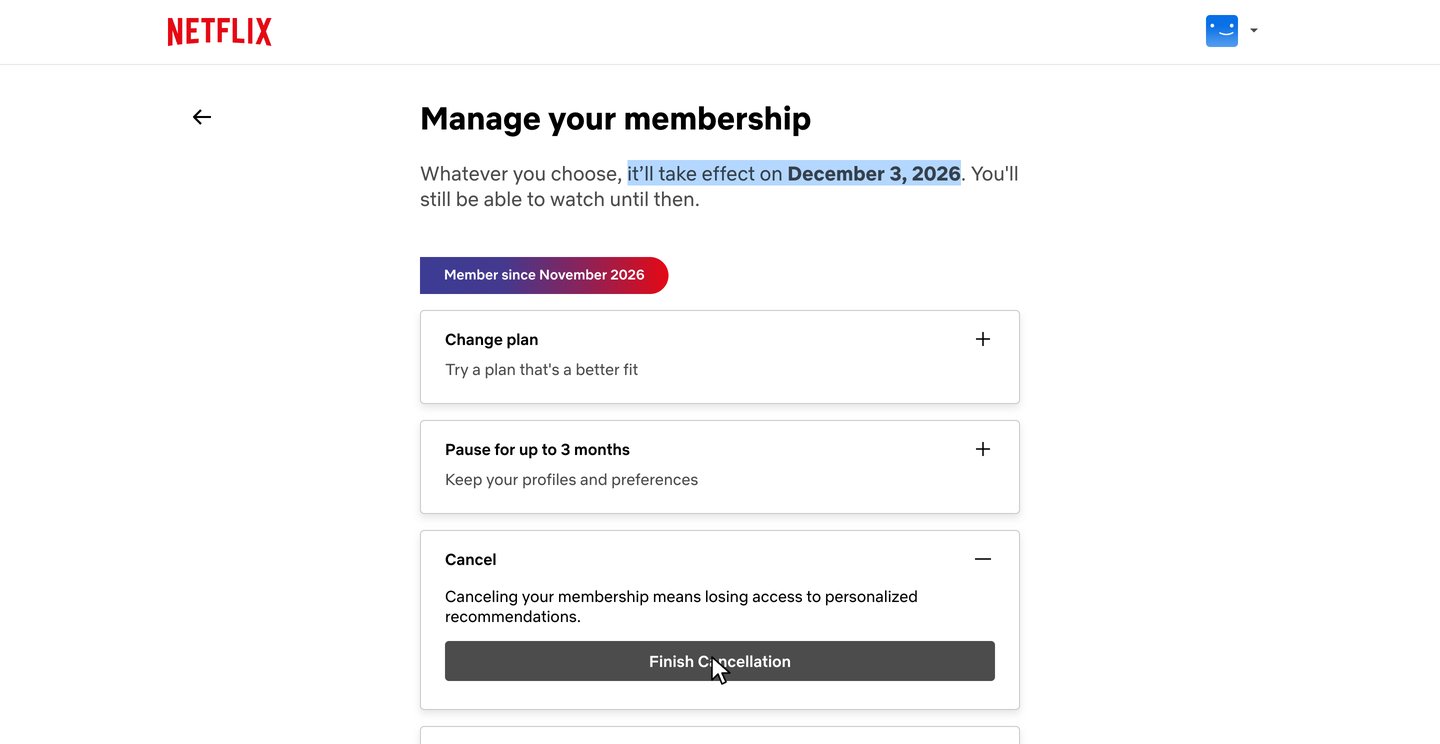
The Manage your membership page offers two ways to stay: Change plan and Pause for up to 3 months. Skip them, open Cancel with its plus sign and click Finish Cancellation.
-
5
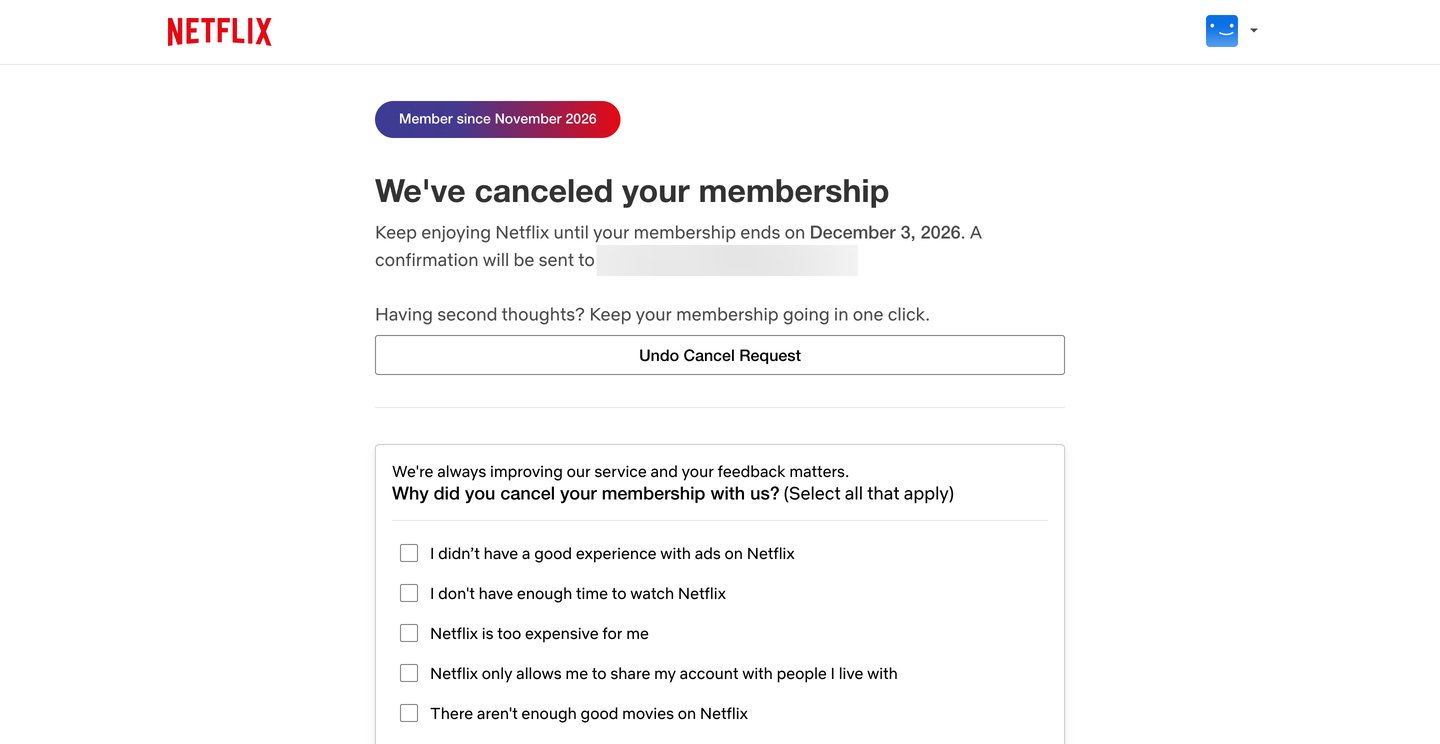
Check the confirmation
Netflix confirms the membership is canceled and shows the date it ends. A confirmation is sent to the email on the account. The survey below it is optional.
After you cancel
You keep watching until your billing period ends
In the recording, the Account page showed the next payment on December 4, 2026, and the confirmation said the membership ends on December 3, 2026.
Your history is kept for 24 months
Netflix says it keeps your viewing activity, recommendations and ratings for 24 months after the account closes, in case you rejoin.
A confirmation email follows
Netflix says a confirmation email is sent to the email on the account, and the confirmation page in the recording said the same.
Netflix cancellation FAQ
Common questions about canceling Netflix. Sources checked Nov 4, 2026.
I pay through Apple, my phone company or my internet provider. How do I cancel?
If you don't see the option to cancel on your Netflix Account page, cancel with the company that bills you. Netflix says the Membership section of that page shows either a link that guides you through it or instructions to contact your payment partner. For Apple billing, Netflix says to cancel through Apple, and the account then stays on hold for 30 days before it is completely canceled. Netflix also notes that Apple may still renew it if you cancel less than 24 hours before your renewal date.
Can I keep watching after I cancel?
Yes, until the end of your billing period. Netflix says that if you cancel with time left in your billing period, you can use Netflix until the account cancels automatically at the end of it, and your Payment History page shows when that is. In the recording, the next payment was due December 4, 2026, and the confirmation said the membership ends on December 3, 2026. If your account is on hold, Netflix says it closes as soon as you cancel.
Can I get a refund for the rest of the month?
No. Netflix's Terms of Use say payments are nonrefundable and there are no refunds or credits for partially used subscription periods, though Netflix may give credits at its own discretion. You keep watching until the end of the billing period instead.
Can I pause Netflix instead of canceling?
Yes, on most plans. The cancel page offers Pause for up to 3 months, and the text inside that option says "Start with a month and extend for up to 2 additional months." Netflix says you keep watching until your next billing date, then you aren't charged and the membership pauses. While it's paused you can browse and add to My List but can't stream or download, and you can unpause or cancel at any time from the Account page. When the pause ends, Netflix charges your current plan price. Pausing isn't available on the Basic plan or with some payment methods, such as gift cards and some partner payments.
What does Undo Cancel Request do?
It keeps your membership going. The confirmation page in the recording said "Having second thoughts? Keep your membership going in one click." above the Undo Cancel Request button. Netflix says that if you restart while you can still watch, your profiles, My List, game saves and payment information are all still there and your billing date stays the same. If the button is gone, look for Restart Membership on your Account page.
What happens to my profiles and recommendations?
The cancel option in the recording warned "Canceling your membership means losing access to personalized recommendations." Netflix says it keeps your viewing activity, recommendations, ratings and game saves for 24 months after the account closes, so they are there if you rejoin within that time. If you restart and sign in to the same account, Netflix says your profiles and My List are still there too.
Will I be charged again after I cancel?
No. Netflix says you won't be charged again unless you restart your account. If a charge shows up after you canceled, Netflix says you or someone using your account may have restarted it by accident. Cancel again, then change your password with Sign out of all devices checked.
Does deleting the app or signing out cancel Netflix?
No. Netflix says signing out of your account or deleting the Netflix app doesn't cancel your account. The membership ends only when you finish the cancellation.
I'm switching to a package that includes Netflix. Do I need to cancel?
No. Netflix says you can link your existing account to the package and keep your preferences, downloads and My List. Once the account is linked, Netflix stops billing your payment method because the package covers the cost.
What does zuzu do?
zuzu is an assistant you text. Ask it to cancel Netflix and it does the steps above, then texts you when it's done.
Pausing, partner billing, packages, restarting and what Netflix keeps after you cancel come from Netflix's help articles on canceling, restarting, billing through Apple and charges after canceling, and the refund rule comes from its Terms of Use. The rest comes from the recorded cancellation on Nov 4, 2026.
Skip the 44 s
Text zuzu and it's handled.